

June 24 2026 APP 2.0.0-beta46 has been released !
Improved internal memory configuration (lower ! memory usage), fixed beta45 startup issue, fixed Set Save Directory & 2-panel mosaics.
May 27 2026 APP 2.0.0-beta45 has been released !
Fully Multi-Threaded LNC, many improvements for the registration engine, platform upgrade, and further tuning of internal memory consumption and memory release back to OS.
Apr 14 2026: Google Pay, Apple Pay & WeChat Pay added as payment options
Update on the 2.0.0 release & the full manual
We are getting close to the 2.0.0 stable release and the full manual. The manual will soon become available on the website and also in PDF format. Both versions will be identical and once released, will start to follow the APP release cycle and thus will stay up-to-date to the latest APP version.
Once 2.0.0 is released, the price for APP will increase. Owner's license holders will not need to pay an upgrade fee to use 2.0.0, neither do Renter's license holders.
Dear All,
New to APP and my Seestar S50,
Just managed to integrate and Stack a Horsehead Picture using a Reference Picture from te Seestar App
I importetd all Lights as "Session 1" and the imported the stacked Horsehead Fit done by S50.
This time the Session Window allowed me to choose "Refernce" in the Session window
Afterwards everything worked fine and I got an decent result
Tried the same with the next Target (IC342) but this time I could not choose the "reference" in the session window when I imported the reference fit
What I have to do?
CS
Sascha
Hi Sascha @docsascha,
Thank you very much for your question and welcome to the APP forum !
I am not quite sure about choosing a reference in the Session window, you can not set it there. The session window/dialogue is simply there for you to give a name to your session for your own convenience.
The place to select the reference frame manually is in menu 4) REGISTER at the top with the set reference button as shown in the below screenshot.
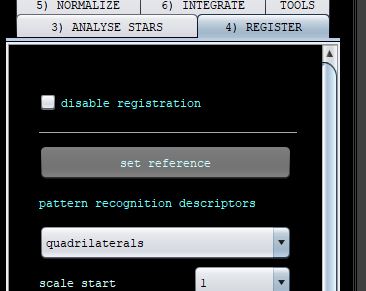
Please let me know if this helps.
Mabula
