It did take a long time to have the work finished on this and it will have a major performance boost of 30-50% over 2.0.0-beta39 from calibration to integration. We extensively optimized many critical parts of APP. All has been tested to guarantee correct optimizations. Drizzle and image resampling is much faster for instance, those modules have been completely rewritten. Much less memory usage. LNC 2.0 will be released which works much better and faster than LNC in it's current state. And more, all will be added to the release notes in the coming weeks...
Update on the 2.0.0 release & the full manual
We are getting close to the 2.0.0 stable release and the full manual. The manual will soon become available on the website and also in PDF format. Both versions will be identical and once released, will start to follow the APP release cycle and thus will stay up-to-date to the latest APP version.
Once 2.0.0 is released, the price for APP will increase. Owner's license holders will not need to pay an upgrade fee to use 2.0.0, neither do Renter's license holders.
I used a remote telescope to make images of the Whirlpool galaxy. I was provided with 6 images made with a R-,G- and B-filter (so 18 images in total). How can I combine them in APP ? I cannot just use 'combine RGB' because the images are not completely centered.
The columns are bad columns of the camera sensor that is used.
Doesn't fitswork show this in the single light frames?
If not, then I suspect fitswork is applying some sort of bad column detection?
So these columns aren't an error of APP, and it is something that can be easily fixed by calibration normally.
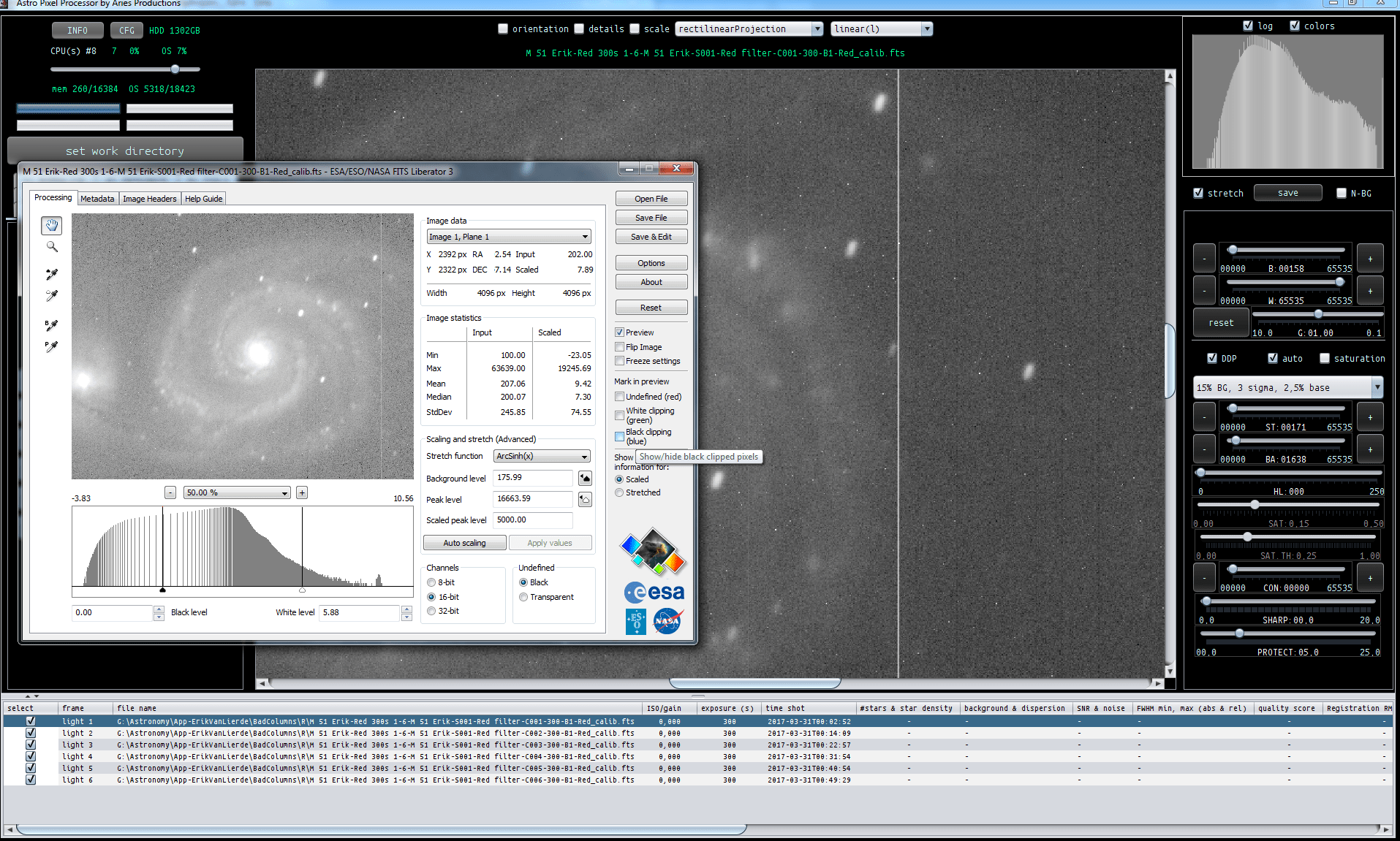
For comparison crops of M51 in APP and Fits Liberator, an esa/eso/nasa fits viewer. It shows the same columns. There are several hot columns on the sensor.
And I have studied the FITS header, only Bias calibration is done apparantly. No Bad Pixel Mapping to remove the bad columns. Neither flat or dark calibration.
HDU1 - SWMODIFY= 'MaxIm DL Version 5.24 131112 219J3' / Name of software that modified HDU1 - the image HDU1 - HISTORY Bias Subtraction (Bias RBI, 4096 x 4096, Bin1 x 1, Temp -30C, HDU1 - HISTORY Exp Time 0ms) HDU1 - CALSTAT = 'B '
I would ask the provider of the FITS frames if they can provide a couple of darks of this particular camera at least so we can remove all bad columns and hot pixels?
I have integrated the Red Channel to see of we can get rid of the bad pixels and the bad columns by using median integration instead of average in 6) Integrate: integrate, and by using rather strong outlier rejection.
First screenshot is average integration without outlier rejection, second screenshot is median with outlier rejection: sigma clip 1 iteration kappa 1
Median integration removes the hot pixels, and sigma clipping can remove some of the bad columns. But this is a very sub-optimal method.
If we can make a bad pixel map of this camera's sensor using some darks, we probably can get rid of the hot pixels and bad columns in the calibration fase before integration. Which will be way better for the end quality of the integration.
(From these integrations and the applied stretch, its'also clear that these frames badly need flat-field calibration which they clearly didn't had as is indicated by the FITS header.)
EDIT: apparantly the red channel only had bias calibration, B & G had Bias and Flat calibration according to the fits files.
In the meanwhile I receive following info from the owner of the remote telescope:
I do have some darks which should mitigate your problem, but basically what you need is to remove the bad column (with those big CCDs there are always some) with the software. A bad pixel map should do the trick, apply it before alignment of the subframes. Also, the integration of the subframes is crucial, sigma clipping or similar is supposed to remove these defects.
In the meanwhile I receive following info from the owner of the remote telescope:
I do have some darks which should mitigate your problem, but basically what you need is to remove the bad column (with those big CCDs there are always some) with the software. A bad pixel map should do the trick, apply it before alignment of the subframes. Also, the integration of the subframes is crucial, sigma clipping or similar is supposed to remove these defects.
Regards
Erik
Hi Erik,
Indeed, I am downloading the darks 😉
I'll create a bad pixel map and you can try as well following this topic :creating-a-bad-pixel-map
A good Bad Pixel Map is always the best way to remove bad pixels and bad columns. Because a Bad Pixel Map never introduces noise in correcting the problems and the proposed method of removing the problems with oulier rejection while integrating is a a sub optimal suggestion/solution. To remove the problems with outlier rejection, you need much more frames and outlier rejection should always be used as a last resort to solve problems, the reason being: outlier rejection when applied aggresively is very destructive for the quality of your results. It really has a bad influence on the Signal to Noise Ratio of the result if applied too aggresively.
You want to solve the problems of bad pixels and bad columns as soon as possible, that means in calibration 😉
I have created a BPM of the 20 darks. As you can see, there are a lot of hot pixels and bad columns.
Just load the 20 darks and select create bad pixel map in 2)CALIBRATE.
I used hot kappa default of 2:
FITS HDUs: 1 HDU1 - SIMPLE = T / Java FITS: Sun Jun 11 11:33:39 CEST 2017 HDU1 - BITPIX = 8 / bits per data value HDU1 - NAXIS = 2 / number of axes HDU1 - NAXIS1 = 4096 / size of the n'th axis HDU1 - NAXIS2 = 4096 / size of the n'th axis HDU1 - EXTEND = T / Extensions are permitted HDU1 - DATE = '2017-06-11T09:34:43' / creation date of bad pixel map HDU1 - SOFTWARE= 'Astro Pixel Processor by Aries Productions' / software HDU1 - VERSION = '1.042 ' / Astro Pixel Processor version HDU1 - CALFRAME= 'bad pixel map' / bad pixel map for instrument FLI HDU1 - INSTRUME= 'FLI ' / instrument name HDU1 - CFAIMAGE= 'no ' / Color Filter Array pattern HDU1 - NPIX = 16777216 / raw number of pixels HDU1 - HOTKAPPA= '2,00 ' / kappa value used for hot pixel determination HDU1 - COLDFRAC= '0,50 ' / percentage used for cold pixel determination HDU1 - NBADPIX = 623280 / number of bad pixels HDU1 - PBADPIX = '3,715 ' / percentage of bad pixels HDU1 - NHOTPIX = 623280 / number of hot pixels HDU1 - PHOTPIX = '3,715 ' / percentage of hot pixels HDU1 - NCOLDPIX= 0 / number of cold pixels HDU1 - PCOLDPIX= '0,000 ' / percentage of cold pixels HDU1 - NLINPIX = 16153936 / number of linear pixels HDU1 - PLINPIX = '96,285 ' / percentage of linear pixels HDU1 - END
Don't be alarmed by the amount of bad pixels, there are a lot in fact 😉
I will process your lights with this BPM and post the result.
I am making an R,G,B composite of the data with the Bad Pixel Map used for calibration of all the light frames.
The calibration is not perfect and it's hard to correct all bad columns properly. (I think I will need to add a seperate bad column detection to improve here.)
I would suggest the next time that you order frames from a remote observatory, that you request the calibration frames for each channel as well and /or request some more subs.
6 frames per channel (12 for green) is very little to let dithering work. With a double amount of frames, the integration should prove to be much better 😉
Anyway, I also combined the channels with the RGB Combine tool. Then started work with the "remove light pollution" tool in 9. This needs some work, but as you can see in the screenshot, most of the illumination problems can be corrected to a high degree with this tool. This is the result of only applying the tool once:
Next step is the calibrate background tool:
Star Color Calibration:
Selective color to tweak the colors, removed a little bit green, added some yellow and red..
Then cropped the field of view and applied a final DDP stretch with saturation with background protection, sharpening while protecting the stars, and some Highlights protection as well. This really helps with the core of M51:
I think it's really worth it to add some more data (another session to add another 6 lights per channel perhaps ? ), this will improve the result significantly, but very nice already 😉
If you are going for a new object. It's probably very benificial for the end results if you were to aim to get a higher number of frames per channel possibly reduce the exposure time per sub so that you have the same integration time but more frames.. Than the drizzling of the remote telescope and the integration algorithms can better work to remove those sensor artefacts (the bad columns) 😉