

UPDATE FROM MABULA
I have had a very rough 2 months unfortunately health wise. I was struck 3x in a row with bacterial infections. The second infection occurred after a routine hospital checkup and I became very sick. I had to rest and take a lot of antibiotics. Once I was recovering and restarting work 1 month ago, I again became sick. The infection was not yet gone, so even more antibiotics and rest was needed. Needless to say, it took a lot of my energy and I needed a lot of rest.
Finally, the infection is really gone and my energy is coming back step-by-step now and I have started work again. I am terribly sorry to have kept you waiting for support. I will address all outstanding questions and e-mails step-by step and will be on the forum daily from today.
APP 2.0.0-beta47 will come soon as well, a lot of work was already completed before I became very ill, so the release is also nearly ready for you. Beta47 will be much faster actually. Many workflows will be more than 2x faster, mosaics can even be 10x faster than before because registration really received a major boost... all compared to beta46. Before I release it, I will make sure that everything is working properly and then I will release it.
Hi, Can dialog boxes (app modal dialog boxes requesting some kind of action, like Overwrite File No/Yes) be part of the APP application Window and not pop up as the main window? I've just waited 1 hour for an Integration to occur in the background whilst working/writing emails - and I pressed Enter for a new line in email, at the moment a dialog box popped up from APP to overwrite the resultant integration. As the default is Cancel, this frustrating turn of events cause me to scream loudly at my PC and then re-process my Integration. It isn't the first time this has happened.
Separately, there is another RFC to allow control of all dialog box actions: "Allow Overwrite Always" for example so dialog boxes and pauses are not necessary. This should be considered. There are too many pop-ups for a long--running batch processing tool.
Interesting issue indeed, I'll ask Mabula about it and will let you know.
Ironically, this just occurred just now reading your response in my web browser... the Dialog Box that pops up is the highest priority - new Windows, say I'm launching another app, end up underneath this.
If I'm working in application1, I don't want it to interfere with my application2. It is too intrusive.
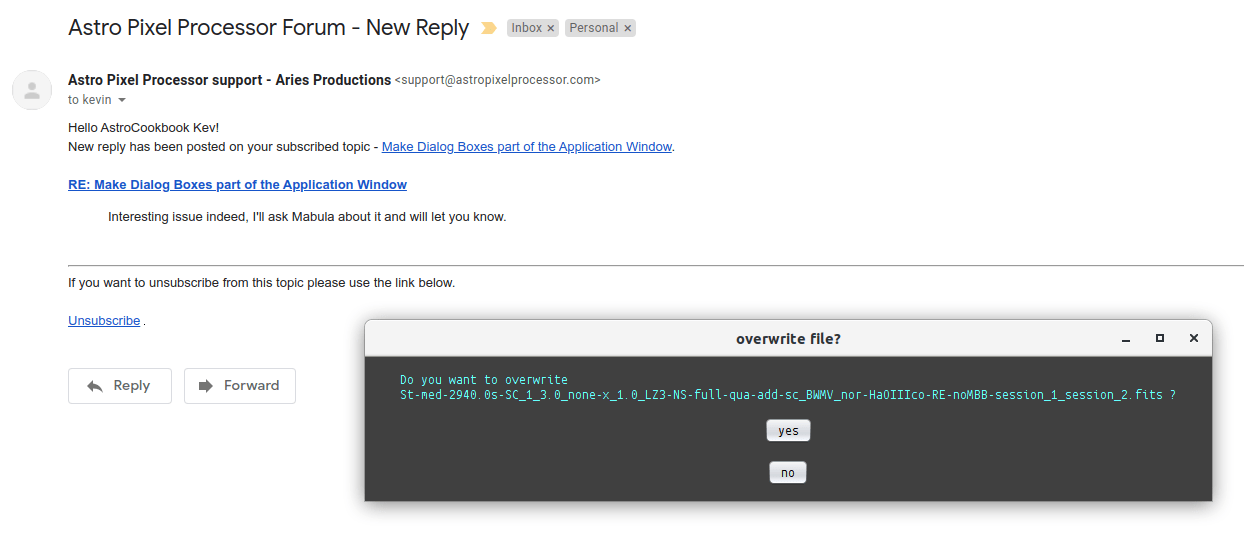
Yes I understand, I'll talk about it with Mabula and will know soon if there is another way to deal with this. Thanks for pointing it out!
Ok, Mabula got back to me and will change this. Dialogs will become part of the main window, just not in 1.076 yet but after that.
Any update on this feature? I am nervously writing this because I'm currently saving 250+ frames and each time it saves, a dialog box pops up telling me it is saving a fits file, but the problem is that there is an action on it - and the action is to Cancel the saving of the frame.
After 30 mins of saving files (part way through) I went to press space in a completely different program, but the priority of this dialog box (on Linux at least) is to be the most important thing, so I hit cancel by mistake. It not only cancels the save of the file, but I have to start the save of all files again.
I'll ask him for an update on when this might be incorporated.
