Mar 28 2026 APP 2.0.0-beta40 will be released in 7 days.
It did take a long time to have the work finished on this and it will have a major performance boost of 30-50% over 2.0.0-beta39 from calibration to integration. We extensively optimized many critical parts of APP. All has been tested to guarantee correct optimizations. Drizzle and image resampling is much faster for instance, those modules have been completely rewritten. Much less memory usage. LNC 2.0 will be released which works much better and faster than LNC in it's current state. And more, all will be added to the release notes in the coming weeks...
Update on the 2.0.0 release & the full manual
We are getting close to the 2.0.0 stable release and the full manual. The manual will soon become available on the website and also in PDF format. Both versions will be identical and once released, will start to follow the APP release cycle and thus will stay up-to-date to the latest APP version.
Once 2.0.0 is released, the price for APP will increase. Owner's license holders will not need to pay an upgrade fee to use 2.0.0, neither do Renter's license holders.
Astro Pixel Processor 2.0.0-beta37 release notes
This version took more than 1 month to be realized, we made a big change in the project layout to make several new features possible and solve outstanding bugs that required these changes. Our project now fully adheres to the Java Platform Module System introduced in Java 9. This makes our code more secure, better managed and also it enables us to be better prepared to make an API, using APP headless and making side projects like a separate quick FITS viewer. The changes also include improvements in the installers per platform. The Windows installer is more secure, linux has a new installer AppImage. We have removed the startup screen/splash screen for several reasons which should enhance application startup experience. Finally, the development platform has been upgraded again to GraalVM 24.0.1.
- Linux added AppImage installers
We now provide a new installation type for Linux, called AppImage besides the regular RPM and DEB packages. To have a HiDPI version, we also provide a separate AppImage for HiDPI. Information about how to use AppImage can be found here: https://appimage.org/
- REDUCED installation package size on all platforms macOS, Linux & Windows
Installation package is quite a bit smaller by installing with a smaller version of our development platform.
- removed the application startup window / splash screen
To solve several issues on our list we have now removed the startup windo / splash screen. Astro Pixel Processor should now startup quickly within 2-3 seconds.
- Improved Windows installer
Windows installer now always cleans up the development platform and external libraries before installing a new version which should prevent weird application issues.
- Removed JavaFX warning at startup
When APP was started from the command line, the following javafx warning would be shown com.sun.javafx.application.PlatformImpl startup WARNING: Unsupported JavaFX configuration: classes were loaded from 'unnamed module @xxxxxxx' . This warning is now gone.
- Upgraded development platform to Oracle GraalVM 24.0.1+9.1
This upgrade makes APP more compatible with newer Operating Systems and should increase APP's performance in the coming versions.
- project code has been fully modular
Which creates a better code layout for making an API, using APP headless and making side projects like a separate quick FITS viewer. This change solves several issues on our list and will help us to automate things more and more.
- FIXED APP crashes after license activation and starting with processing data for the first time
If a user activates his/her's license and then starts with processing data, APP would crash, simply stop. This bug has been fixed.
- Fixed Memory to File mapper file length bug
If a filename becomes too long for a file system, we will now make sure that the file can still be saved by truncating the file name.
- TIFF read/write support has been improved
We have updated the dependency for TIFF read/write support which should make the TIFF reader support more kinds of TIFF files.
- IMPROVED INTEGRATION BUFFER
We have adjusted the internal IO buffer of the integration process to be dynamic based and the available memory and the amount of data that needs to be read or written. Also the external memory buffer has been made dynamic so APP will use a bit more memory in the integration process when it is available from the computer's resources. Both improvements should increase performance by 2-5% in the integration process depending on the computer and on what kind of harddisk and connection the working directory is, for instance an internal M2 SSD will benefit a little bit, but a conventional harddisk in a network storage can benefit a bit more from this.
- FIXED TIFF Read error IndexOutOfBoundsException in GPS IFD
We received a TIFF from the Celestron Origin with a read bug due to an issue with the GPS information in the TIFF header. The error is shown in below screenshot. App can now read these TIFFs without problems. The GPS info is also read and shown in the header.


- FIXED FITS SAVER on computer with TURKISH language
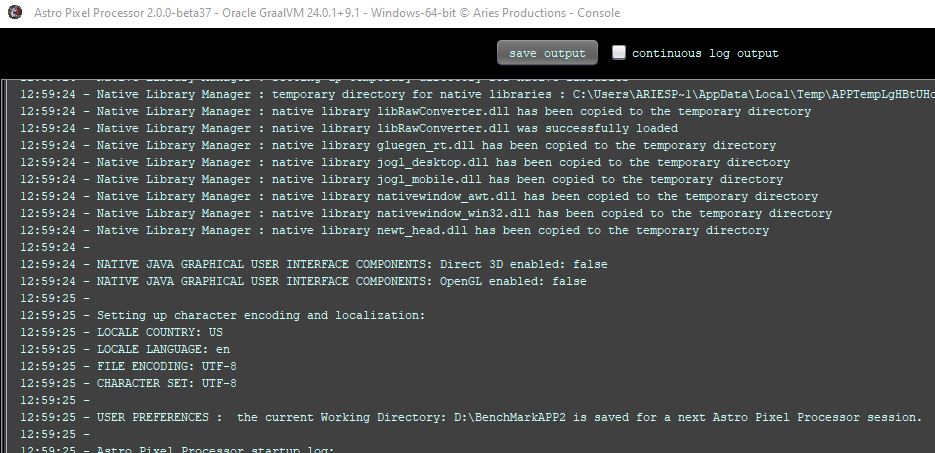
As mentioned in this thread https://www.astropixelprocessor.com/community/appreleases/beta-36-problem/#post-32870 app could not save a BadPixelMap of Light frame on a computer with the turkish language because the I character would be seen as a Turkisch UTF-8 encoded character instead of an ASCII character required for the fits header. This is fixed by enforcing english language in the locale of Astro Pixel Processor when it starts.
- IMPROVED setting a default locale with english language and region US
We decided to enforce the language inside astro pixel processor to english to prevent further issues with character encoding and saving Fits files that require ASCII values in the fits header tags. The above issue with the FITS saver on a turkish computer was caused by using the turkish language inside Astro Pixel Processor. By setting the language to english, such an error can be prevented and we fix possible other language/encoding problems for other languages while doing so.