

2026-10-09 APP 2.0.0-beta48 has been released !
This is mainly a bug fix release for the reported bugs in beta47. In addition it has a significant User Interface performance improvement noticable when you need to process 1000s of images in APP.
2026-10-03 APP 2.0.0-beta47 has been released !
This is a very big release... many code optimizations/rewrites, many parts of APP are much faster and more precise, especially star analysis and registration are much faster ! Big mosaics will go much faster 🙂
And we introduce a new preview filter, which includes the new Adaptive Deep Sky Stretch and a General Levels Stretch, this has been long over due. The old preview filter (the panel on the right side to stretch and preview your data) has not been updated for a couple of years and it is a critical part of any APP session.
Adaptive Deep Sky Stretch or ADSS is a much more intuitive stretch algorithm. It is also color preserving (which is a great new addition in itself ! ) which means that the highlights are no longer bleached, color is maintained from the linear data while stretching. You can simply stretch your data using the sky background level and signal width sliders which work much easier and more intuitive. You no longer need to fiddle with the old complicated sliders with zoom buttons. All the zoom buttons for the sliders are made redundant. And you can enter slider values in the slider value fields yourself. I will make a youtube video in the coming days to explain and fully introduce ADSS. Once the video is ready, it will be highlighted on the forum.
RGB Combine upgrade !. The RGB Combine Tool has been rewritten mostly. The tool is faster and easier to use and most importantly, the Luminance slider to inject a luminance channel or channels into the RGB composite is now working correctly. It no longer bleaches the RGB colors. Combined with the new ADSS preview, you will get much better and easier great composites with great color! I will also explain this in a new youtube video.
I have acquired some Mily Way data and I am really struggling with processing. The data is acquired with EOS Ra and Sigma 28mm f1.4 Art lens at f2.5, so it has really minimal vignetting. Here is attached a single frame that I have colour corrected in Lightroom so that it is easier to see there is no vignetting - the bottom right corner is close to the sea and therefore it gets dark. The other attached image is just two consecutive frames stacked with all settings left to default and no calibration frames in 1.083-beta2 and this file is just saved as JPG from APP. Obviously something went terribly wrong if I end up with black corners.
If anyone has an idea how to process this: here are 20 light frames (so 20 min of data): https://drive.google.com/file/d/1vn20Bz_jXPcx9fXBB9v9RCthlTu153xR/view?usp=sharing
I have never processed anything shot wider than 40mm and have never experienced such problems. Any idea what to do?
Thank you and best regards
Samo


So, no calibration frames at all? To me this does look like some vignetting is going on. I would try to make a flat with that setup just to verify if that might be the case, you can immediately see it in the flat then as well.
I have calibration frames. But stacking only two frames with just a slight vignetting shouldn't result into this, don't you agree? I normally make flats just by pointing the telescope at early morning sky, but this is not possible with this lens as it is too wide. So I have made calibration frames by shooting a white monitor 50x. I have attached a single flat (downsized) and this is a link to master calibration files: https://drive.google.com/file/d/1yCqp2TU0wFIR2YZtpwh4I4C6eznOAtm_/view?usp=sharing

Using flats actually makes the situation worse.
I might try today with f2.8, which should only have 0.6 stops of vignetting in extreme corners. But I don't think this current data is useless if I look at single light frames.
A white monitor doesn't have to be very good at that, it depends on if you have a panel that sends out broad spectrum light. Flats also need to be calibrated with a master-bias. But, I'll have a look at the data tomorrow, would be nice to find out what the actual issue is.
@vincent-mod Thank you.
One explanation for the PhotoShop images having no vignetting might be that you have automatic Lens Correction Filter turned on in PS.
@jgwyther I have provided 20 RAW files. You can check those. I don't think I have done any vignetting correction to the image above - just colour correction.
Hi Samo,
So I loaded in 1 frame and stretched it a lot (all in APP). No processing, just stretching and what you can see is vignetting indeed. This is likely because of the housing of the sensor, or maybe the cap on the front of the lens (not 100% sure about that).
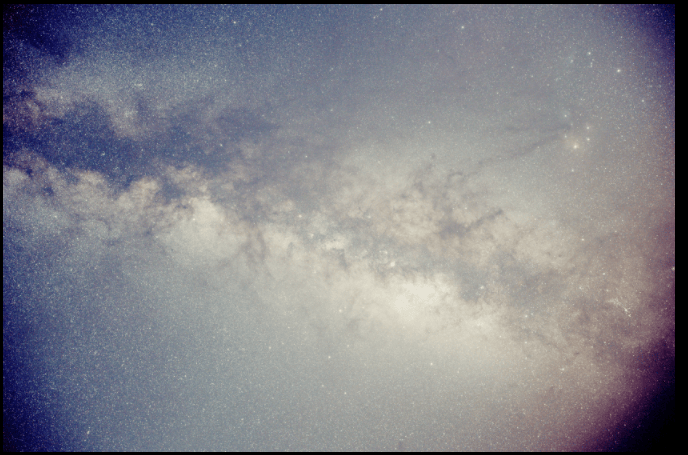
The masterflat I can't load in both APP or PixInsight (as in it shows a black screen). Not sure why that is, but at least the fits info shows an exposure of 0.06 seconds, normally it's advised to have this at at least 1-2 seconds per sub. Why I don't see any signal in both programs I'm not sure about, but I wouldn't use it indeed.
I think @jgwyther is correct in that Lightroom is applying a lens correction.
@vincent-mod Thank you for this. I have recorded also data with f2.8 and it looks a lot better. Can be corrected without flats. And I normally shoot flats like this and don't have problems. Didn't know about 1-2s requirement.
Yes, also make sure the histogram of the flats is nicely at around 50-70% without clipping, then it should work fine.
I have found one workaround that is time and disk space consuming, but it works without flat frames: I have converted cr3 subs to tiff files so that peripheral illumination information gets baked into files and stack those. This are three frames stacked from the test set I have provided above. It would be a great thing if APP would support this. This would make processing extremely wide-field photos much easier.

