

UPDATE FROM MABULA
I have had a very rough 2 months unfortunately health wise. I was struck 3x in a row with bacterial infections. The second infection occurred after a routine hospital checkup and I became very sick. I had to rest and take a lot of antibiotics. Once I was recovering and restarting work 1 month ago, I again became sick. The infection was not yet gone, so even more antibiotics and rest was needed. Needless to say, it took a lot of my energy and I needed a lot of rest.
Finally, the infection is really gone and my energy is coming back step-by-step now and I have started work again. I am terribly sorry to have kept you waiting for support. I will address all outstanding questions and e-mails step-by step and will be on the forum daily from today.
APP 2.0.0-beta47 will come soon as well, a lot of work was already completed before I became very ill, so the release is also nearly ready for you. Beta47 will be much faster actually. Many workflows will be more than 2x faster, mosaics can even be 10x faster than before because registration really received a major boost... all compared to beta46. Before I release it, I will make sure that everything is working properly and then I will release it.
Hello. My camera is ZWO ASI294MC Pro. Having an issue with "Extract Ha" algorithm. The image was taken with HaOIII filter. After integration, if I zoom in I'm seeing weird patterns. This only happens with Bayer Drizzle, in this case 3.0 but can happen with any scale. If drizzle is off there's no pattern. Also no pattern in colour images, regardless of drizzle setting.
How to fix this pattern?
Attached is the example
- Top left is "HaOIII: Extract H-alpha" with drizzle disabled.
- Top right is "HaOIII Mono" with 3.0 bayer drizzle
- Bottom left is "HaOIII: Extract H-alpha" with 3.0 bayer drizzle
- Bottom right: "HaOIII color" with 3.0 bayer drizzle
And finally the image of the pattern I'm having issue with. Why isn't it "solid" colour?
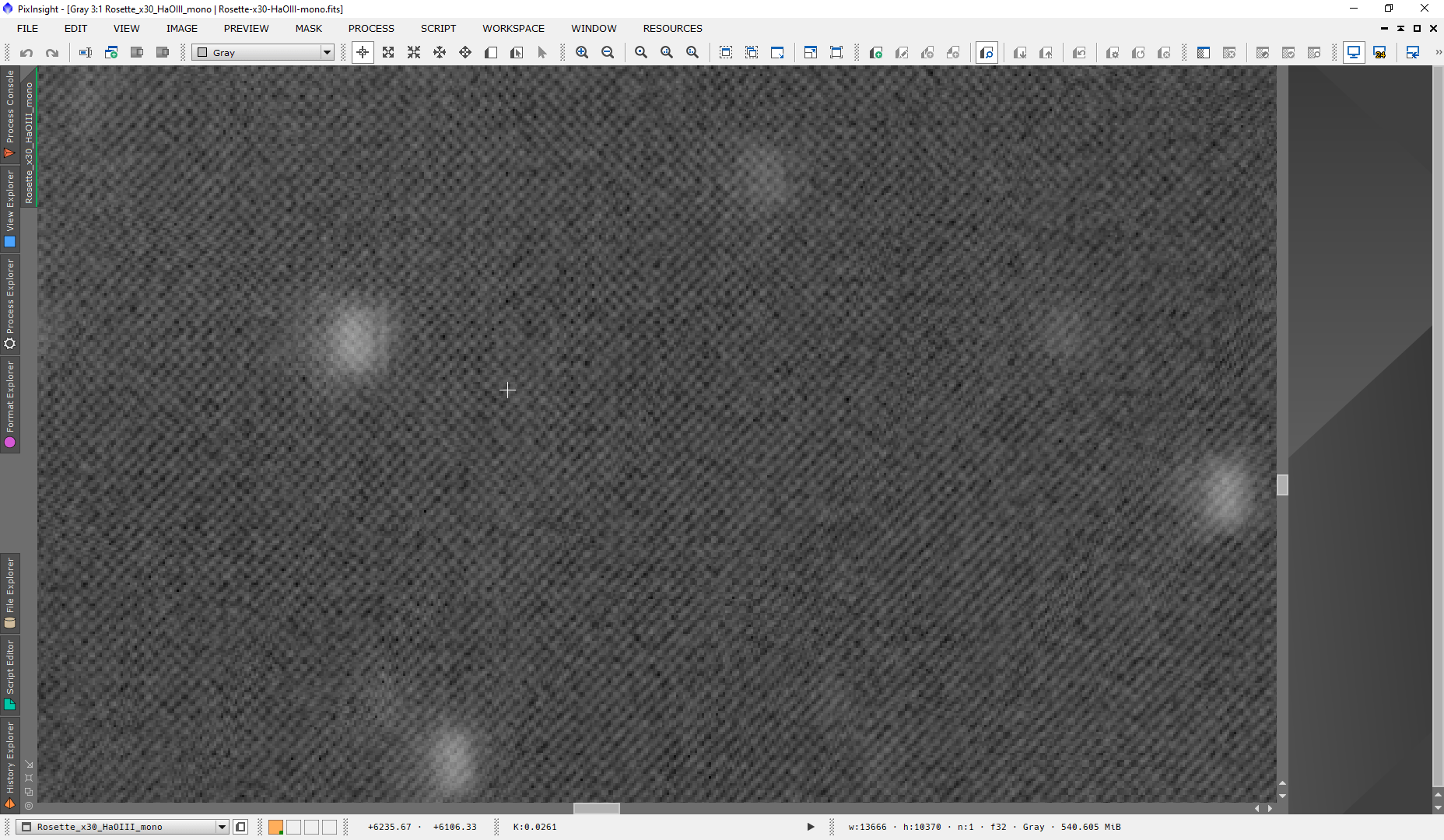

I see the same thing. Extracting without drizzle or doing Ha-OIII color with drizzle works, but extracting with drizzle gives that pattern and/or doesn't result in different Ha and OIII outcomes.
How did you capture the data? It is important for drizzling that your data is undersampled (or at least it will have a good effect on that) and very well dithered.
What counts as sufficiently under-sampled or "very well dithered"? I can say that I'm what astronomy.tools would call slightly under-sampled at 2.24"/pixel. For dithering, I used 1 pixel dithering (and I have the option to use 2, 3, 5, or 10) after each frame and required 1" stability to start again with a 5s settle time.
I'd say that somewhat undersampled can already benefit from it, regarding dithering I would go higher, probably at least 3 as that will then cover more pixels for it to do the drizzling with. The more data the better for it as well.
Dark and brighter grey-scale pixels are alternating in a specific pattern in each line:
D B D B D B D B...
B D B D B D B D...
D B ...
I thought it has something to do with de-bayering in combination with drizzle, or maybe there's some other reason. While dithering is important it's not relevant to producing such a pattern in the image.
I confirm what Roman had said: extracting OIII or Ha from HaOIII-filtered colour image plus drizzle with result in this alternating pattern of pixels instead of a smooth image.
Also the Ha-extract and OIII-extract are the same image:
https://www.astropixelprocessor.com/community/main-forum/duo-band-l-enhance-and-drizzle/#post-12492
Yes, I'll have a look at the data today, it might point to why this is the case.
