

UPDATE FROM MABULA
I have had a very rough 2 months unfortunately health wise. I was struck 3x in a row with bacterial infections. The second infection occurred after a routine hospital checkup and I became very sick. I had to rest and take a lot of antibiotics. Once I was recovering and restarting work 1 month ago, I again became sick. The infection was not yet gone, so even more antibiotics and rest was needed. Needless to say, it took a lot of my energy and I needed a lot of rest.
Finally, the infection is really gone and my energy is coming back step-by-step now and I have started work again. I am terribly sorry to have kept you waiting for support. I will address all outstanding questions and e-mails step-by step and will be on the forum daily from today.
APP 2.0.0-beta47 will come soon as well, a lot of work was already completed before I became very ill, so the release is also nearly ready for you. Beta47 will be much faster actually. Many workflows will be more than 2x faster, mosaics can even be 10x faster than before because registration really received a major boost... all compared to beta46. Before I release it, I will make sure that everything is working properly and then I will release it.
Hello,
I run my PC with Linux Mint 21.1/Cinnamon. After a fatal hardware-crash I had to reinstall everything and I took the opportunity to upgrade to APP 2.0.0-beta19.
Now, my stacking-results look strange - here is an example of M20.

I must state that the stack does not contain any calibration-frames as the recording is done with a Stellina Smart-Telescope. If I try to integrate frames from my C11 (and include darks, flats, darkflats and BIAS), the result looks a little better.
In the APP-forum, I have found this post but the solution (check the "hot pixel kappa" box) did not work for me.
Finally, I have downgraded back to 1.083.2 again and everything looks good as before:

So - where is the problem? In my opinion, it shouldn't be a matter of star recognition (currently set to 500) as the area around M20 contains a lot of stars (see picture 2) and - as mentioned - it works with the old version.
My general integration settings are (and always were):
integrate: average
weights: quality
local normalization rejection: adaptive rejection with kappa high = 2.8
local normalization correction: 2nd degree LNC / 3 iterations
Does anyone have any ideas?
CS, Jochen
Did you try the option: cosmic ray / noise reducer in the analyse stars tab? This is likely what will fix this as we had some changes here that make most data registration more robust, but without calibration files you likely need this option.
Hi Vincent,
I do not want to mess up my working 1.083.2 version - so I have installed an additional 2.0.0-beta19 inside a Windows VM for testing purpose.
I get the same blurry result and it makes no difference whether the "cosmic ray / noise reducer" in the "analyse stars"-tab is checked or not.
So - I can clearly say, that it is not a Linux problem as for the Windows-Version the problem is the same!
Regards, Jochen
I have also tried to reduce the #stars target to 60 - still, the result is the same...
Ok, that is interesting, I wonder if APP is registering on the hot pixels, which is why that reducer is there. If that still doesn't work it may very well be due to the lack of dark frames. Are you able to upload your dataset for me to try?
Hi Vincent!
Thank you for your effort! I have now uploaded the two sessions into different folders which I had combined to one stack.
Regards, Jochen
PS: no hurry - 1.083.2 works fine for me for the moment!
Looking at the result now, are you able to go for more than 10s per sub? I think that will be beneficial to increase the signal to noise ratio. The noise is definitely the problem. I integrated each session separately.
Session 1 settings:
- Tab 2; hot pixel kappa to 2.0
- Tab 3; cosmic reducer set to 10
Session 2 settings:
- Tab 2; hot pixel kappa to 2.0
- Tab 3; cosmic reducer to 17
Due to the high noise this has to be set quite high and we changed this as it is more robust for other tricky datasets.
The result of session 2, I think session 1 isn't contributing much due to lack of signal (right click the image to open it in a new tab):
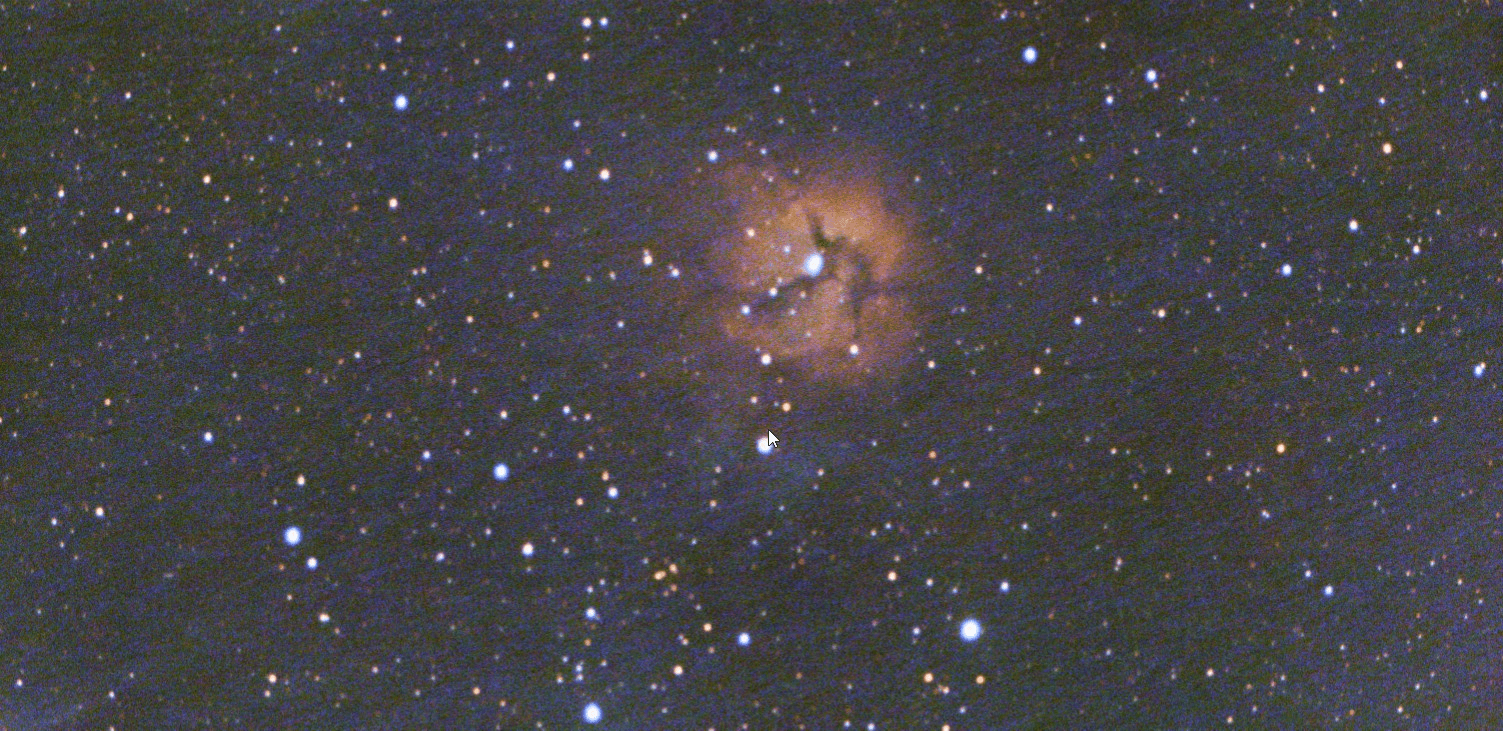
I played a bit with the stretch, calibrated as much light pollution as possible and cropped off the difficult parts, color corrected the stars, upped saturation and added contrast. Is the stellina able to dither? The noise that looks like diagonal stripes is walking noise, which can be removed by dithering during the data collection.
Hi Vincent,
Thank you - but hmm... I am not yet convinced with the result. The Stellina-Roboscope is basically an APO on an Alt/AZ mount with a field rotator. Therefore, unfortunately settings are very limited. For example, there is no way to create flats (due to the field rotator), there is no way to dither and the maximum exposure time is 20s. The M20 was taken from Stellinas pre-defined catalogue of targets and the preset exposure for this object is 10s.
Still, with the 1.083.2 I can archive reasonably good results without having to set hot pixel kappa or cosmic reducer.
For example - this is the result of 4 sessions (it includes the 2 sessions I have uploaded). It has been stacked with 1.083.2 with the settings mentioned in post #1 and it is post-processed with PI and PS. Exposure is 612x10s = 1,7 hrs

So - IMHO something severe must have changed between the versions of APP - but what?
Regards, Jochen
Sorry, missed your reply! So, I only used 2 sessions and did not external processing, the issue I'm seeing is walking noise for sure. With more data, and postprocessing you can stretch that into the background (which is why you have a darker backround). Do you have a screenshot without postprocessing from APP between 1.083 and 2.0?
Hi Vincent - don't worry - as I said it is not an urgent matter as 1.083 is working fine.
I did some more testing and I have attached some stacking-results without any post-processing (except auto-stretch in PI and turn/flip the picture).
This is the (raw) picture as it comes out of 1.083 (91% Integration (=161x10s) | integrate=average, weights=quality | adaptive rejection on with kappa high=2.8 | LNC 2nd deg./ 3 iterations):
1.083 stack:

Then, I have tried the same in 2.0.0-beta with the same settings as in 1.083 - still without setting the hot-pixel kappa and cosmic reducer. This does the "bad result":
2.0.0-beta19 stack without hot-pixel kappa and cosmic reducer:

Then, I did the same in 2.0.0-beta with the additional settings you have recommended AND I have stacked both sessions separately with the hot pixel kappa settings you had recommended:
Session1: hot pixel kappa=2.0 | cosmic reducer=10 Session 2: hot pixel kappa=2.0 | cosmic reducer=17
I have then combined the stacks of Session 1 and 2 into one and I must say, that the result seems to be even a little better than the 1.083 result. The background has less walking noise and seems to bee a little smoother and cleaner.
2.0.0-beta19 stack with hot-pixel kappa and reducer:

I will try to play with my settings. Apart from Stellina... with my other telescopes, I do not have these kind of problems as I can use calibration-frames and dithering.
Thank you so far!
Regards, Jochen
