

UPDATE FROM MABULA
I have had a very rough 2 months unfortunately health wise. I was struck 3x in a row with bacterial infections. The second infection occurred after a routine hospital checkup and I became very sick. I had to rest and take a lot of antibiotics. Once I was recovering and restarting work 1 month ago, I again became sick. The infection was not yet gone, so even more antibiotics and rest was needed. Needless to say, it took a lot of my energy and I needed a lot of rest.
Finally, the infection is really gone and my energy is coming back step-by-step now and I have started work again. I am terribly sorry to have kept you waiting for support. I will address all outstanding questions and e-mails step-by step and will be on the forum daily from today.
APP 2.0.0-beta47 will come soon as well, a lot of work was already completed before I became very ill, so the release is also nearly ready for you. Beta47 will be much faster actually. Many workflows will be more than 2x faster, mosaics can even be 10x faster than before because registration really received a major boost... all compared to beta46. Before I release it, I will make sure that everything is working properly and then I will release it.
Ive found that some of my images get these walking noise like pattern. Ive tried stacking with and without the calibration frames but they are still here.
I am not dithering, but the stacked files from DSS does not show this effect at all.
Is there a stacking optoin I can use to get rid of these? I normally use automatic, but I've tried manual with Average with the same results.
This example image is a stack of 500*30s at f/1.8 from APP and the streaks are not visible in DeepSkyStacker.
@digitaliz-se Hi Stefan, did you attach an image to your post? I don't see any.
@digitaliz-se Hi Stefan, did you attach an image to your post? I don't see any.
Hmm must've been deöleted by misstake.
Here is DSS vs APP.
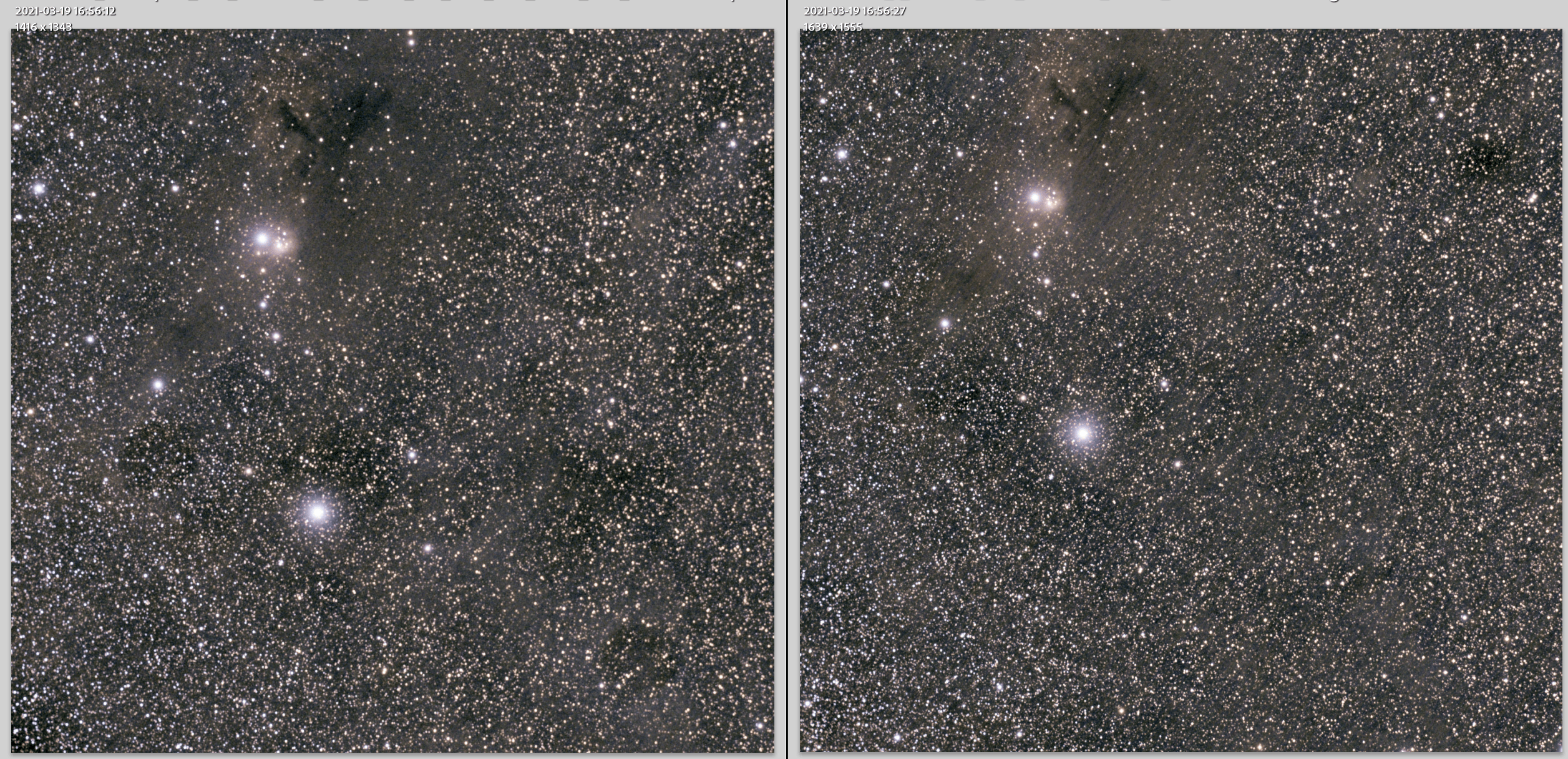
/stefan
I think DSS might have them as well, I see a difference in the stretching basically. The APP version shows more of the nebulosity and probably makes the walking noise stand out more. You can only really get rid of walking noise with dithering unfortunately.
Thanks! Ths was my secondary setup. I can dither on RA of my iOptron. I think you are spot on.
I have tried everything, changed debayer algtorithm, skippe normalisation etc etc. But the "problem" is stiill there.
/Stefan
And when you're able to eliminate field rotation, that may also help (if that's a possible cause).
@digitaliz-se On top of what Vincent writes, to my best of knowledge it is not possible to get rid of walking noise in (post-)processing the images.
Hi,
I have a walking noise issue so thought I would resurrect this post rather than start a new one. I was wondering if there was any improvement to stacking method that can eliminate walking noise. Otherwise, if I take more subs with dithering could that save the 200 5min subs that I have where I didn’t dither?
thank you,
eli
Unfortunately, the only cure, iy foy uwant to use your data, is to take more data. Try manual dithering if you can not do it by software.
Thanks Stefan! Thanks actually great news! If a can save 16 hrs of data just by taking more data (dithered of course) - that is a worthwhile investment. Hopefully it will work.
Thank you,
Eli
I get walking noise in my images and I don’t dither either, but with a really good well matched set of temp matched darks (around 50) it goes completely. Many people will tell you that you have to dither to get rid of it, but it’s just not the case at all, I use darks Flats and also darks for the flats and all is good, and this is also with a fault small stack of light images too around 60-80. Just my twopeneth but obviously YMMV
Hi,
I have a walking noise issue so thought I would resurrect this post rather than start a new one. I was wondering if there was any improvement to stacking method that can eliminate walking noise. Otherwise, if I take more subs with dithering could that save the 200 5min subs that I have where I didn’t dither?
thank you,
eli
Hi Eli @eacron, like Stefan indicates 😉 add more data and dither it with plenty of pixels, that will really help.
Steward @astroshed, great to hear that matched darks work well for you, it can surely be a solution but it does depend on the camera's sensor characteristics for sure what helps. What i can say from my own experience, that dithering always helps to improve things. Even bigger dither stacks improve SNR of your results. For instance, dither with 1-4 pixels only with the new CMOS sensors and things look nice, but if you dither with 10-20 pixels, the actual SNR of your result will be improved as well because dithering is the perfect solution to remove sensor noise patterns that are larger than a couple of pixels. All the CMOS sensor have these patterns burned into it, because CMOS have variable read noise per pixel. In this sense, the old CCD sensors were actually still better with a fixed read noise over the whole sensor instead per pixel 😉
Mabula
Thank you Mabula @mabula-admin! I actually started taking more data last night with dithering. I only dithered 10 pixels so I hope that will be enough. My issue is my mount is not the best and every time I dither it takes a while for the guide error to decrease < 2 arcsec. - anyway no choice I want to save my 16hrs of data! Actually one more question... ideally what would be a sufficient number of frames to dither? should I be dithering every frame?every other frame, every 3 frames etc...?
Thanks again!
Eli
