Improved internal memory configuration (lower ! memory usage), fixed beta45 startup issue, fixed Set Save Directory & 2-panel mosaics.
May 27 2026 APP 2.0.0-beta45 has been released !
Fully Multi-Threaded LNC, many improvements for the registration engine, platform upgrade, and further tuning of internal memory consumption and memory release back to OS.
Apr 14 2026: Google Pay, Apple Pay & WeChat Pay added as payment options
Update on the 2.0.0 release & the full manual
We are getting close to the 2.0.0 stable release and the full manual. The manual will soon become available on the website and also in PDF format. Both versions will be identical and once released, will start to follow the APP release cycle and thus will stay up-to-date to the latest APP version.
Once 2.0.0 is released, the price for APP will increase. Owner's license holders will not need to pay an upgrade fee to use 2.0.0, neither do Renter's license holders.
I have an issue that I think relates to Multi Channel Processing.
I have imaged NGC3324 - cluster with nebula. Narrowband - Lum, Ha and Oiii.
I initially tried the Multi Channel Processing and loaded the three sets of Lights and Flats, with Darks and Bias.
When I get to Step 4 - Register, I quickly get an error messaging saying there was a problem with the stars and that I should "reduce the kappa value in Step 3 - Analyse Stars". When I try to reduce the Kappa value from 250 to something lower, it just returns the kappa value to 250, proceeds with Analysing, then gives the same error in Step 4.
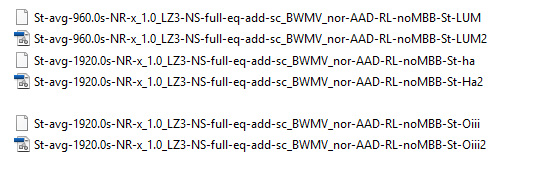
So, I tried to process each of the narrowband sets individually and it worked. I ended with a, "St-agv-******.fits" file for each of the sets. But when I try to combine them; 9) TOOLS; Combine RGB, I get a message saying that the files are not the same size. Confusing.
In Step 3 I have also tried to reduce the "automatic minimum #stars target" from the default 500 to 100, and it made no difference.
This has only happened with the set of files from NGC3324. I have imaged and processed IC443 (Jellyfish nebula) and NGC2359 (Thors Helmet) and it worked fine in MultiChannel Processing.
Any suggestions? Either on the Multi Channel Processing error at Step 4, or when processed individually why I would get a message saying the files are not the same size.
Have you tried normalize stacked files from all channels before using RGB combine tool? Sometimes this method works for me when I use data from multi sources.
No I haven't this. I am still new with APP. Is this something I would do after creating each of the channel files, then load the three into APP? Is this found in Step 5 - Normalise?
My workflow after finish and save the stacked channel files is: 1) go to 1'load' menu and 'clear', 2) re-load channel files as 'Light'. 3) in 0'Raw/Fits files' change 'algorithm' to 'no interpolation, 4) If you use data from same optics same images scale you probably click 5' Normalize' APP will run from analyze stars, register, and normalize but you have to manually save the normalized files. 5) Then you can load the saved normalized file of each channel to 'RGB combine tool' in 9'Tools'.
For data from different sources you need to uncheck the 'same camera and optics' and probably need to check 'change descriptors in x/y' if the channel files are taken in different' orientation.
Thanks for the suggestion, but no luck. I got to your Step 4 and clicked Normalize. It seemed to work and got to about 85% when I got the following message. I did not get to the point to save the normalised files.
Registration failed on some of the frames !
Please lower the "detect above noise level" kappa value in menu 3) ANALYSE STARS and re-run star analysis so more stars can be detected.
By detecting more stars, chances are much bigger that registration will be succesfull.
To clarify, all the images were taken with exactly the same equipment and same focus.
Sorry for your inconvenience with APP. I think Vincent or Mabula can help with this issue. For register only 3 files, APP should do this within few seconds. There must be something wrong with the images I used to stack wrong objects together because I changed the target during an event of another without renaming the target.
I have an issue that I think relates to Multi Channel Processing.
I have imaged NGC3324 - cluster with nebula. Narrowband - Lum, Ha and Oiii.
I initially tried the Multi Channel Processing and loaded the three sets of Lights and Flats, with Darks and Bias.
When I get to Step 4 - Register, I quickly get an error messaging saying there was a problem with the stars and that I should "reduce the kappa value in Step 3 - Analyse Stars". When I try to reduce the Kappa value from 250 to something lower, it just returns the kappa value to 250, proceeds with Analysing, then gives the same error in Step 4.
So, I tried to process each of the narrowband sets individually and it worked. I ended with a, "St-agv-***.fits" file for each of the sets. But when I try to combine them; 9) TOOLS; Combine RGB, I get a message saying that the files are not the same size. Confusing.
In Step 3 I have also tried to reduce the "automatic minimum #stars target" from the default 500 to 100, and it made no difference.
This has only happened with the set of files from NGC3324. I have imaged and processed IC443 (Jellyfish nebula) and NGC2359 (Thors Helmet) and it worked fine in MultiChannel Processing.
Any suggestions? Either on the Multi Channel Processing error at Step 4, or when processed individually why I would get a message saying the files are not the same size.
So, I tried to process each of the narrowband sets individually and it worked. I ended with a, "St-agv-***.fits" file for each of the sets. But when I try to combine them; 9) TOOLS; Combine RGB, I get a message saying that the files are not the same size. Confusing.
Let me explain what happens in this case, you have created separate integrations using separate reference frames for registration of the images, right? So that means the end integrations per channel are not registered to each other and therefore will in most cases not be of the same dimensions.
You will now need to register (and preferably also normalize) these separate integration first:
load them as lights, in 1) disable the automatic recogniztion of Masters & Integrations, so the integrations can be loaded as new lights.
star analyse, register (and normalize)
then save at the bottom of 4) Register (or 5) Normalize)
the saved frames will be created in your work directory
These frames are now registered (and normalised) and will have the same dimensions, so you can load them properly in the RGB Combine tool
When I get to Step 4 - Register, I quickly get an error messaging saying there was a problem with the stars and that I should "reduce the kappa value in Step 3 - Analyse Stars". When I try to reduce the Kappa value from 250 to something lower, it just returns the kappa value to 250, proceeds with Analysing, then gives the same error in Step 4.
There indeed is a bug here which I am aware of, I will fix this for the next release. My suggestion would be to try the following for now:
Keep the automatic minimum/maximum stars target enabled and increase the minimum stars target to 1000. Then run star analysis and registration on all frames and let me know what happens.
If it fails it will be very usefull to know how many stars were actually detected in all of the frames 😉
Can you share these integration files, perhaps with wetransfer or dropbox so I can have a look why it does not work? (send it to support@astropixelprocessor.com) I will use the data to improve this for the next release.
Which frame fails? Is there anything in the data that could explain why it fails? (Bad focus, lots of bad pixels for instance ? )
I have just sent the three integration files to you via wetransfer. I cannot see anything that would cause the failure. On the same night, with the same equipment I imaged Thors Helmet and it has been processed with no trouble. I have also taken the three files and combined them in Photoshop. No problems.
Thank you for sending the frames, I am studying the data now.
The first thing that I notice, is that the frames that you have sent me are not the original linear integration files. These files have been processed with a stretch operation already. This is not good and a problem in fact. To be able to perform accurate star analysis/ photometry of the stars, the data still needs to be linear ;-). Registration depens on accurate luminosity values for the stars.
Can you send me the linear integration files? Then I can verify if this is part of the problem or the whole problem with your data.
Sorry about that. My inexperience is showing through. I have reprocessed my light frames and created the three integration files. This time, I deselected the "stretch" option.
The files have been sent to your support address using wetransfer.
I have downloaded the linear frames, thank you very much 😉
These will now register without problems in APP 1.070 with default settings.
I noticed you uploaded, the original integrations and unstretched ones. These unstretched ones have identical data as the source so they are exactly the same ;-).
I have tried three times to create the composite. Each time the process stops at Step 4 - Register. The message is the same as reported above - "Registration failed on some of the Frames". I tried using the unstretched set as well as the original files.
If I am interpreting the output in the file listing at the bottom of the screen correctly, it appears that the process stops on the LUM file.
The settings in APP are the default settings from when it was installed.
I don't know how this has happened, but I have gone back and tried a fourth time. It has worked. I loaded my three frames, Analysed, Registered, Normalised. All good. I then saved each of the three files, as linear. However when I tried to create the RGB, I got a message saying that the files are incompatible.
I am still trying to work through this. I have loaded the three integrated files again. This sequence I have been changing one of the settings in 3) Analyse.
Automatic Minimum Stars Target When set at 100 = fail - Kappa started at 128 ended at 886 When set at 500 = success Kappa ended at 264 When set at 1000 = success
Automatic Maximum Stars Target was left at 1000.
When I then try to combine to RGB, I get the same message - the files are not compatible.
Darrell, I notice that your normalize files path did not contain 'norm' at the end of their names. This means that they probably were not normalized together yet. Could you try normalize files by loading these channel files as light in a normal way without checking multichannel integration? Hoping that this time we should have more lucks.
I had no problem whatsoever to register the linear integrations so I think something is going wrong with the workflow and perhaps with understanding what is happening and where the results will appear.
I will be happy to create a small video tomorrow and upload it here, to show you what you need to do to get this working correctly. Okay?
In addition, the star analysis/registration trouble will be dealt with in the next release 😉 I am testing a lot right now with a lot of different datasets and I am nearly ready to release it the new implementation.
Thanks. I have accepted that there must be an issue with either my data, my installation, or how I am doing things.
To answer Kijja, and to make sure that I am interpreting things correctly -
I have tried to reprocess several times with the same result each time. To clarify the Normalisation.
The attached pictures show screeshots of the last sequence I tried. ScreenA shows the file listing after Star Analysis and Registration. ScreenB shows the listing after Normalisation. The NORM entry in the column with the Red Dot shows that the files have been normalised.
After this has been done, I have then been saving the files as FITS. ScreenC shows the file listing with the 6 files. The saved files would be normalised?
I am at the point of accepting there is just something peculiar about this particular dataset and move on. I will leave it to Mabula.
Today, I have decided to reprocess some old data. I chose NGC2736 Pencil Nebula. Everything processed fine.
So I can process NGC2736, IC443, NGC2359, NGC2024. All are Nebulae. I have also processed NGC5128 - Centaurus A and M104 - Sombrero with no trouble. For some reason it is jut NGC3324.
The one other thing I have notice, which you might like to comment on, is the Combining process.
When I start the Comine RGB process and select ADD, I select a file and lets say the first one is the Ha file. In the next dialog screen that opens which asks for a short description of the file, the default type in the drop-down box matches the file. In this example it says it is the Hydrogen alpha. When I select the Oiii, this dialog box defaults to Oiii. This is what has happened in all the processing I have done where the combine has been successful.
However, with my problem set of NGC3324, at the Combine RGB step, when I select a file, eg Ha or Oiii, the default for this dialog displays CUSTOM. I change this is match the file I am loading eg Ha or Oiii or Lum. It is as if APP does not recognise that I have selected the Ha or Oiii. Any idea on what may cause this?
The one other thing I have notice, which you might like to comment on, is the Combining process.
When I start the Comine RGB process and select ADD, I select a file and lets say the first one is the Ha file. In the next dialog screen that opens which asks for a short description of the file, the default type in the drop-down box matches the file. In this example it says it is the Hydrogen alpha. When I select the Oiii, this dialog box defaults to Oiii. This is what has happened in all the processing I have done where the combine has been successful.
However, with my problem set of NGC3324, at the Combine RGB step, when I select a file, eg Ha or Oiii, the default for this dialog displays CUSTOM. I change this is match the file I am loading eg Ha or Oiii or Lum. It is as if APP does not recognise that I have selected the Ha or Oiii. Any idea on what may cause this?
The RGB Combine tool check the metadata to give you the right suggestion to what filter the data belongs and this a correct description.
The frames probably are missing the filter tag in the metadata, because they weren't processed in the Multi-Channel/Filter mode, right?
It has no effect on the actual processing in the tool ;-), it's just a description so you now while working in the tool which channels you are tweaking for the composite.
Thanks. I have accepted that there must be an issue with either my data, my installation, or how I am doing things.
To answer Kijja, and to make sure that I am interpreting things correctly -
I have tried to reprocess several times with the same result each time. To clarify the Normalisation.
The attached pictures show screeshots of the last sequence I tried. ScreenA shows the file listing after Star Analysis and Registration. ScreenB shows the listing after Normalisation. The NORM entry in the column with the Red Dot shows that the files have been normalised.
After this has been done, I have then been saving the files as FITS. ScreenC shows the file listing with the 6 files. The saved files would be normalised?
I am at the point of accepting there is just something peculiar about this particular dataset and move on. I will leave it to Mabula.
Today, I have decided to reprocess some old data. I chose NGC2736 Pencil Nebula. Everything processed fine.
So I can process NGC2736, IC443, NGC2359, NGC2024. All are Nebulae. I have also processed NGC5128 - Centaurus A and M104 - Sombrero with no trouble. For some reason it is jut NGC3324.
Maybe it's still a good idea, If I make a small video instruction to show you how I would do this in APP, concerning registering and normalising these integrations so you can still make a proper composite ? Okay?
The next release is forthcoming now in which the star analysis and registration has been further improved to prevent the problem that you experienced 😉
I have been struggling with the almost exact same issues as Darrell and have been following this thread with great interest. I can say that with the current 1.071 beta I have for the first time in APP been successful in combining my RGB and Lum images from different cameras with different, pixel sizes and FOVs. The RGB is shot with a OSC CMOS camera(Atik Horizon) and the Lum with a mono CCD camera(Atik 414EX). I still have some issues though as you can see on the image of NGC772
.
The images are not blending seamlessly. It's only the smaller field of view from the lum images that comes out ok, the wider RGB image has more or less disappeared with only some strangely colored stars remaining. Is it possible to retain the whole RGB image with the added enhancement of the lum for the central part of the image?
An additional comment on the process; At the moment I need to manually split the RGB image in separate channel files and load them into RGB combine tool together with the lum file. Ideally I would like to be able to keep the RGB image as just 1 file through the whole process, which seems to be possible from a user interface perspective (by selecting RGB when loading the multi-channel files as well as in the RGB combine tool) , but when Normalizing the RGB and the Lum images I get the following exception (otherwise the exact same parameters are used as for the successful split-RGB files scenario; Dynamic Distortion Correction, not Same Camera and Optics and Advanced mode for normalization):
Encountered error in module: OverlapBetweenTwoImageObjectsCreatorWorker
Thanks for a great software and Im looking forward to see it continue to develop and BTW, yes it would be great with an instruction video on this topic.
I have been struggling with the almost exact same issues as Darrell and have been following this thread with great interest. I can say that with the current 1.071 beta I have for the first time in APP been successful in combining my RGB and Lum images from different cameras with different, pixel sizes and FOVs. The RGB is shot with a OSC CMOS camera(Atik Horizon) and the Lum with a mono CCD camera(Atik 414EX). I still have some issues though as you can see on the image of NGC772
Thank you for your feedback and welcome to the APP forum 😉
Great to hear that 1.071 beta is working better, thanks for sharing.
The images are not blending seamlessly. It's only the smaller field of view from the lum images that comes out ok, the wider RGB image has more or less disappeared with only some strangely colored stars remaining. Is it possible to retain the whole RGB image with the added enhancement of the lum for the central part of the image?
The blending is controlled by Mult-Band-Blending and Local Normalization Correction as well. Did you use both?
The colors in the area where the luminance is not applied must come from the settings that you used in the RGB COmbine tool I must assume. I do think it should be possible to get a much better results in this regard. Perhaps you can share what you did exactly to make the LRGB composite?
An additional comment on the process; At the moment I need to manually split the RGB image in separate channel files and load them into RGB combine tool together with the lum file. Ideally I would like to be able to keep the RGB image as just 1 file through the whole process, which seems to be possible from a user interface perspective (by selecting RGB when loading the multi-channel files as well as in the RGB combine tool) , but when Normalizing the RGB and the Lum images I get the following exception (otherwise the exact same parameters are used as for the successful split-RGB files scenario; Dynamic Distortion Correction, not Same Camera and Optics and Advanced mode for normalization):
Encountered error in module: OverlapBetweenTwoImageObjectsCreatorWorker
At the moment not I am afraid. APP is not yet made ready to process both OSC/RGB data together with monochrome data. So, indeed, for now, you need to process these datasets separately or...my recommended workflow for now would be:
first split the calibrated RGB images in 2) calibrate, enable split channels and save calibrated frames
calibrate the monochrome data and save that as well
Then simply process, L, R, G, B in multi-channel modus with the calibrated channels
I have it on my ToDo list to make this possible and much easier though 😉
Thanks for a great software and Im looking forward to see it continue to develop and BTW, yes it would be great with an instruction video on this topic.
Anders
Thank you very much Anders. I think a video instruction for OSC with monochrome data is warrented. I will work on that.