

UPDATE FROM MABULA
I have had a very rough 2 months unfortunately health wise. I was struck 3x in a row with bacterial infections. The second infection occurred after a routine hospital checkup and I became very sick. I had to rest and take a lot of antibiotics. Once I was recovering and restarting work 1 month ago, I again became sick. The infection was not yet gone, so even more antibiotics and rest was needed. Needless to say, it took a lot of my energy and I needed a lot of rest.
Finally, the infection is really gone and my energy is coming back step-by-step now and I have started work again. I am terribly sorry to have kept you waiting for support. I will address all outstanding questions and e-mails step-by step and will be on the forum daily from today.
APP 2.0.0-beta47 will come soon as well, a lot of work was already completed before I became very ill, so the release is also nearly ready for you. Beta47 will be much faster actually. Many workflows will be more than 2x faster, mosaics can even be 10x faster than before because registration really received a major boost... all compared to beta46. Before I release it, I will make sure that everything is working properly and then I will release it.
After running the Light Pollution Correction tool on my LHaRGB image of M101 there are a series of concentric rings around the object. See attached screen shot. For this image I set the stretch to maximum for easy visibility, but they are visible at 10% stretch.
I turned off OpenGL and they are still visible.
I also saved out tiff copies in 16 and 32 bit and opened the files in Affinity Photo and Preview. Rings visible.
It occurred to me that I started my pattern of boxes in the tool as a rough arc
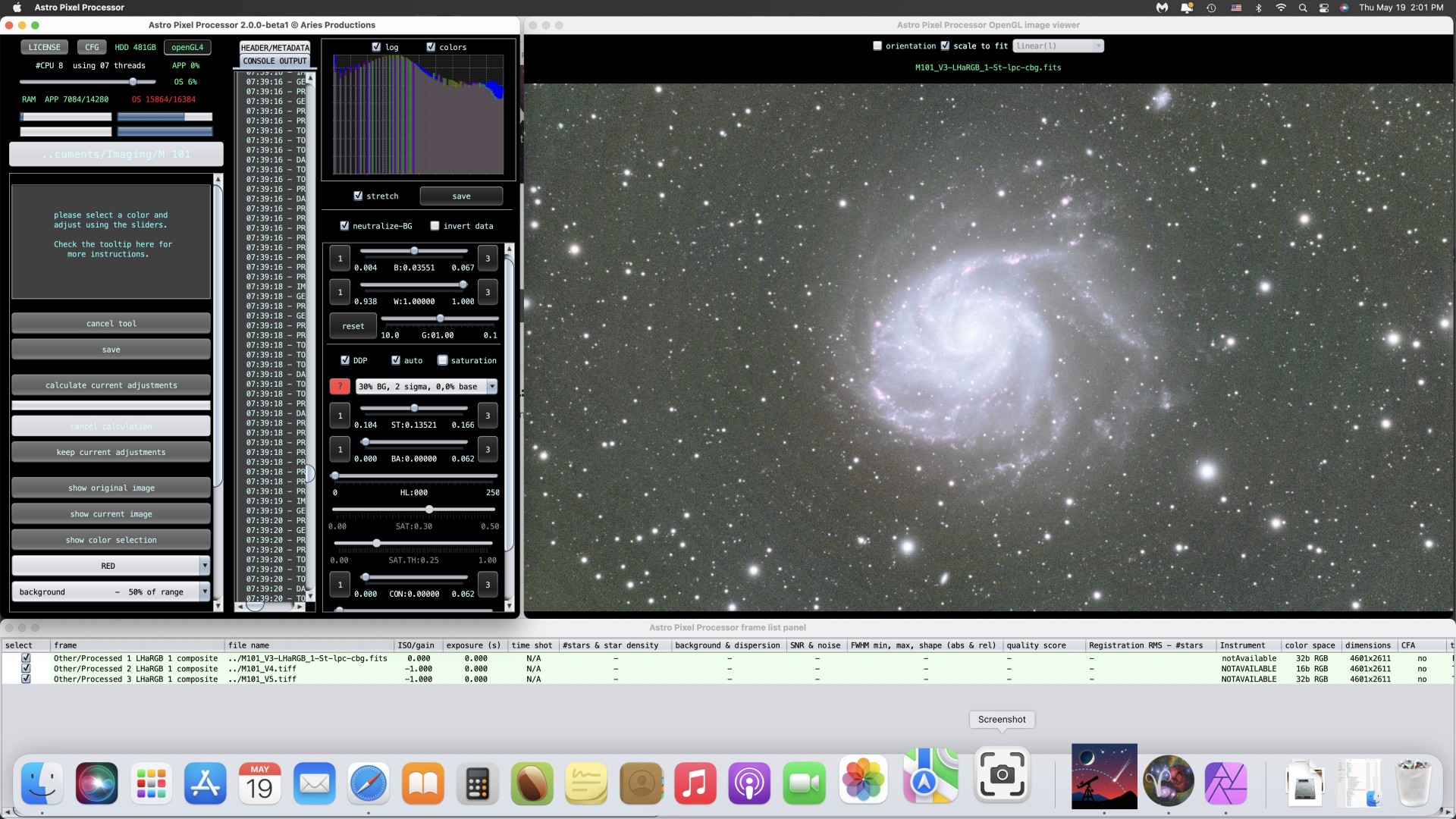
around the galaxy, but not at this frequency. They were large boxes.
I will run this again tonight using a more staggered pattern to see if it repeats.
Update - I used a different box pattern, moving from top left corner and expanding across the image left to right. Same pattern.
I also opened up 1.083 and used the Light Pollution Correction tool. Same pattern.
This suggests it originates in a previous step. Combine RGB or in the Integration(s) themselves.
When you overstretch a sub, do you see any evidence of these as well?
@vincent-mod I decided to come at this problem with fresh eyes this morning. Procedure:
1) Launch 2.0 Beta
2) Using the LPC TOOL, examine individual integrations (L, Ha, R, B, G) at 15% stretch and 30% stretch. Stretch values chosen for testing convenience.
3) Examine files saved immediately after RGB Combine at 15% and 30%.
4) Examine files saved immediately after LPC at 15% and 30%.
Along the way I was perplexed that the individual integrations did not display in the LPC tool - then I switched from CPU to OpenGL4 and they displayed fine.
Results:
1) No concentric banding noticed in individual integrations.
2) No concentric banding noticed in my older files saved immediately after RGB Combine.
3) No concentric banding noticed in my older files saved immediately after processing in LPC Tool.
4) My most recent RGB combine shows no banding immediately after being saved from RGB Combine.
5) My most recent RGB combine shows banding after being processed in LPC Tool.
As a cross-check, I opened both of the recent files (post-RGB Combine and Post-LPC) in the HSL Tool. Same results. Post RGB fine, Post LPC banded.
It appears my problem is limited to that one file. Earlier files were processed successfully in the LPC Tool.
It occurred to me this effect is similar to trying to photograph a sunset - too much dynamic range for the sensor. So I loaded both files as lights - and the problem file shows 8 bit color space! I hate to say it, but this could have been a very silly user error - some where along the way - LPC tool or HSL Tool - I meant to save it as 32 bit and rushing through selected 8 bit instead.
Later today I will reprocess the RGB file through the LPC tool and see what happens.
