It did take a long time to have the work finished on this and it will have a major performance boost of 30-50% over 2.0.0-beta39 from calibration to integration. We extensively optimized many critical parts of APP. All has been tested to guarantee correct optimizations. Drizzle and image resampling is much faster for instance, those modules have been completely rewritten. Much less memory usage. LNC 2.0 will be released which works much better and faster than LNC in it's current state. And more, all will be added to the release notes in the coming weeks...
Update on the 2.0.0 release & the full manual
We are getting close to the 2.0.0 stable release and the full manual. The manual will soon become available on the website and also in PDF format. Both versions will be identical and once released, will start to follow the APP release cycle and thus will stay up-to-date to the latest APP version.
Once 2.0.0 is released, the price for APP will increase. Owner's license holders will not need to pay an upgrade fee to use 2.0.0, neither do Renter's license holders.
Have I been under-exposing my Flats this whole time?!
I have just come across the thread below, and now i am worried that i have been under-exposing my Flats without realising it. I would be extremely grateful if you could verify as much for me.
I should point out, i am using a Ha-modified Nikon D5300, which is a 14bit camera. I take my flats by placing my ipad on the end of the dew shield of my SW 80ED (with an opal diffuser in between). For all of my RGB (i.e not NB) work i usually use my IDAS-D1 filter, so i also have an App on the ipad that lets me choose any colour i want by setting 3 sliders (for R, G, and B). This way, i can set the levels so that all 3 channels end up being equally exposed, even though the D1 suppresses the Red signal. I normally shoot 1 sec Flats at ISO 200, and at an exact brightness level that i know gives a well illuminated histogram (or so i thought!).
I worked all of this out by experimentation, and examining the flats in a program called FastOne. When i view them in this, i see all 3 histogram peaks overlapping nicely and in the middle. However, after reading the above thread, i decided to view them in APP in Linear mode, and i was horrified to see that the histograms actually don't overlap at all (not such a big issue i suppose), but more worryingly that all 3 appear to be significantly under-exposed (i.e nowhere near the middle). See below:
I've attached a link below to one of the Flat files. Could you confirm that you think this is indeed under-exposed? I'm guessing that i need to now increase the exposure time, probably to something like 3-4 secs.
ps - If it turns out that they are under-exposed, and an increase to 4 secs would be needed, this would obviously quadruple the time it takes me to grab the Flats at the end of a session (sounds like a small thing, but it's really not considering it's always v. late and i usually need to finish asap for work in the morning, lol). So, would there be any drawback to capturing the Flats at a higher ISO (say 1600) in order to keep the exposure around 1 sec? In other words, using a workflow that involves loading all of the following: the ISO 200 Lights, an ISO 200 Master Bias, the ISO 1600 Flats, an ISO 1600 Master Bias, and a BPM. So using 2 Master Biases. And then running everything as normal.
Yes, you looked at your flat correctly. The linear data as recorded by the sensor is shown this way 😉
Indeed, the flats could be exposed longer, but if the flat calibration is working correctly I wouldn't mind.
Increasing ISO with your Nikon Dslr won't improve things, so I wouldn't use iso1600 to have the peaks more to the right. (These Nikon DSLRs really are best with lower ISOs !, they have isoless behaviour from ISO 200 and higher. Higher ISO value won't improve things then.)
Your flat peaks are between 5000-10000 ADU in 16bits. So yes, you could increase the exposure time with a factor of 3-4 to have the peaks somewhere in the middle of the histogram.
But like I said, if calibration works fine then I wouldn't adjust your workflow (you can always try though, to check if calibration is better 😉 )
I know that some Nikon DSLRs (like my D610) do benefit from these longer exposed flats. With shorter exposures I often get severe ringing in the calibrated lights... and I know from my beta testers this even happens with a D810a.
Thanks Mabula. I'm not so concerned now. I do think my Flats are working, they certainly seem to always get rid of the few dust bunnies I have, as well as any vignetting. I will still try increasing the exposure time to around 3 to 4 seconds next time though, just to see if it improves things at all. (note, the increase in total time to shoot my 30 Flats will actually be minimal after all. Each one takes about 10 secs in total, including download time, so an increase to 14 secs will actually only add an extra couple of mins, not 15 as I had earlier thought! lol). So I will install APP on my imaging laptop as well, so I can quickly check the histogram before I shoot them all.
When you say that you often get extreme ringing in your calibrated lights, what F-ratio do you image at? And is the ringing obvious straight away, or do you have to stretch aggressively to see it? Just wondering if mine also might have some subtle ringing that I haven't noticed before.
Also, how were you able to see the ADU values of the peaks in my Flat? Is there an easy way for me to see them in APP?
When you say that you often get extreme ringing in your calibrated lights, what F-ratio do you image at? And is the ringing obvious straight away, or do you have to stretch aggressively to see it? Just wondering if mine also might have some subtle ringing that I haven't noticed before.
My Nikon D610 (and other models) have a specific sensor problem which could cause ringing unfortunately. Some Sony camera's seem to have this problem as well. I know from testing by several photographers that longer exposed flats decrease this problem. I got the rings at both F/8 and F/5.6.
Also, how were you able to see the ADU values of the peaks in my Flat? Is there an easy way for me to see them in APP?
Check this image;
The data shown is linear, but I moved the B(lack) and W(hite) sliders to compress the data range and thus make the histogram peaks wider in the histogram. So technically, I applied a stretch using only the B & W sliders. That gives me the ADU data range,
But check your FITS header of the masterflat, it contains the mean/median values per CFA channel (R,G1,G2,B). The calibration value in the header is the peak ;-). You should also realize that the data in the masterframe is 14bits and thus the reported values are in 14bits for your DSLR. It's multiplied with a factor (also in the Fits header) to scale to 16bits for output on your screen.
The Fits header can be seen by loading the frame into the image viewer and then clicking on details above the image viewer 😉
Try it on a NEF file, you will see all the metadata, IFD(s) Exif, Nikon Makernote etc...
Thanks for this Mabula. It's my NB Flats that have been the most under-exposed. My RGB ones don't look too bad, but the Ha ones were woefully under-exposed (although i seem to have got away with it so far - just been lucky i suppose that it never bit with my current gear).
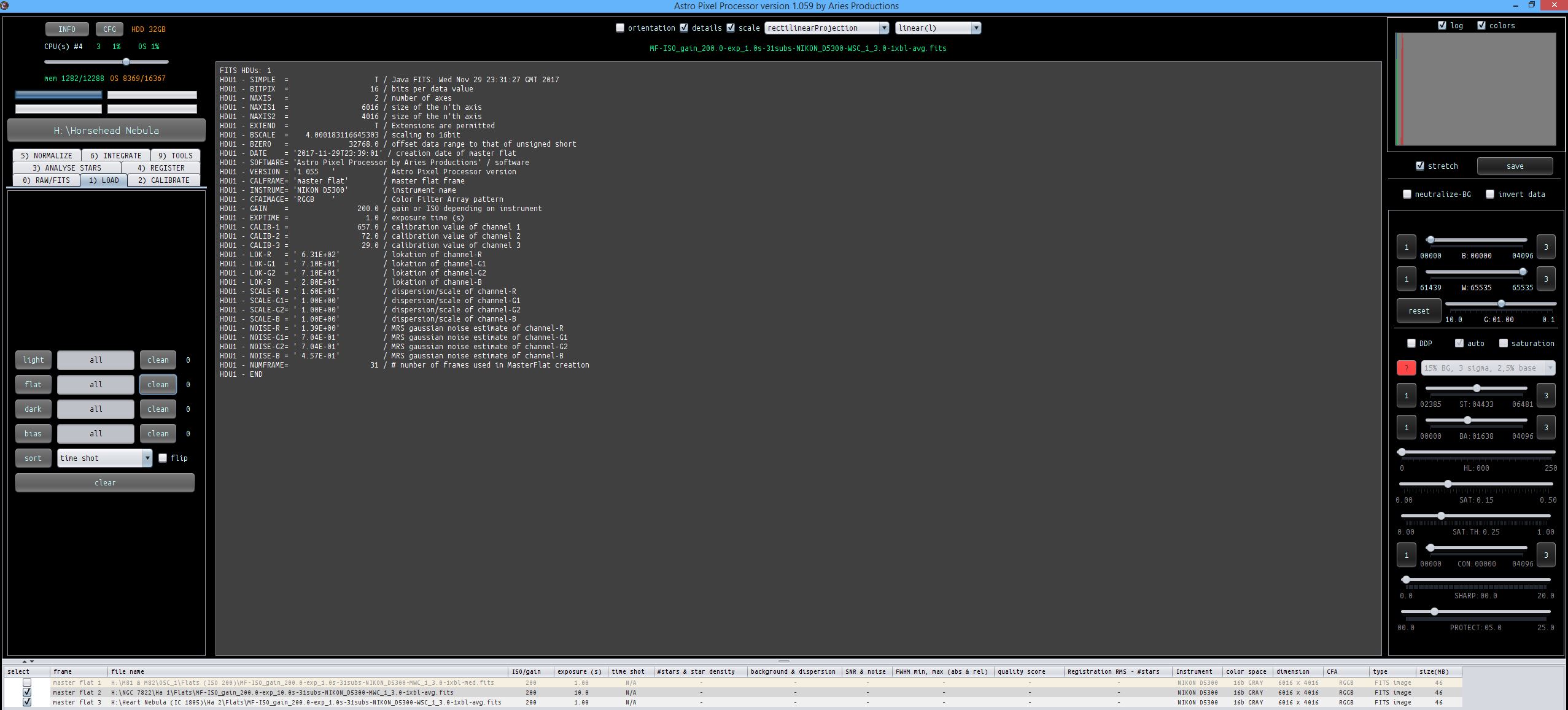
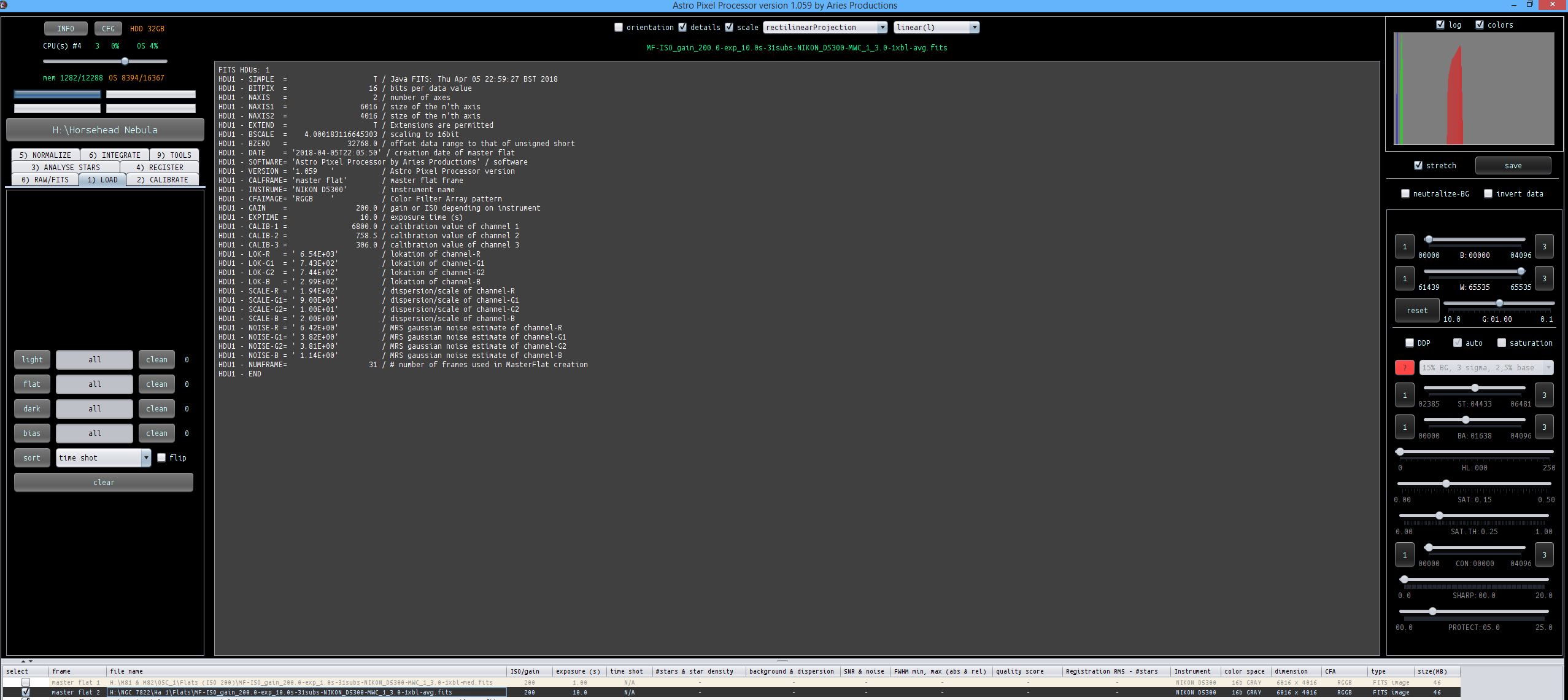
I've now moved from 1 sec Flats to 10 sec Flats when shooting Ha. I've shown pics below to illustrate the histogram for each.
Thanks for this Mabula. It's my NB Flats that have been the most under-exposed. My RGB ones don't look too bad, but the Ha ones were woefully under-exposed (although i seem to have got away with it so far - just been lucky i suppose that it never bit with my current gear).
I've now moved from 1 sec Flats to 10 sec Flats when shooting Ha. I've shown pics below to illustrate the histogram for each.