

2026-10-09 APP 2.0.0-beta48 has been released !
This is mainly a bug fix release for the reported bugs in beta47. In addition it has a significant User Interface performance improvement noticable when you need to process 1000s of images in APP.
2026-10-03 APP 2.0.0-beta47 has been released !
This is a very big release... many code optimizations/rewrites, many parts of APP are much faster and more precise, especially star analysis and registration are much faster ! Big mosaics will go much faster 🙂
And we introduce a new preview filter, which includes the new Adaptive Deep Sky Stretch and a General Levels Stretch, this has been long over due. The old preview filter (the panel on the right side to stretch and preview your data) has not been updated for a couple of years and it is a critical part of any APP session.
Adaptive Deep Sky Stretch or ADSS is a much more intuitive stretch algorithm. It is also color preserving (which is a great new addition in itself ! ) which means that the highlights are no longer bleached, color is maintained from the linear data while stretching. You can simply stretch your data using the sky background level and signal width sliders which work much easier and more intuitive. You no longer need to fiddle with the old complicated sliders with zoom buttons. All the zoom buttons for the sliders are made redundant. And you can enter slider values in the slider value fields yourself. I will make a youtube video in the coming days to explain and fully introduce ADSS. Once the video is ready, it will be highlighted on the forum.
RGB Combine upgrade !. The RGB Combine Tool has been rewritten mostly. The tool is faster and easier to use and most importantly, the Luminance slider to inject a luminance channel or channels into the RGB composite is now working correctly. It no longer bleaches the RGB colors. Combined with the new ADSS preview, you will get much better and easier great composites with great color! I will also explain this in a new youtube video.
Hi Mabula,
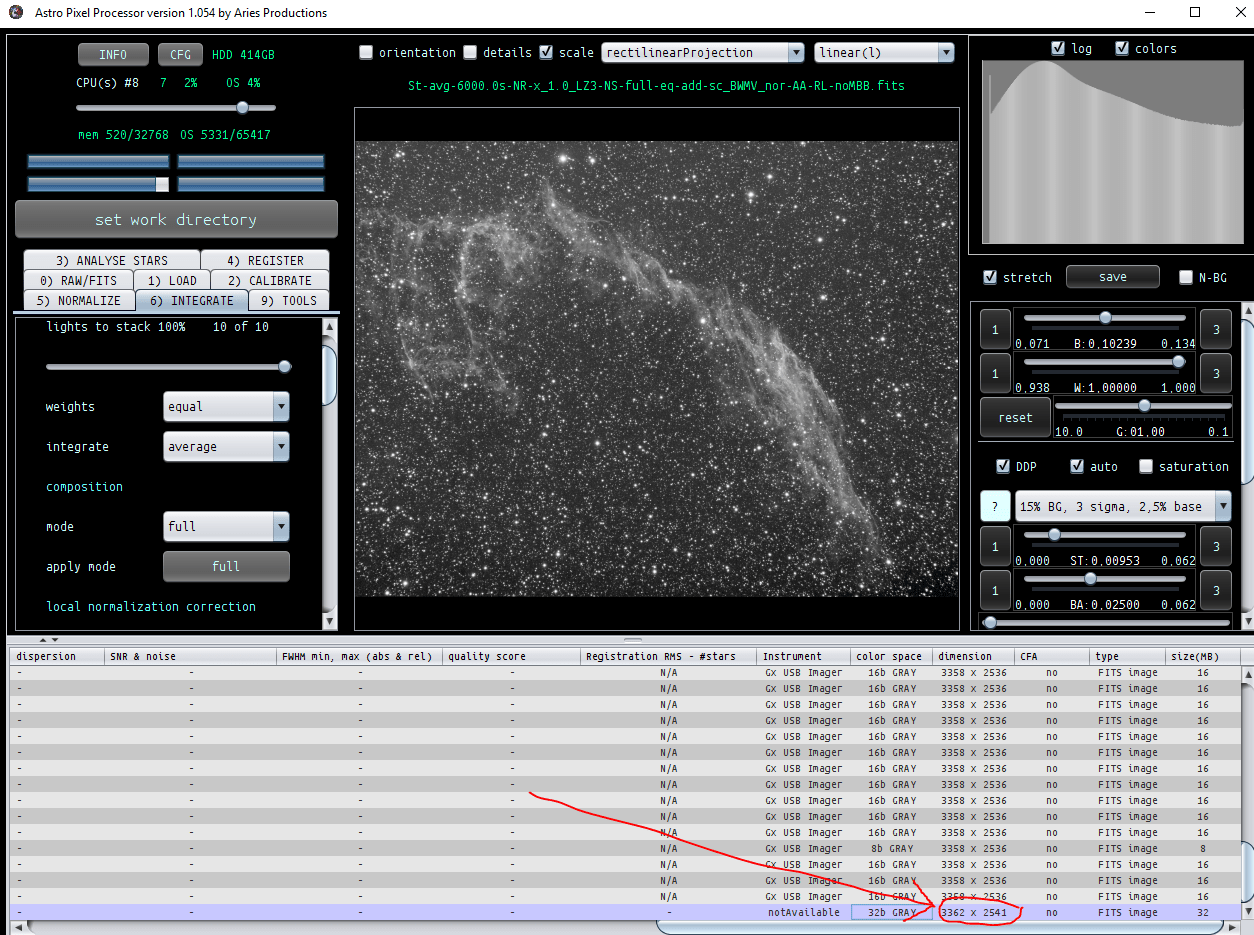
After Calibration, Registration and so on, the final lum stack gets a few pixel larger than the subs and the rgb combine does not work. If I integrate the rgb channels without the lum I have no problem. Any idea what I'm doing wrong?
Uwe
log:
 Dropbox File (Private or Invalid)
Hi Uwe,
Yes, the integrations will have different dimensions due to integration composition set at full. The full composition mode created a Field Of View in which all pixels of all frames are used in the integration. If you use the reference composition mode, then the integrations will have the same dimensions as the chosen reference frame. So that's one solution, just make sure that you use the same reference frame (either a good Lum or Green frame I would recommend) when registering the frames of different channels.
There are several other solutions for your problem:
- just create the integrations of all channels separately, and afterwards, load the integrated channels as new lights and register en save them in 4) using save registered frames.
- Or register all frames of all channels at once. Then 2 possibilities, save all the frames and put the registered frames for each channel in separate folders (for your own overview), and then create the integrated channels by using the no registration mode (since registration was already done). Then the integrated channels will have the same image dimensions and are registered to each other. The other possibility, don't save and after normalisation, just select the frames for each channel and click on integrate to create the integrated channels.
Let me know if you can create your composite now 😉
Kind regards,
Mabula
Hi Mabula!
Thank you very much for your help!
With the "register all frames of all channels at once" + "just select the frames for each channel and click on integrate" + "try out things in tools" i have got a first result. And I like it:)
I have a lot of different files: 5x300s R/G/B, flats: 15 R/G/B, 10x600s lum, 11x600s darks, 15x300s darks, bias: 15.
Can APP handle such a puzzle?-) It recognises the different darks, but I'm unsure about the flats.
Anyway, I will make further attempts in the next days.
Thanks again for your help!
Kind regards,
Uwe

Hi Uwe,
Currently, it's best to calibrate the data of the different channels first. Then proceed with the calibrated frames 😉
In a future version, I am planning to have implemented full multi-channel processing, then APP should be able to do as you indicate.
Kind regards,
Mabula
