

Mar 28 2026 APP 2.0.0-beta40 will be released in 7 days.
It did take a long time to have the work finished on this and it will have a major performance boost of 30-50% over 2.0.0-beta39 from calibration to integration. We extensively optimized many critical parts of APP. All has been tested to guarantee correct optimizations. Drizzle and image resampling is much faster for instance, those modules have been completely rewritten. Much less memory usage. LNC 2.0 will be released which works much better and faster than LNC in it's current state. And more, all will be added to the release notes in the coming weeks...
Update on the 2.0.0 release & the full manual
We are getting close to the 2.0.0 stable release and the full manual. The manual will soon become available on the website and also in PDF format. Both versions will be identical and once released, will start to follow the APP release cycle and thus will stay up-to-date to the latest APP version.
Once 2.0.0 is released, the price for APP will increase. Owner's license holders will not need to pay an upgrade fee to use 2.0.0, neither do Renter's license holders.
I am using the latest version of APP in a trial basis on an IMac. I have been through the process several times and have had reasonable success ( for a beginner). For the last week or so I have been trying to use the program but I can't load any files into APP. With the working directory on screen I can the directory down to folders and sub folders but when I open these it shows nothing although the files are definitely there. In the file type box there is no file type showing and nothing on the dropdown. I am probably missing something obvious but has any one any ideas how to correct this please as the program is unusable at the moment.
Thankyou
Hi @chrisby18,
Thank you for your question and welcome to the APP forum.
The application starts with asking you to select a working directory. In this directory, APP will store all results and also temporary files while integrating.
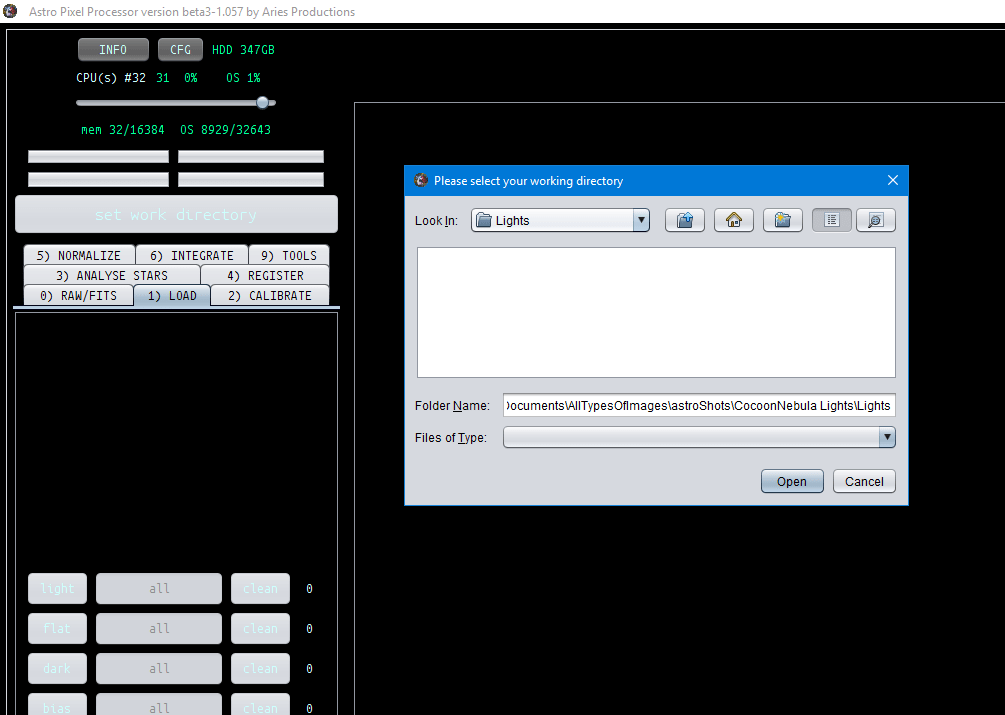
The File Chooser states: select your working directory
So your first step is to just choose a work directory. After having chosen a work directory, you can load frames with the lights, darks, flats, bias buttons and they should show up then 😉
I pressed the light button after having chosen the lights folder as my working directory, now I can see/select an load the frames.

Let me know if this solves it for you 😉
Kind regards,
Mabula
Hi Mabula,
Thank-you for your very prompt reply, I feel a bit of an idiot now, I thought I was doing just as you suggest but realise I was pressing lights and then trying to find the files rather than, as you say pressing and choosing the directory button first.
Thank you once again, APP is the best program of its type, I have tried, and I will be taking out a subscription very soon.
Chris.
