

Mar 28 2026 APP 2.0.0-beta40 will be released in 7 days.
It did take a long time to have the work finished on this and it will have a major performance boost of 30-50% over 2.0.0-beta39 from calibration to integration. We extensively optimized many critical parts of APP. All has been tested to guarantee correct optimizations. Drizzle and image resampling is much faster for instance, those modules have been completely rewritten. Much less memory usage. LNC 2.0 will be released which works much better and faster than LNC in it's current state. And more, all will be added to the release notes in the coming weeks...
Update on the 2.0.0 release & the full manual
We are getting close to the 2.0.0 stable release and the full manual. The manual will soon become available on the website and also in PDF format. Both versions will be identical and once released, will start to follow the APP release cycle and thus will stay up-to-date to the latest APP version.
Once 2.0.0 is released, the price for APP will increase. Owner's license holders will not need to pay an upgrade fee to use 2.0.0, neither do Renter's license holders.
I'm trying to learn how to calibrate DSLR frames using the tutorial. I have loaded dark frames and bias frames and clicked on "create bad pixel map" but there is no "calibrate" button anywhere in the panel on the left side of the screen like there is in the tutorial. I don't know how to proceed.
Another question: Why am I not seeing an image in the main window? I have loaded lights and support frames and gone through all the steps but the window is black.
Yes, I am a beginner. Only 7 months doing astro and have never used PixInsight, ImagesPlus, etc. Have used StarTools with some success but I'm not satisfied with result. Mostly used PshopCC2018. Thanks.
Hi,
I'm sure that someone more knowledgeable than me will come along to assist you soon, however I can advise that you need to double-click a file (e.g. one of your light frames) listed in the area beneath the image display to get an image to appear.
You can use this to visually check your lights or calibration frames.
I cannot answer the missing calibration button - does it not appear under your working directory as shown below?
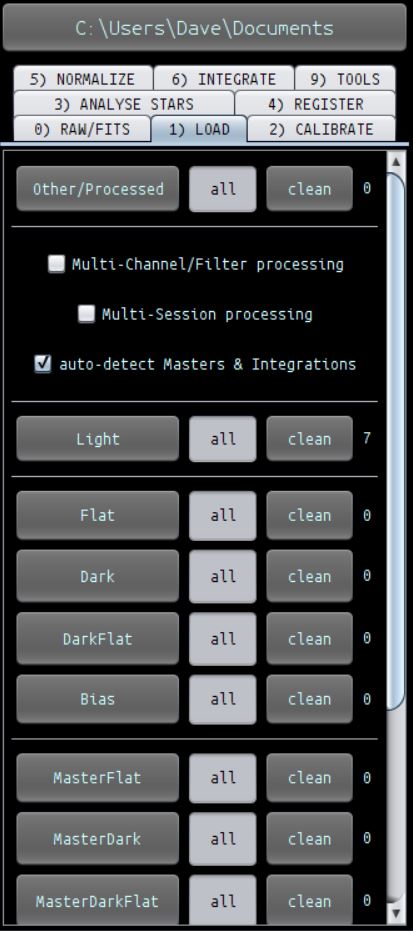
Regards
Dave
Thanks for that, Dave. The calibrate button I'm referring to is right under the "create bad pixel

map" in the tutorial: A DSLR data calibration work flow.
Here is the panel I see when I try to create a bad pixel map. There is no "calibrate" button like there is in the tutorial.

Aha, the tutorial is running a very old version of APP. To initiate the calibration process in 1.068, you need to click on 'Create Masters and Assign to Lights' to start the process running.
Hope this helps!
Dave
Thanks again, Dave. That worked!
Great! I am pretty new to astrophotography also and am finding that APP is a really excellent tool that is rapidly growing in functionality and allowing complex tasks to be performed very easily.
There is a lot of good information on this forum plus the latest video tutorials are extremely useful once you get a bit further into it.
Once you have processed a few images it will become a lot more intuitive to use 🙂
Rgds
Dave
