

2026-10-09 APP 2.0.0-beta48 has been released !
This is mainly a bug fix release for the reported bugs in beta47. In addition it has a significant User Interface performance improvement noticable when you need to process 1000s of images in APP.
2026-10-03 APP 2.0.0-beta47 has been released !
This is a very big release... many code optimizations/rewrites, many parts of APP are much faster and more precise, especially star analysis and registration are much faster ! Big mosaics will go much faster 🙂
And we introduce a new preview filter, which includes the new Adaptive Deep Sky Stretch and a General Levels Stretch, this has been long over due. The old preview filter (the panel on the right side to stretch and preview your data) has not been updated for a couple of years and it is a critical part of any APP session.
Adaptive Deep Sky Stretch or ADSS is a much more intuitive stretch algorithm. It is also color preserving (which is a great new addition in itself ! ) which means that the highlights are no longer bleached, color is maintained from the linear data while stretching. You can simply stretch your data using the sky background level and signal width sliders which work much easier and more intuitive. You no longer need to fiddle with the old complicated sliders with zoom buttons. All the zoom buttons for the sliders are made redundant. And you can enter slider values in the slider value fields yourself. I will make a youtube video in the coming days to explain and fully introduce ADSS. Once the video is ready, it will be highlighted on the forum.
RGB Combine upgrade !. The RGB Combine Tool has been rewritten mostly. The tool is faster and easier to use and most importantly, the Luminance slider to inject a luminance channel or channels into the RGB composite is now working correctly. It no longer bleaches the RGB colors. Combined with the new ADSS preview, you will get much better and easier great composites with great color! I will also explain this in a new youtube video.
To it my concern,
I load my data into APP. Dark, flat, dark flat, light. Never had problems with crashing before. It has happen twice so far. I got it to work once so far out of three times. I am using a windows 11, intel base pc with 64gig of memory, I have alot of storage. If you can tell me where the log files to send you.
thank you for your time
Don
Dear Donald, @don1957.
Thank you very much for reporting this. Did you run the previous beta19? Can you tell me if that is completely stable when compared to beta20? If so, I think I might know the cause and will be able to provide a fixed version soon.
Please try 2.0.0-beta19 and let me know if this is stable:
https://www.astropixelprocessor.com/downloads/
Mabula
@mabula-admin Yes, I was using beta 19 without crashing. I have been using 2.0 beta since the beginning.
Hi Donald, @don1957
Okay that is very good to know. I will make some chances and then will share a version with you for you test to make sure it is fixed then 😉 I will keep you updated.
Mabula
Hi Donald, @don1957,
Can you give me some additional information, is the crash occuring at the same time or at random moments if it occurs? At what stage/process does it occur, for instance when doing Analyse stars or during integration?
Mabula
@mabula-admin , Hello Mabula,
They seem to be random moments. I guess I need to sit watch the process and see where it crashes.
ok, I got to crash again. It crashed on anaylse stars. Cosmic ray / noise reducer is checked. lower-limit area size is set at 4. automatic #stars target: is 3000 and checked
Hi Donald @don1957,
Okay, thank you for the feedback, can you check if there are crash report files in APP's installation folder? It should help us understand the cause of these crashes 😉 and fix it a.s.a.p.
Mabula
Hi Donald, @don1957
Okay thank you for checking. I have been doing extensive tests here and I think I can provide you tomorrow with an adjusted beta20 that might be fixed (should not crash) 😉
Mabula
Hi Donald @don1957
Can you please test this new version and let us know if this has fixed the crashes with beta20 on your computer?
Mabula
@mabula-admin I’ll test this as well, I have been having random ctd’s with beta 20 as well, win10 x64.
I'm afraid I could not get this version (beta 21) to open APP even , sorry.
and could not find a log file.
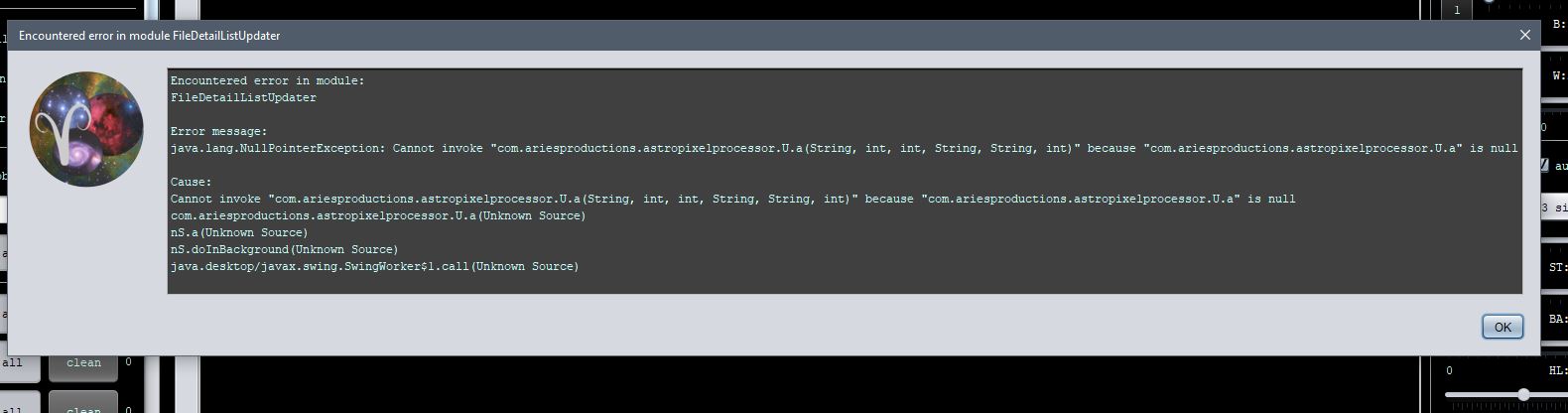
Hi Andy @andybooth, did you first uninstall the old APP version before installing this test version?
Mabula
@andybooth i see that this is caused by the General Console Panel, did you have this enabled or disabled Andy before installing this test version ?
@mabula-admin Hi mate,
yes I used the uninstall, and yes I had the console as separate window.
i now discover that if I just ok the error message , then app stays open, and I have not yet had a subsequent error or ctd.
am continuing testing.
EDIT: I did the full routine on the data that failed in beta 20, with no errors.
If i close app with beta 21 and reopen, i still get the opening error message as above, but can ok, and all then seems to be ok.
Hi Andy, thank you very much.
So the error occured only once at startup of this test version? Does the error appear again if you restart this test version ?
Mabula
@mabula-admin my edit crossed over your post.
I did the full routine on the data that failed in beta 20, with no errors.
If i close app with beta 21 and reopen, i still get the opening error message as above, but can ok past it, and all then seems to be ok.
EDIT: After several, at least 5 reopens and some processes, it now does not open with an error at all, lol, go figure.
@mabula-admin my edit crossed over your post.
I did the full routine on the data that failed in beta 20, with no errors.If i close app with beta 21 and reopen, i still get the opening error message as above, but can ok past it, and all then seems to be ok.
Hi Andy, can you provide me the following:
If you restart this beta21 test version, can you share with me the contents of the console panel at that moment after you have clicked away that error message?
Click on save output and send me the created file, then I should be able to find the cause of this problem 😉
You can send it to support@astropixelprocessor.com or possibly attach it to your forum message.
Thanks,
Mabula
Hi Donald @don1957,
Please try 2.0.0-beta22, it should no longer crash 😉 and let us know if everything is allright now.
Thanks,
Mabula
@mabula-admin I have downloaded and tested it. It seems to be working fine now. thanks
