

UPDATE FROM MABULA
I have had a very rough 2 months unfortunately health wise. I was struck 3x in a row with bacterial infections. The second infection occurred after a routine hospital checkup and I became very sick. I had to rest and take a lot of antibiotics. Once I was recovering and restarting work 1 month ago, I again became sick. The infection was not yet gone, so even more antibiotics and rest was needed. Needless to say, it took a lot of my energy and I needed a lot of rest.
Finally, the infection is really gone and my energy is coming back step-by-step now and I have started work again. I am terribly sorry to have kept you waiting for support. I will address all outstanding questions and e-mails step-by step and will be on the forum daily from today.
APP 2.0.0-beta47 will come soon as well, a lot of work was already completed before I became very ill, so the release is also nearly ready for you. Beta47 will be much faster actually. Many workflows will be more than 2x faster, mosaics can even be 10x faster than before because registration really received a major boost... all compared to beta46. Before I release it, I will make sure that everything is working properly and then I will release it.
Hi,
it seems APP lately believes my flats are color, but they were made from the 6200mm mono. And they had worked before. Now the are loaded as RGGB. Under "0" I only set "no interpolation" as usual and nothing else, load the lights plus the masters and this happens where in the past months this never was the case. Any idea what this can be (1.083.3)
stefan

@elgol Can you please upload a few lights and the masters to a directory called elgol_rggb? Please follow the upload instructions at the top of any forum page and let me know when the upload is done. Then I will have a look. Thanks!
done. I uploaded what I usually load as masters (here only Ha-flat) and then the lights, here only 2. in pixinsight the flats and lights are loaded as grey. it must be something simple 🤯
@elgol Thanks a lot. I'll have a look as soon as possible, probably during the weekend.
@elgol I found some time to download your data and have a look. The Master Flat, Master Dark and Master DarkFlat all have the CFAIMAGE FITS header keyword set to 'RGGB' and that is why APP thinks it is an RGB image. However, the INSTRUME keyword is set to 'ZWO ASI6200MM Pro' and I see that the masters have been created by APP (either version 1.083-beta2 or 1.083). Do you still have the raw images that these masters were created with? If yes, can you inspect the FITS headers and see if the CFAIMAGE keyword is present there as well? I don't see the keyword in the two Lights that you uploaded.
A change was made to APP recently where the CFAIMAGE keyword now is interpreted as a Bayer pattern so that's why APP now thinks that it is an RGB image. I suspect that the raw calibration files contain the CFAIMAGE keyword and if that's the case then the APT developers need to make sure not to set that keyword if a mono camera, or perhaps more specifically if an ASI6200MM, is used.
For now, the only solution is to use the "batch modify FITE metadata/CFA" tool in the tools tab. you can load the masters in there all at one time and select the "remove CFA/undemosaic" option:

Thanks for your efford. Yes indeed it was all done by APP recently that is why I cannot understand that suddenly APP inserts errors which keep me from finishing the stacks. Like I said, before it worked with these masters. Software error then? Will this be corrected or do I need to redo them or this workaround? Kind a annoying actually
This should be solved by APT as it makes no sense to include that tag for your camera. It's very hard for APP to take into account what all external software may or may not include in the header, even more so when it's wrong.
This should be solved by APT as it makes no sense to include that tag for your camera. It's very hard for APP to take into account what all external software may or may not include in the header, even more so when it's wrong.
It cannot acually be too wrong since "A change was made to APP recently where the CFAIMAGE keyword now is interpreted as a Bayer pattern so that's why APP now thinks that it is an RGB image" was said. How can an exaggeration like "It's very hard for APP to take into account what all external software may or may not.." help here?
I will tell Ivo from APT what you said.
Excellent, would be nice to hear if that indeed is an issue and if not, we may have another look at it. Thanks!
How can an exaggeration like "It's very hard for APP to take into account what all external software may or may not.." help here?
For the record, that is not an exaggeration. There is a FITS standard which APP follows and that standard states what keywords to add to a FITS header for a certain image type. For mono images, no RGGB-containing keyword should be added since that means that the data are color and not mono. Unfortunately there are other software that actually use this particular FITS keyword to indicate that it is color data so there is a conflict there that needs to be solved by the imaging software, in this case APT. It literally is impossible for APP to know what is meant if and when this keyword is present: actual-color-data or mono-data-with-a-wrong-keyword.
Like I said, before it worked with these masters. Software error then? Will this be corrected or do I need to redo them or this workaround? Kind a annoying actually
Like I said before, this was introduced recently which is why it worked before. As a matter of fact, it was introduced in APP 1.083.2. Software error? Yes, of APT and not of APP as I explained above. There is no need to redo the masters. Just apply the workaround as I indicated and you can keep on using them. And please redirect your annoyance to the APT developers so they may actually solve the bug in their software 🙂
it does not work. no matter how I try, it will not remove this


Hi @elgol,
Like @wvreeven indicated, that Bayer Pattern tag in your masters must have come there because the individual calibration files had a fits header tag of RGGB. If your camera is a mono camera, of course that tag should have no business there unless you forced the capture software? If you did not force it, it is a problem of the capture software evidently. We can tell easily if you would have still had the individual calibration frames, if not, we can only speculate.
Anyway, we can easily fix your issue in the following way:
Using APP 1.083.4 on windows (which should be indentical to 1.083.2 on macOS & Linux)
Load the Masters with the RGGB tag into the Batch Modify FITS Metadata/CFA Tool:
Enable remove CFA/demosiac, the mosaic pattern can be kept on supported, since APP detects a RGGB pattern
Click on Modify FITS metadata/cfa
Make sure to save it in a different folder than the original masters, so you won't get confused... I saved it in a folder : modify
Now before continuing, push the clear button in 1)Load
Then load your lights, the 2 uploaded lights do NOT have the bayer pattern in the header so they are okay, (no need to set the Bayer Algorithm to No Interpolation then ;-))
And now load explicitely the modified masters with the MasterFlat and MasterDark button, so they are loaded as Masters correctly, this is what the frame list panel will show now:

And trying to calibrate the lights with the l-calibrated image viewer works as expected:
Stretched light with linear image viewer mode:
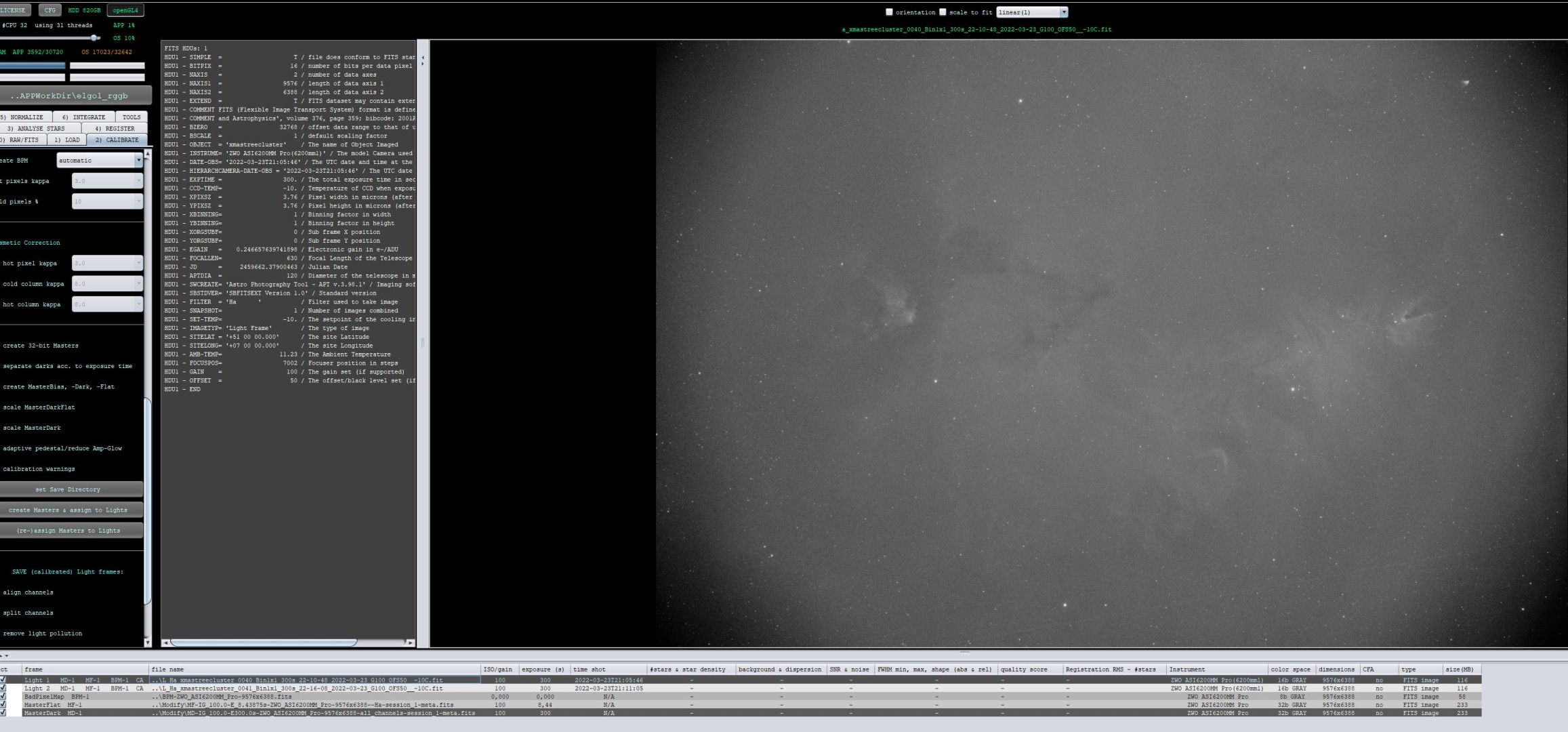
Streched calibrated light with l-calibrated image viewer mode:

Let me know if this is clear 😉
Mabula
