

Mar 28 2026 APP 2.0.0-beta40 will be released in 7 days.
It did take a long time to have the work finished on this and it will have a major performance boost of 30-50% over 2.0.0-beta39 from calibration to integration. We extensively optimized many critical parts of APP. All has been tested to guarantee correct optimizations. Drizzle and image resampling is much faster for instance, those modules have been completely rewritten. Much less memory usage. LNC 2.0 will be released which works much better and faster than LNC in it's current state. And more, all will be added to the release notes in the coming weeks...
Update on the 2.0.0 release & the full manual
We are getting close to the 2.0.0 stable release and the full manual. The manual will soon become available on the website and also in PDF format. Both versions will be identical and once released, will start to follow the APP release cycle and thus will stay up-to-date to the latest APP version.
Once 2.0.0 is released, the price for APP will increase. Owner's license holders will not need to pay an upgrade fee to use 2.0.0, neither do Renter's license holders.
Hi!! I am brand new to APP, was using DSS and StarTools (Still am, but want to try this out -looks promising!!) My computer is super slow, and I finally stacked all Ha RGB files for flaming star widefield. I registered each integrated file and I went into RGB combine, I tried putting Ha under Ha and didn't see any Ha nebulocity.....I then put Ha under luminance and then it looked more normal as far as detail goes...
Question is this: When I use StarTools, I do a synthetic lum and I combine all RGB into one file, then use that one file for each color channel...when I put each channel into APP, I don't see much color at all -I tried moving sliders etc...I don't think I am doing it right. I use an asi1600mm-c with filters. Any help is appreciated! also, is there a user manual? I see a quick start guide which seemed incomplete at the end, and I am new to this, so a user guide will really help a ton! thank you all so much for taking the time, and here are my files if you dare..
ha https://drive.google.com/open?id=1D302xE5ULJUNi9JEu71hRhy2AEb6OQYR
red https://drive.google.com/open?id=1wi2FM0WXV2r8pL6yVMhnS7STSR1l_kdG
green https://drive.google.com/open?id=187JHk0qwzxRFyvqpZoxuL_6m24N1Yd4I
blue https://drive.google.com/open?id=1eeBBgotnuPIq_S5vvfP7b1a113HlNqW8
thank you so much!
newbie Adam
Hi Adam,
Thank you for your question and welcome to the forum 😉
I'll have a look at your data, but let me react to your question(s):
First of all, you can easily create a synthetic lum of your data, there are several ways to accomplosh this:
- register, normalize and integrate all subs of all channels into 1 integration
- use the RGB combine tool to create a Luminance layer from the separate channels by giving the channels separate luminance weights and different multipliers. Usually, you need to multiply H-alpha very strongly compared to the broadband channels. A multiplier of 5 is very normal.
Save this luminance to a separate file.
Then create a new composite, like an LHaRGB, and use the luminance channel that you just created 😉
I will try to do this myself on your data and will report back later today.
Mabula
Hi Adam,
I have downloaded your frames. My first reaction is that it will be much better if you start the creation of the luminance and the composite from linear data.
The frames that you have shared are already stretched. (using the save button below the histogram with the stretch selectbox selected). The postfix:
-st.fits
shows you it's stretched data.
So can you share the unstretched integrations per channel? That should be much better to work with.
Kind regards,
Mabula
Hi Adam,
Using your already stretched data, I have created this initial composite. The screenshots show what kind of parameters I used in the RGB Combine tool. That will give you an idea on how you can use this tool.
First the suggested luminance from the Ha, R,G,B channels:

Then I used that as the luminance layer in a new LHaRGB composite. Again, just a quick try:
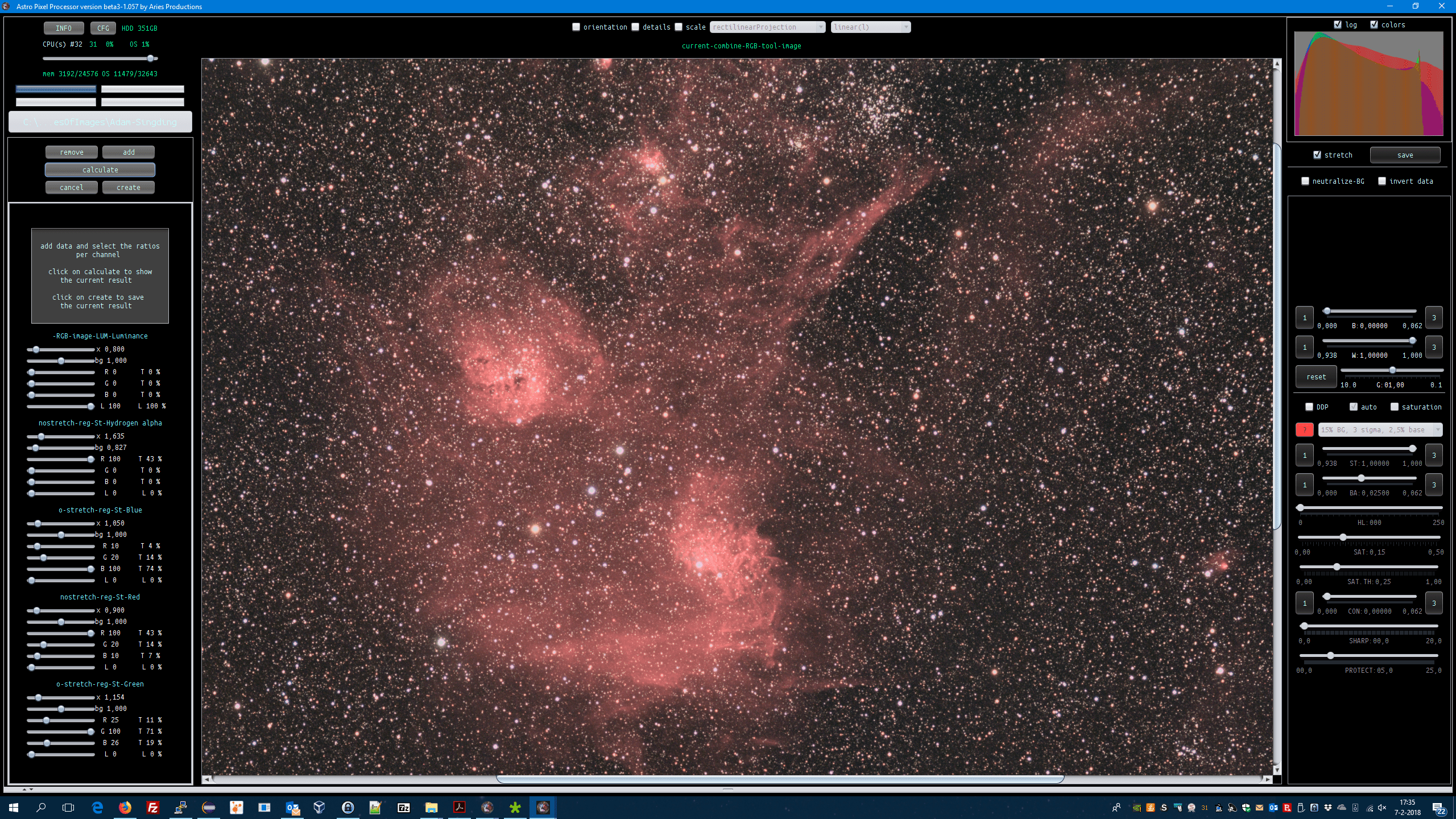
To get nice star colors, it really helps, if you first start with only the RGB layers, try to get good star colors. Then add the Ha to the Red channel. And finally add the luminance layer. Tweak the mutipliers per channel step by step 😉
Kind regards,
Mabula
Awesome thank you! I appreciate it so much 🙂
You're most welcome Adam,
If you share the linear channel integrations, I will be happy to provide similar screenshots to get you going 😉
Cheers,
Mabula
I thought I unchecked stretch and then saved them...when I have an integrated stack and I check it OR uncheck stretch, the images look the same...when I saved them I thought I unchecked it.... How can I tell if it's linear and not stretched...I assume it would look black, but it isn't that way...what am I doing wrong lol??
What I thought I did was double click on the final integration image, go to tools and light pollution removal and then save with stretch box unchecked...am I doing it all wrong?
I thought I unchecked stretch and then saved them...when I have an integrated stack and I check it OR uncheck stretch, the images look the same...when I saved them I thought I unchecked it.... How can I tell if it's linear and not stretched...I assume it would look black, but it isn't that way...what am I doing wrong lol??
The postfix
-st.fits
is the indication that you saved it with stretch on using the save button.
-st -> stretch
The images that you see in the image viewer are all stretched previews using the preview filter. If you disable DDP, then the data shown in the image viewer will be linear 😉
Cheers,
Mabula
What I thought I did was double click on the final integration image, go to tools and light pollution removal and then save with stretch box unchecked...am I doing it all wrong?
No, but if you are finished with a tool, like light-pollution removal, and you click on ok, the linear result will be automatically saved with -LPC extension.
LPC = Light Pollution Correction.
So the linear results of the tools can always be found in your working directory 😉 So you won't need to actually use the save button, the save button is useful however, to just save an intermediary result while still working in the tool.
Cheers,
Mabula
