

2026-10-09 APP 2.0.0-beta48 has been released !
This is mainly a bug fix release for the reported bugs in beta47. In addition it has a significant User Interface performance improvement noticable when you need to process 1000s of images in APP.
2026-10-03 APP 2.0.0-beta47 has been released !
This is a very big release... many code optimizations/rewrites, many parts of APP are much faster and more precise, especially star analysis and registration are much faster ! Big mosaics will go much faster 🙂
And we introduce a new preview filter, which includes the new Adaptive Deep Sky Stretch and a General Levels Stretch, this has been long over due. The old preview filter (the panel on the right side to stretch and preview your data) has not been updated for a couple of years and it is a critical part of any APP session.
Adaptive Deep Sky Stretch or ADSS is a much more intuitive stretch algorithm. It is also color preserving (which is a great new addition in itself ! ) which means that the highlights are no longer bleached, color is maintained from the linear data while stretching. You can simply stretch your data using the sky background level and signal width sliders which work much easier and more intuitive. You no longer need to fiddle with the old complicated sliders with zoom buttons. All the zoom buttons for the sliders are made redundant. And you can enter slider values in the slider value fields yourself. I will make a youtube video in the coming days to explain and fully introduce ADSS. Once the video is ready, it will be highlighted on the forum.
RGB Combine upgrade !. The RGB Combine Tool has been rewritten mostly. The tool is faster and easier to use and most importantly, the Luminance slider to inject a luminance channel or channels into the RGB composite is now working correctly. It no longer bleaches the RGB colors. Combined with the new ADSS preview, you will get much better and easier great composites with great color! I will also explain this in a new youtube video.
Canon CR2 & CR3: tested camera models
The following camera models have been tested in APP:
- EOS-1D
- EOS-1D MARK II
- EOS-1D MARK II N
- EOS-1D MARK III
- EOS-1D MARK IV
- EOS-1D C
- EOS-1Ds
- EOS-1Ds MARK II
- EOS-1Ds MARK III
- EOS-1D X
- EOS-1D X MARK II
- EOS-1D X MARK III
- EOS 100D
- EOS 1000D
- EOS 1100D
- EOS 1200D
- EOS 1300D
- EOS 1500D
- EOS 20D
- EOS 20Da
- EOS 200D
- EOS 2000D
- EOS 250D
- EOS 30D
- EOS 3000D
- EOS 350D DIGITAL
- EOS 40D
- EOS 400D DIGITAL
- EOS 4000D
- EOS 450D
- EOS 5D
- EOS 5D MARK II
- EOS 5D MARK III
- EOS 5D MARK IV
- EOS 5Ds
- EOS 5Ds R
- EOS 50D
- EOS 500D
- EOS 550D
- EOS 6D
- EOS 6D Mark II
- EOS 60D
- EOS 60Da
- EOS 600D
- EOS 650D
- EOS 7D
- EOS 7D MARK II
- EOS 70D
- EOS 77D
- EOS 700D
- EOS 750D
- EOS 760D
- EOS 80D
- EOS 800D
- EOS 8000D
- EOS 850D
- EOS 90D
- EOS DIGITAL REBEL XT
- EOS DIGITAL REBEL XTI
- EOS KISS DIGITAL N
- EOS KISS DIGITAL X
- EOS KISS F
- EOS KISS X2
- EOS KISS X3
- EOS KISS X4
- EOS KISS X5
- EOS KISS X50
- EOS KISS X6I
- EOS KISS x7
- EOS KISS X70
- EOS KISS X7I
- EOS KISS X80
- EOS KISS X8I
- EOS KISS X9
- EOS KISS X90
- EOS KISS X9i
- EOS M
- EOS M2 (2.0.0-beta34)
- EOS M3
- EOS M5
- EOS M6
- EOS M6 Mark II
- EOS M10
- EOS M50
- EOS M50 Mark II
- EOS M100
- EOS M200
- EOS R
- EOS Ra (astro model ! )
- EOS RP
- EOS R1 (2.0.0-beta47)
- EOS R3
- EOS R5
- EOS R5 MARK II (2.0.0-beta47
- EOS R6
- EOS R6 MARK II (2.0.0-beta34)
- EOS R6 MARK III (2.0.0-beta47)
- EOS R7
- EOS R8 (2.0.0-beta34)
- EOS R10
- EOS R50 (2.0.0-beta34)
- EOS R50 V (2.0.0-beta47)
- EOS R100 (2.0.0-beta34)
- EOS REBEL SL1
- EOS REBEL SL2
- EOS REBEL SL3
- EOS REBEL T100
- EOS REBEL T1I
- EOS REBEL T2I
- EOS REBEL T3
- EOS REBEL T3I
- EOS REBEL T4I
- EOS REBEL T5
- EOS REBEL T5I
- EOS REBEL T6
- EOS REBEL T6I
- EOS REBEL T6S
- EOS REBEL T7
- EOS REBEL T7i
- EOS REBEL XS
- EOS REBEL XSI
If your camera model is not on this list, please share one of your CR2/CR3 files and I will add full support for your camera.
Please contact support by e-mail for upload instructions at support@astropixelprocessor.com
Be aware: APP will read all CR2/CR3 files, but if your camera is not on this list yet, correct interpretation of your data cannot be fully guaranteed .
Hi all,
APP 2.0.0-beta34 will add fully tested support for the following models: EOS M2, EOS R6 MARK II, EOS R8, EOS R50
Unfortunately, the software cannot convert or recognize the Canon *.cr3 format. Camera Canon EOS R6 Mk III
The file is perfectly readable with Canon software.
Which setting might be incorrect, or are these files simply not directly processable by the Astropixel processor? If so, to which format should the files be converted without loss of quality?
Kind regards Ulrich
@gre Ulrich, I am not sure if I understand the problem, but when I open the latest APP version, then under supported files also *.cr3 formats. are listed in APP.
Regards
Martin
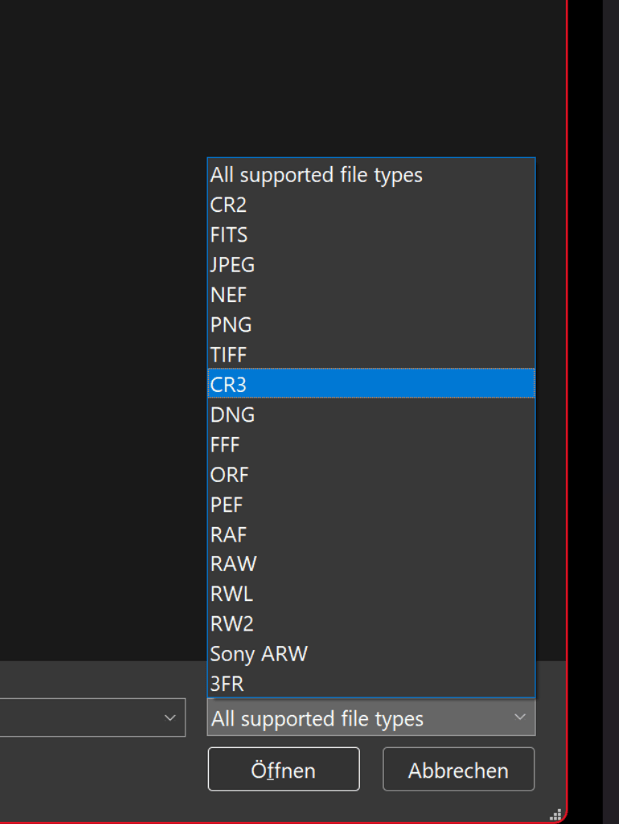
Unfortunately, the software cannot convert or recognize the Canon *.cr3 format. Camera Canon EOS R6 Mk III
The file is perfectly readable with Canon software.
Which setting might be incorrect, or are these files simply not directly processable by the Astropixel processor? If so, to which format should the files be converted without loss of quality?
Kind regards Ulrich
Dear Ulrich @gre,
Thank you very much for posting your issue.
Your model is not in our tested list, so we need to test it still : Canon EOS R6 Mk III. Apparantly our Raw converter (LibRaw) does not support this new model yet as well, otherwise it would have worked.
Solution: You can convert your CR3s without data loss with the latest DNG converter : https://helpx.adobe.com/camera-raw/digital-negative.html#downloads
Then load the DNGs into APP, that usually works 😉
Can you upload a couple of CR3s to our server so we can test it and add support for it going forward?
https://upload.astropixelprocessor.com/
username: uploadData
password: uploadTestData
Please make a folder with your name and issue like: Ulrich-CR3-not-working
and upload a couple of CR3 there and let me know once done.
Thanks,
Mabula
Hi Ulrich,
APP 2.0.0-beta47 will have support for the Canon EOS R6 MARK III. I have just finished testing it and it works 😉
beta47 will be released in probably a weeks time from now.
Mabula
