

June 24 2026 APP 2.0.0-beta46 has been released !
Improved internal memory configuration (lower ! memory usage), fixed beta45 startup issue, fixed Set Save Directory & 2-panel mosaics.
May 27 2026 APP 2.0.0-beta45 has been released !
Fully Multi-Threaded LNC, many improvements for the registration engine, platform upgrade, and further tuning of internal memory consumption and memory release back to OS.
Apr 14 2026: Google Pay, Apple Pay & WeChat Pay added as payment options
Update on the 2.0.0 release & the full manual
We are getting close to the 2.0.0 stable release and the full manual. The manual will soon become available on the website and also in PDF format. Both versions will be identical and once released, will start to follow the APP release cycle and thus will stay up-to-date to the latest APP version.
Once 2.0.0 is released, the price for APP will increase. Owner's license holders will not need to pay an upgrade fee to use 2.0.0, neither do Renter's license holders.
Hi,
I would like to propose ergonomy suggestions...
It would be nice that the software keeps the working directory and not asking each time we start it.
It would be nice to have the possibility to clic on the name of the column of the tab in order to arrange the desired column best and worst, like in windows system.

It would be nice to add a the possibility with a "Master" icon the Master directory.
It would be nice to add a shortcut icon to go directly to the "Project" directory.

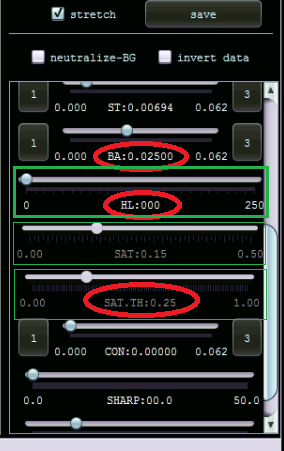
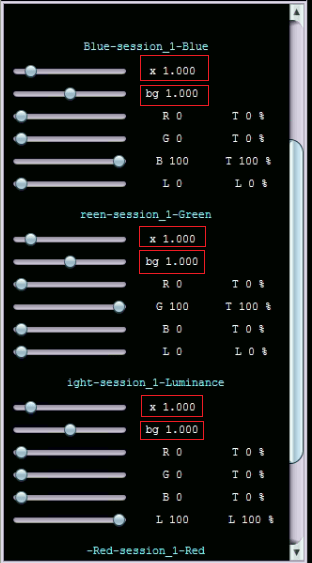
It would be nice to have more explicit names and rectangular zone in order to avoid to touch the bad slider.
TOOLS :
It would be nice to have the possibility to enter a value with the keyboard instead of playing with the cursor. We could enter a precise value.
Thank you.
Regards.
Franck
Hi Franck,
Great suggestions indeed. Mabula is planning to tackle the right hand side, I don’t know when exactly but he mentioned this very recently. Thanks for sharing your ideas!
Also in the interest of simplifying workflow, could there be a user selected setting when loading Lights that would automatically display only "Fits" instead of "all supported"?
We'll take all your suggestions in consideration, I think it's best to first see when APP supports saving of settings and then get that improved. Thanks!
Also in the interest of simplifying workflow, could there be a user selected setting when loading Lights that would automatically display only "Fits" instead of "all supported"?
That would be great if you only use FITS files but for people using CR2 files or other formats that would not be great at all. Unless it can be configured to select which file format you want to be able to load. In that case, when occasionally you use FITS and occasionally other formats you would need to switch all the time. In short, many circumstances need to be taken into account 🙂
