

UPDATE FROM MABULA
I have had a very rough 2 months unfortunately health wise. I was struck 3x in a row with bacterial infections. The second infection occurred after a routine hospital checkup and I became very sick. I had to rest and take a lot of antibiotics. Once I was recovering and restarting work 1 month ago, I again became sick. The infection was not yet gone, so even more antibiotics and rest was needed. Needless to say, it took a lot of my energy and I needed a lot of rest.
Finally, the infection is really gone and my energy is coming back step-by-step now and I have started work again. I am terribly sorry to have kept you waiting for support. I will address all outstanding questions and e-mails step-by step and will be on the forum daily from today.
APP 2.0.0-beta47 will come soon as well, a lot of work was already completed before I became very ill, so the release is also nearly ready for you. Beta47 will be much faster actually. Many workflows will be more than 2x faster, mosaics can even be 10x faster than before because registration really received a major boost... all compared to beta46. Before I release it, I will make sure that everything is working properly and then I will release it.

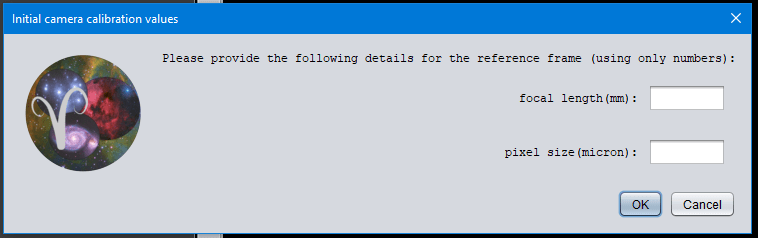
There is a minor bug when using the mercator projection mode in 2.0.0 beta 13.
The data entry area for pixel size is not fully visible as per my screen capture
Hi Kelvin @kelvin-hennessy,
That looks odd, I will investigate this in the coming days and will let you know. It is added to our issue list.
Mabula
Hi @kelvin-hennessy,
The window asking for camera calibration parameters always pops-up when you use the calibrated projective registration model.
It is a bit weird that it is not showing nicely on your monitor, which screen resolution are you using to run APP with?
I have modified it a bit now, to make the appearance more robust and not dependent on screen resolution, so it should be properly fixed now.
Mabula
@mabula-admin I have three monitors on my computer but mostly only use the main two which are 2560x1440 and 3840x2160 (the third I dont use often is 1920x1080)
I wont be able to try a new version for a while as 2.0.0.beta13 has been problematic with a large (160 degrees of sky) Milky Way mosaic I am working on so I reverted back to beta 4 which had previously worked for me.
@mabula-admin I just did a test using 2.0.0 beta 4 on my 1920x1080 monitor and there was no problem.
Oddly today the 2560x1440 monitor was ok too, though previously it had the problem.
As soon as I move to my 4K monitor the problem occurs.
