

Mar 28 2026 APP 2.0.0-beta40 will be released in 7 days.
It did take a long time to have the work finished on this and it will have a major performance boost of 30-50% over 2.0.0-beta39 from calibration to integration. We extensively optimized many critical parts of APP. All has been tested to guarantee correct optimizations. Drizzle and image resampling is much faster for instance, those modules have been completely rewritten. Much less memory usage. LNC 2.0 will be released which works much better and faster than LNC in it's current state. And more, all will be added to the release notes in the coming weeks...
Update on the 2.0.0 release & the full manual
We are getting close to the 2.0.0 stable release and the full manual. The manual will soon become available on the website and also in PDF format. Both versions will be identical and once released, will start to follow the APP release cycle and thus will stay up-to-date to the latest APP version.
Once 2.0.0 is released, the price for APP will increase. Owner's license holders will not need to pay an upgrade fee to use 2.0.0, neither do Renter's license holders.
Astro Pixel Processor 2.0.0-beta38 release notes
- IMPROVED, big Local Normalization Correction / LNC performance gain ! Several other analytical steps have been optimized as well giving additionl performance gain.
One of the only parts of APP that was not using multiple cpu threads, was the LNC calculation. We have now been able to implement a way that uses multiple cpu threads and it will give the same exact solution. Therefor the LNC calculation will now go 3-4x faster depending on the amount of CPU threads. This should really give a big performance boost for big stacks that need higher LNC degrees. The improvement has been implemented for all LNC degrees from 1 to 8. We have benchmarked this as well with a data set of 100 H-alpha frames of the Rosette Nebula that were made with 5 different camera's. The data was pre-registered and NOT normalized at all when we did 6) Integrate. So these results that are shown, are only 6) Integrate performance differences on pre-registered and not normalized data. You can expect the performance gain to increase when you apply LNC to more than 100 frames. For 500 frames, the performance will be more than 2x as fast, because the actual LNC calculation where all LNC parameters are found is roughly 3-4x faster and the higher LNC degrees do benefit more.


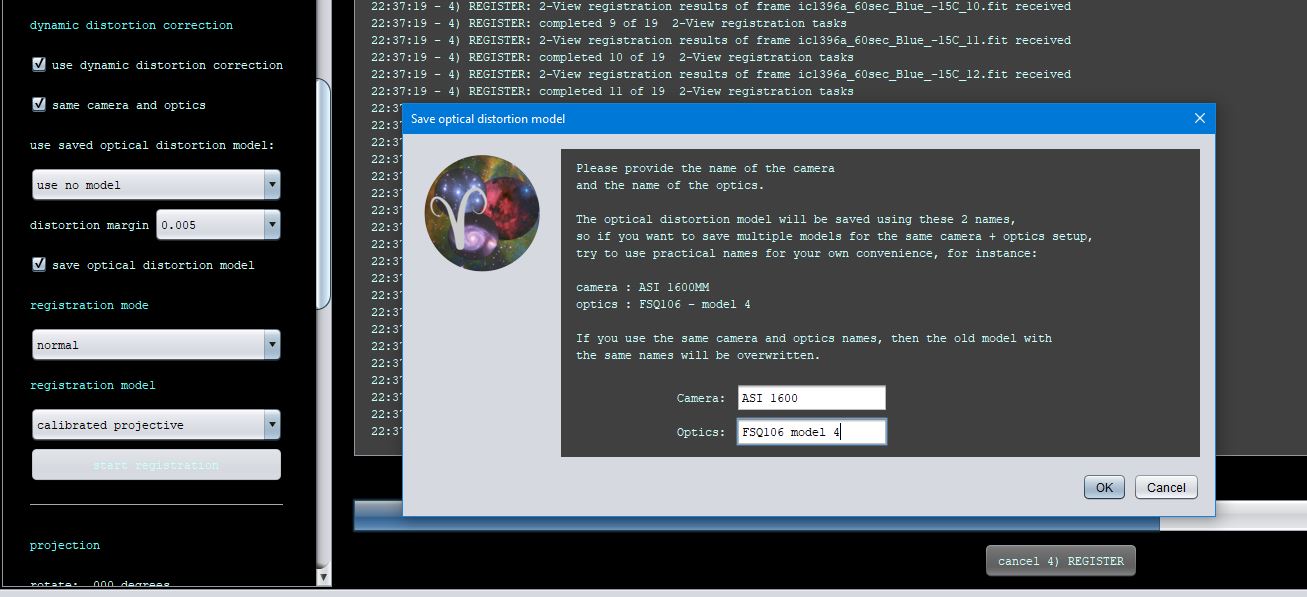
- IMPROVED AND FIXED, 4) REGISTER, SAVE OPTICAL DISTORTION MODEL
As mentioned in this thread https://www.astropixelprocessor.com/community/main-forum/saving-camera-profile-solution-contains-uncountable-numbers/#post-32820 , there was a bug when you try to save an optical distortion model. We have fixed this bug. We have changed the names of the settings for the optical distortion model saving and have also improved the tooltips and the dialog that asks for your camera and optics names to be able to save the optical distortion model. The camera name and optics name for the model are also remembered per APP session, so you won't need to re-enter them if you make a newer model with the same setup.
- IMPROVED AND FIXED, BAD PIXEL MAP creation and BAD PIXEL correction
As mentioned in this topic https://www.astropixelprocessor.com/community/main-forum/black-pixel-dots-in-calibrated-image/#post-32874 the bad pixel map creator did not work efficiently when hot pixels were clustered together on the sensor. This can happen depending on the sensor technology. From now, the bad pixel map creator and thus also the bad pixel correction will allow bad pixel clusters and thus this issue is hereby properly fixed.


- FIXED 2) CALIBRATE cancel button not working properly
As reported here https://www.astropixelprocessor.com/community/main-forum/general-cancel-function/paged/2/#post-31470 if you would try to cancel in 2) Calibrate, the application could become unusable, all the buttons would stay de-activated. This issue is fixed robustly now for any type of calibration frame.
- FIXED 5) NORMALIZE cancel button not working properly
If you would deselect the reference frame and use advanced normalization, the cancel button would not work and the normalization would stall, creating a dead lock. This is fixed robustly now. The normalization will work properly giving correct normalization details and you can stop the process at any time.
- FIXED NullPointerException in CreateCalibrationDetails
As mentioned here https://www.astropixelprocessor.com/community/main-forum/looking-for-help-with-error-message-when-calibrating-5/#post-32982 a null pointer exception was thrown when creating the Calibration Details in 2) Calibrate. The issue was triggered by loading a MasterBias with the BPM button in Multi-Session/Filter mode. This issue is fixed by preventing this null pointer in the code. It is also fixed by not allowing to load a MasterBias or other Master with the BPM button. And vice versa, we have also fixed that you can not load an actual BPM as a MasterBias when you deselect auto detect Masters & Integrations.
- FIXED & IMPROVED, no data/lights loaded yet message
If no calibration data is loaded, or if no lights are loaded, the processing steps 2) Calibrate to 6) Integrate can not start. The user is now informed with a logical message as shown below:


