
2026-10-09 APP 2.0.0-beta48 has been released !
This is mainly a bug fix release for the reported bugs in beta47. In addition it has a significant User Interface performance improvement noticable when you need to process 1000s of images in APP.
2026-10-03 APP 2.0.0-beta47 has been released !
This is a very big release... many code optimizations/rewrites, many parts of APP are much faster and more precise, especially star analysis and registration are much faster ! Big mosaics will go much faster 🙂
And we introduce a new preview filter, which includes the new Adaptive Deep Sky Stretch and a General Levels Stretch, this has been long over due. The old preview filter (the panel on the right side to stretch and preview your data) has not been updated for a couple of years and it is a critical part of any APP session.
Adaptive Deep Sky Stretch or ADSS is a much more intuitive stretch algorithm. It is also color preserving (which is a great new addition in itself ! ) which means that the highlights are no longer bleached, color is maintained from the linear data while stretching. You can simply stretch your data using the sky background level and signal width sliders which work much easier and more intuitive. You no longer need to fiddle with the old complicated sliders with zoom buttons. All the zoom buttons for the sliders are made redundant. And you can enter slider values in the slider value fields yourself. I will make a youtube video in the coming days to explain and fully introduce ADSS. Once the video is ready, it will be highlighted on the forum.
RGB Combine upgrade !. The RGB Combine Tool has been rewritten mostly. The tool is faster and easier to use and most importantly, the Luminance slider to inject a luminance channel or channels into the RGB composite is now working correctly. It no longer bleaches the RGB colors. Combined with the new ADSS preview, you will get much better and easier great composites with great color! I will also explain this in a new youtube video.
For normal OSC processing, I see where you set a "force Bayer CFA" step. I was wondering if, for long focal length scopes that are slow and oversampled, if there is a way to increase etendue by software binning of the color image. The attached image shows how this would work. Is this supported, or could it be? Thanks.
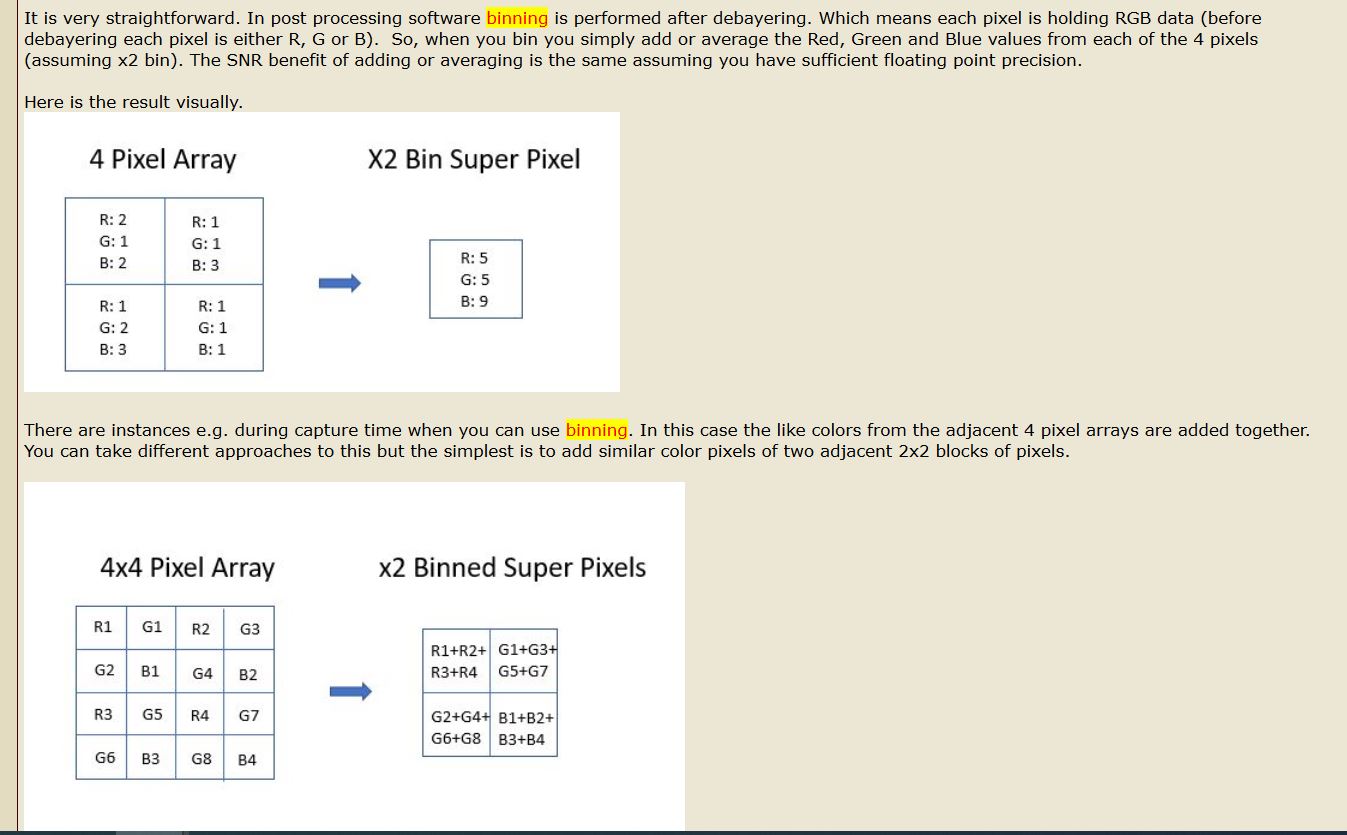
This sounds a little like the super-pixel algorithm (tab 0, algorithm selection). But I'm not sure, in the description of that, it mentions a degradation of the data quality. You can read about it in the tooltip of the algorithm selection-box.
Hi @cocoplum & @vincent-mod,
First of all, what you are suggesting is reducing resolution for less noise. This principle applies to both color as to monochrome images and certainly works very well if you don't need or want the native resolution of the used camera + optics.
If you reduce resolution, noise will be reduced as well (and you will have lost information as well off course).
You can reduce resolution and decrease noise in several ways:
Method that only applies for OSC data, yes, use the Super Pixel debayer algortihm in 0) Raw/FITS, that will reduce resolution with a factor of 2 and simply creates 1 pixel per 2x2 (RGGB) bayer CFA pixels.
For both OSC data and Monochrome data: you can register and normalize on the native resolution, which is in fact much bettter then registering and normalizing on Super Pixel data because information is already lost with Super Pixels, star centroid calculations will suffer a lot with less precise alignment precision of your images and data normalization precision will suffer as well... so I would not recommend Super Pixel normally, but rather:
- , you can register and normalize on the native resolution, but make the integration with a scale factor of 0,5 or even lower. That will reduce resolution and reduce noise definitely.
- you can register and normalize on the native resolution, and use another data interpolation algorithm like bicubic, bicubic will lower the native resolution by blurring the data and thus you will have less noise and less details in the integration. Note that the amount of pixels is still preserved in this case. Bicubic is data interpolation/resampling with a blur filter inside.
- you can register and normalize on the native resolution and use Drizzle (bayer drizzle for OSC) with drizzle drops larger than 1 pixel. Astro Pixel Processor allows you to use larger drizzle droplets than 1 pixel. That will have again the effect of reducing resolution and reducing noise 😉 Try a Bayer Drizzle on your OSC data with scale factor of 1.0x and drizzle droplets of 3 pixels. You will see that you will have less resolution and also less noise.
- Combine these options, for example use Bayer Drizzle with a scale factor of 0.5x and droplets of 2-3 pixels 😉 that will be like Double Super Pixel mode... or use a scale factor of 0.5x and the Bicubic or Catmull-Rom Spline resample filter...
So yes, this principle can be easily applied with Astro Pixel Processor in different ways.
Like I mentioned, first downscaling data and thus throwing away information with Super Pixels is definitely not the best way to do this in my opinion. Rather keep the native resolution until you start the integration process in 6) Integrate. Downgrade then while integrating with either or combined:
- lower scale factor than 1.0x
- use drizzle/Bayer drizzle with droplets larger than 1 pixel
- use regular data interpolation (no drizzle) and set the data interpolation/resampling to an inferior filter like Bicubic.
Let me know if this is clear 😉
Mabula
Thanks, Mabula and Vincent! I am pretty sure that I get it. My goal is to trade off spatial resolution in oversampled, long focal length, and hence slow scopes, in favor of more signal. In a traditional CCD, hardware binning creates larger pixels, and imaging etendue (speed) scales as the square of the pixel size. CMOS cameras don't sum photoelectrons in hardware, but the same effect (with a bit more noise from four reads) can be had by binning in post processing. For mono, that is all pretty basic; binning in software when you are oversampled is a clear win, especially with the high QE and very low noise of modern BSI CMOS sensors. For OSC CMOS cameras, it is trickier, due to the CFA. I appreciate the guidance, and so will try options #1 and #2 at the end of Mabula's post, and see what happens.
All the best,
Kevin
Excellent, I learned a bit as well. 🙂 Let us know how it went!
Hi @cocoplum & @vincent-mod,
First of all, what you are suggesting is reducing resolution for less noise. This principle applies to both color as to monochrome images and certainly works very well if you don't need or want the native resolution of the used camera + optics.
If you reduce resolution, noise will be reduced as well (and you will have lost information as well off course).
You can reduce resolution and decrease noise in several ways:
Method that only applies for OSC data, yes, use the Super Pixel debayer algortihm in 0) Raw/FITS, that will reduce resolution with a factor of 2 and simply creates 1 pixel per 2x2 (RGGB) bayer CFA pixels.
For both OSC data and Monochrome data: you can register and normalize on the native resolution, which is in fact much bettter then registering and normalizing on Super Pixel data because information is already lost with Super Pixels, star centroid calculations will suffer a lot with less precise alignment precision of your images and data normalization precision will suffer as well... so I would not recommend Super Pixel normally, but rather:
- , you can register and normalize on the native resolution, but make the integration with a scale factor of 0,5 or even lower. That will reduce resolution and reduce noise definitely.
- you can register and normalize on the native resolution, and use another data interpolation algorithm like bicubic, bicubic will lower the native resolution by blurring the data and thus you will have less noise and less details in the integration. Note that the amount of pixels is still preserved in this case. Bicubic is data interpolation/resampling with a blur filter inside.
- you can register and normalize on the native resolution and use Drizzle (bayer drizzle for OSC) with drizzle drops larger than 1 pixel. Astro Pixel Processor allows you to use larger drizzle droplets than 1 pixel. That will have again the effect of reducing resolution and reducing noise 😉 Try a Bayer Drizzle on your OSC data with scale factor of 1.0x and drizzle droplets of 3 pixels. You will see that you will have less resolution and also less noise.
- Combine these options, for example use Bayer Drizzle with a scale factor of 0.5x and droplets of 2-3 pixels 😉 that will be like Double Super Pixel mode... or use a scale factor of 0.5x and the Bicubic or Catmull-Rom Spline resample filter...
So yes, this principle can be easily applied with Astro Pixel Processor in different ways.
Like I mentioned, first downscaling data and thus throwing away information with Super Pixels is definitely not the best way to do this in my opinion. Rather keep the native resolution until you start the integration process in 6) Integrate. Downgrade then while integrating with either or combined:
- lower scale factor than 1.0x
- use drizzle/Bayer drizzle with droplets larger than 1 pixel
- use regular data interpolation (no drizzle) and set the data interpolation/resampling to an inferior filter like Bicubic.
Let me know if this is clear 😉
Mabula
Thanks for the recommendation. I have the same issue with over sampling. Would this algorithm accomplish what PixInsight does with IntegerResample? Quote: "The IntegerResample process is a basic geometry tool that allows resizing an image by an integer resampling factor. Downsampling is applied by using average, median, maximum or minimum pixel binning operations, and upsampling is a nondestructive process that performs a simple pixel replication without any interpolation. The tool can also modify the target image's resolution in pixels per inch or pixels per centimeter".
That's an interesting post, an I am wondering if I can apply this to my scenario.
Quick background: I am shooting with an Altair 183M Pro and use KStars/Ekos with INDI to capture the frames. Especially for my f/10 SCT I want to bin. Unfortunately the INDI driver only uses additive binning and not averaging binning but still clips the additive data at 12bits (4096) which makes me loose dynamic range.
People are suggesting to capture unbinned (full resolution) and do everything with software. Now, in my case, I usually would combine 2x2 L data (still this gives 0.6"/superpixel) and 4x4 RGB data. In addition I would like to combine all channels in the integration to a "superluminance" image.
Is the method you suggest applicable to what I want to do?
As far as I understand it, you would integrate unbinned data and through the scale to 0.5 it would behave like 2x2 binned data.
Cheers,
Björn
