

UPDATE FROM MABULA
I have had a very rough 2 months unfortunately health wise. I was struck 3x in a row with bacterial infections. The second infection occurred after a routine hospital checkup and I became very sick. I had to rest and take a lot of antibiotics. Once I was recovering and restarting work 1 month ago, I again became sick. The infection was not yet gone, so even more antibiotics and rest was needed. Needless to say, it took a lot of my energy and I needed a lot of rest.
Finally, the infection is really gone and my energy is coming back step-by-step now and I have started work again. I am terribly sorry to have kept you waiting for support. I will address all outstanding questions and e-mails step-by step and will be on the forum daily from today.
APP 2.0.0-beta47 will come soon as well, a lot of work was already completed before I became very ill, so the release is also nearly ready for you. Beta47 will be much faster actually. Many workflows will be more than 2x faster, mosaics can even be 10x faster than before because registration really received a major boost... all compared to beta46. Before I release it, I will make sure that everything is working properly and then I will release it.
I tested beta41 regarding the error in https://www.astropixelprocessor.com/community/main-forum/beta40-problem-error-warning-when-using-lnc/#post-34155.
The integration of the 460 lights was performed flawless with LNC 1st degree, 3 iterations and Bayer drizzle 1x, 0.85 droplet 🙂
BUT 🙁
Since in the 460 lights there are some lights that are not so good, I thoght it would be a good idea to integrate just 75%, which are 345 lights. So I dont restart the programm after finishing the 460 lights but set the slider "lights to stack" to 75% and startet integration. Integration started, and after about 3 lights a SUDDEN CRASH happens 🙁
Hi @juergenn,
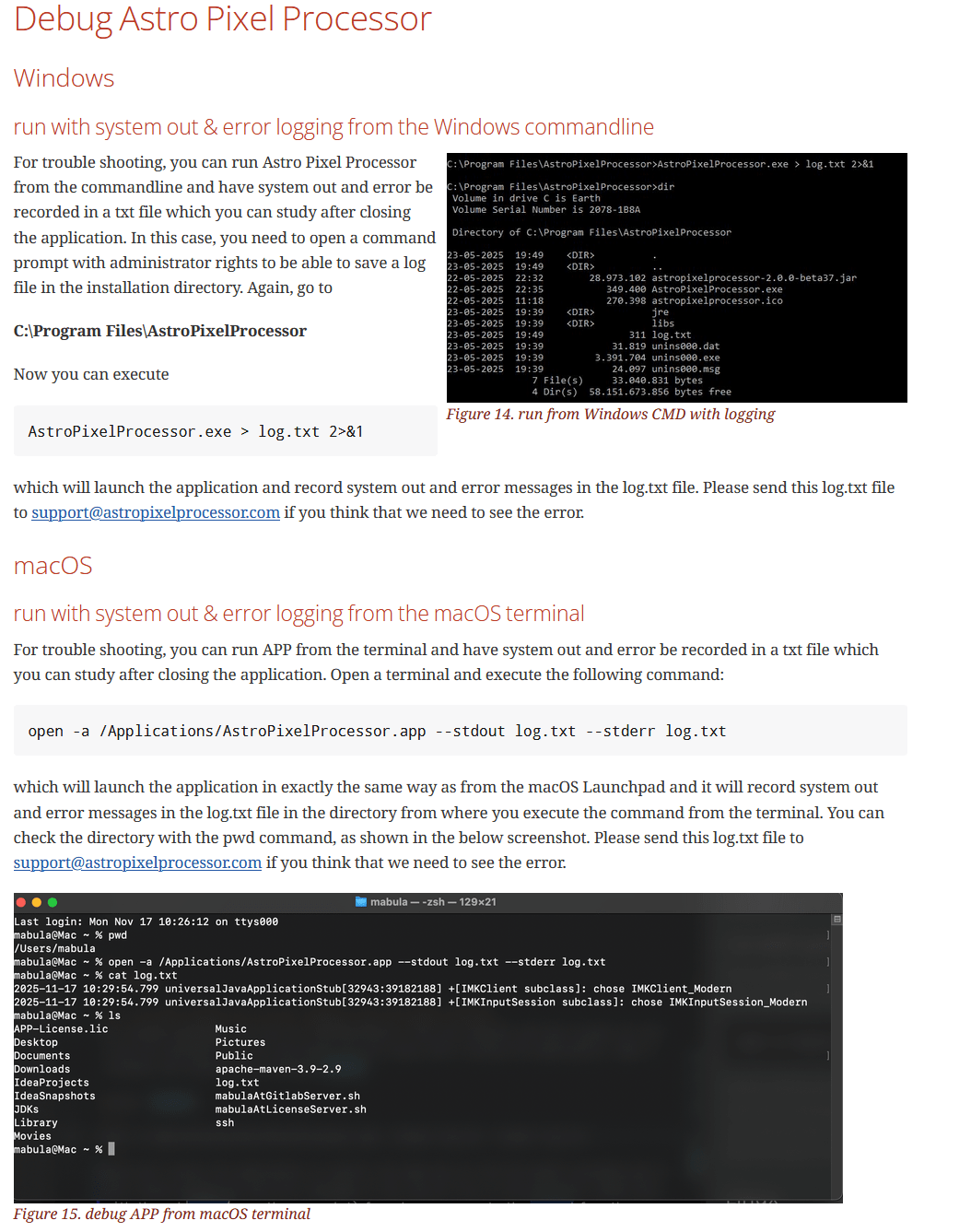
That sounds like a very other type of crash, more like instability with hardware or even the software layer between the OS and our development platform. Maybe you can run in the following way to produce an error log that should help us:
Windows and MacOS:
or Linux:
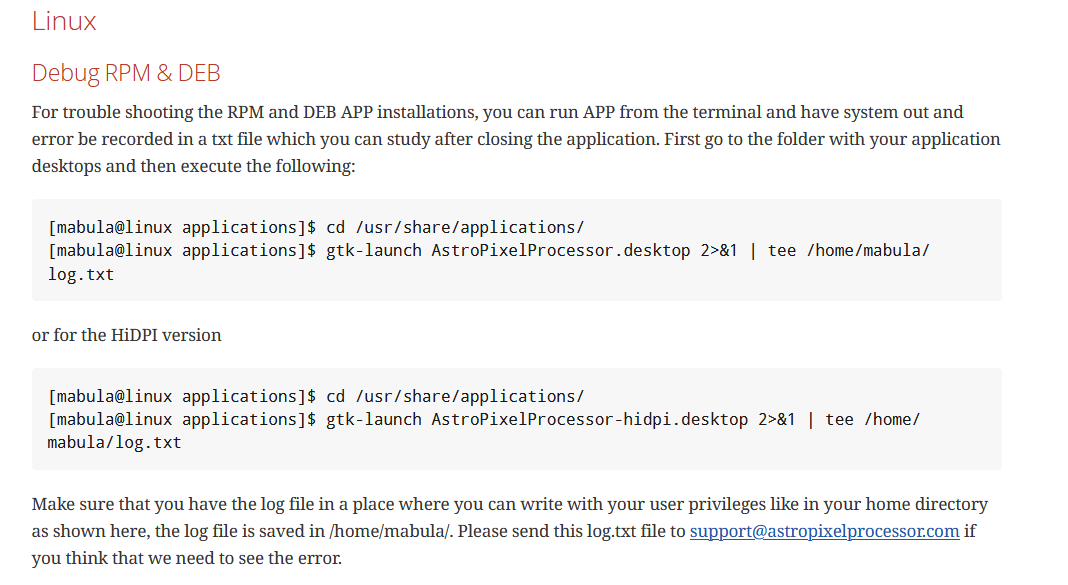
Try to reproduce the error and send me that log file, hopefully I can pinpoint the cause of the crash then. If you can not reproduce the crash, or if it happens more randomly (not at the exact same moment in processing), it will be very likely instability on you system, in that cause you need to check the ram modules and possible overclock settings.
Let me know if this helps.
Mabula
Hi Mabula,
I just restartet APP and set the 75% from the beginning. Now I'm at light 100 of 345 and it seem to work now. Since its still running I will tra again first 100% directly following 75% hoping the crash happens again. I will try to use your commands you mentioned above.
Hi,
I did the test and rerun APP, starting with 100% of the lights, then 75%. Now all went fine 🙂
What I'm wondering is that when closing APP the following message appears (but until closing APP all went ok):
#
# A fatal error has been detected by the Java Runtime Environment:
#
# SIGSEGV (0xb) at pc=0x00007f5c3aac054b, pid=3655, tid=3813
#
# JRE version: Java(TM) SE Runtime Environment (25.0.2+10) (build 25.0.2+10-LTS-69)
# Java VM: Java HotSpot(TM) 64-Bit Server VM (25.0.2+10-LTS-69, mixed mode, tiered, compressed class ptrs, g1 gc, linux-amd64)
# Problematic frame:
# C 0x00007f5c94102eb8
#
# Core dump will be written. Default location: Core dumps may be processed with "/bin/false" (or dumping to /opt/AstroPixelProcessor/core.3655)
#
# An error report file with more information is saved as:
# /tmp/hs_err_pid3655.log
Thanks for fixing the beta40 issue so fast 🙂
P.S:: I'm running Opensuse 15.6.
I installed it via RPM
Okay thanks @juergenn,
Can you send me that /tmp/hs_err_pid3655.log file if you still have it, can you send it to support@astropixelprocessor.com ?
I will have a good look at it, it could be something related still to incompatibility with Linux Wayland or OpenSuse perhaps. Is your linux installation using Wayland?
Next release, we will again move to a newer platform, JDK26, it should again enhance performance and give better compatibility with the new Linux versions.
Mabula
