

Mar 28 2026 APP 2.0.0-beta40 will be released in 7 days.
It did take a long time to have the work finished on this and it will have a major performance boost of 30-50% over 2.0.0-beta39 from calibration to integration. We extensively optimized many critical parts of APP. All has been tested to guarantee correct optimizations. Drizzle and image resampling is much faster for instance, those modules have been completely rewritten. Much less memory usage. LNC 2.0 will be released which works much better and faster than LNC in it's current state. And more, all will be added to the release notes in the coming weeks...
Update on the 2.0.0 release & the full manual
We are getting close to the 2.0.0 stable release and the full manual. The manual will soon become available on the website and also in PDF format. Both versions will be identical and once released, will start to follow the APP release cycle and thus will stay up-to-date to the latest APP version.
Once 2.0.0 is released, the price for APP will increase. Owner's license holders will not need to pay an upgrade fee to use 2.0.0, neither do Renter's license holders.
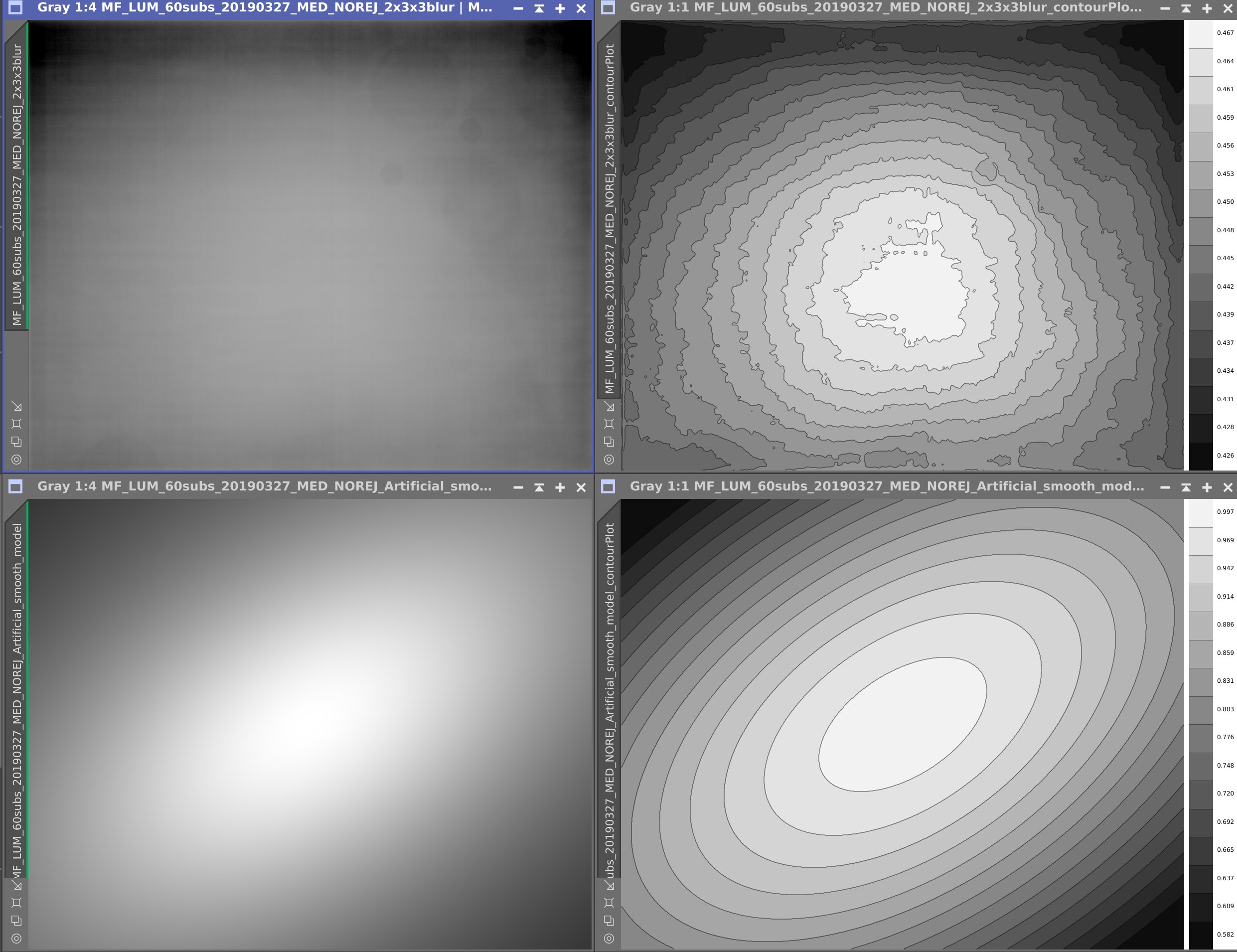
For a target with real faint background features i am optimizing my luminance masterflats. I made 60 flats, loaded them with masterbias based on 256 frames and the BPM. I want to test different masterflat methods and also made a smooth model masterflat that should show only the vignetting (I used v1.071). My imaging train has very little vignetting and only the "upper" corners show up as darker. The smooth model masterflat is smooth, but does not show the typical upper corner vignetting, but upper left, lower right pattern. See attached Pixinsight boosted autostretch images and flat contour plots. What is wrong here? (Seems like a symmetry axis oversimplification?)
Hi Kees @kees_scherer,
First of all, the smooth model artifical flats created in APP are based on Kang-Weiss mathematical models.
A discussion of such models can be found here:
https://www.eecis.udel.edu/~jye/lab_research/09/JiUp.pdf
Now, APP has several degrees of freedom for making such a model.
If you create an artifical flat using the smooth model 2) Calibrate (last blur option), APP will try to create a model with the most degrees of freedom.
An elliptical model, with geometric factor (see article) and the center of vignetting is modelled as well.
Judging from your images, this most flexible model is clearly not working well on your data and I would suspect this to be caused partly (mainly) by the clear decentering of the vignetting profile.
The optics don't seem to be very well centered on the camera's sensor (which is not uncommon, so don't be alarmed...). Usually, all four corners of the sensor will have more or less the same vignetting. The center of vignetting in your original masterflat is well below the sensor center as you can see cleary from the contour plots.
You can try to get a better result by loading the masterflat in the correct vignetting tool and do the modelling yourself by placing area select boxes and trying the different Kang Weiss models.
I must point out, that I would not suspect such a model to give you a better masterflat than you would normally get if you simply create proper flats and proper bias/darkflats frames. A kang-weiss model will not model dust and odd patterns from a OAG near the sensor or a mirror chamber which can be seen on full-frame DSLRs for instance. I don't know if your optical train has such odd patterns though.
Is flat-field calibration not working well?
Are you concerned that you are missing data?
Kind regards,
Mabula
There is a 2.5% difference between top and bottom corners, is that a "clear decentering of the vignetting profile"? It shows up on the "nuclear" boost and on the flat contour plot but read the numbers on those plots, that is a flat flat profile. And however flat or not flat or decentered that profile may be, the smooth model explanation says it is based on the flats and it is noise free and the only thing it does not do is correct for dust. But i do not see evidence supporting that in the smooth model flat.
Flat field correction for my present project is not working well, i see all sorts of odd patterns (vertical and horizontal bands) when i stretch to the limit. Just a few months ago i had some similair projects with the same amount of data and same setup(270x300 sec luminance, same setup ) and that went perfect. Same method used for this IFN mosaic.
Today and tomorrow i will be making new Bias, Darks and flats to see how that works.
