

UPDATE FROM MABULA
I have had a very rough 2 months unfortunately health wise. I was struck 3x in a row with bacterial infections. The second infection occurred after a routine hospital checkup and I became very sick. I had to rest and take a lot of antibiotics. Once I was recovering and restarting work 1 month ago, I again became sick. The infection was not yet gone, so even more antibiotics and rest was needed. Needless to say, it took a lot of my energy and I needed a lot of rest.
Finally, the infection is really gone and my energy is coming back step-by-step now and I have started work again. I am terribly sorry to have kept you waiting for support. I will address all outstanding questions and e-mails step-by step and will be on the forum daily from today.
APP 2.0.0-beta47 will come soon as well, a lot of work was already completed before I became very ill, so the release is also nearly ready for you. Beta47 will be much faster actually. Many workflows will be more than 2x faster, mosaics can even be 10x faster than before because registration really received a major boost... all compared to beta46. Before I release it, I will make sure that everything is working properly and then I will release it.
- Hi Mabula,
I am working on Ha for m16 and I got 80% of my frames having a normalization failed in red.
I tried doing non for normalization and un checking neutralize as well, but still get this issue....any idea why?
Thanks
Adam
Hi Adam @singding,
Without more information not, please be as thorough as you can 😉
is registration postive on all frames to start with?
which kind of normalization, regular or advanced?
Perhaps show us a screenshot of all frames in the frame list panel before starting normalization?
Kind regards,
Mabula
Hi Mabula,
I have a feeling it was my darks nit matching. I must have not set gain properly on my lights, as lights were 50 gain, darks were 200 but.....some did normalize....
I removed the master dark and it went fine from there. I tried many normalization methods, same thing happened each time with master dark, even when I clicked none.
Once I removed the master dari after I saw it didn't match, they notmalized.
Adam
Hi Mabula,
I have a feeling it was my darks nit matching. I must have not set gain properly on my lights, as lights were 50 gain, darks were 200 but.....some did normalize....
I removed the master dark and it went fine from there. I tried many normalization methods, same thing happened each time with master dark, even when I clicked none.
Once I removed the master dari after I saw it didn't match, they notmalized.
Adam
Hi Adam,
Okay, that makes sense then. Probably the gain was so high for darks compared to the lights, that most of calibrated data was simply black with zero values?
You can always verify if there is a problem in calibration with the l-calibrated image viewer mode 😉 that should show you in this case that something in calibration was way off 😉
Perhaps you can still use the dark with dark scaling enabled? You will need to add a masterbias as well to have dark scaling working.
Mabula
I have the same issue whenever Ha data is included in Multi-Channel processing. The example below shows 3 Ha Lights, some Darks and a BPM. The Gain and Duration match on all frames, but Normalisation fails on all 3 lights:
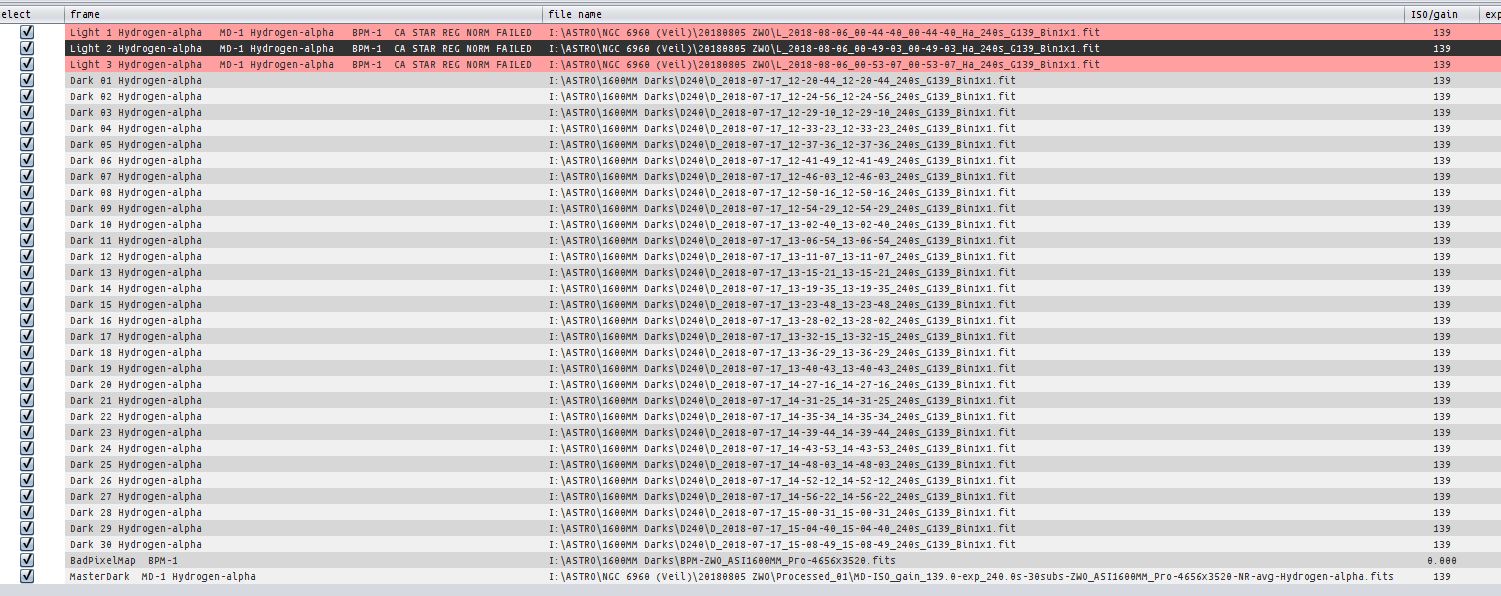
Like Adam, if I remove the Master Dark, Normalisation works fine, but that rather defeats the object of calibration. There is an issue with the processing of Ha data.
Dave
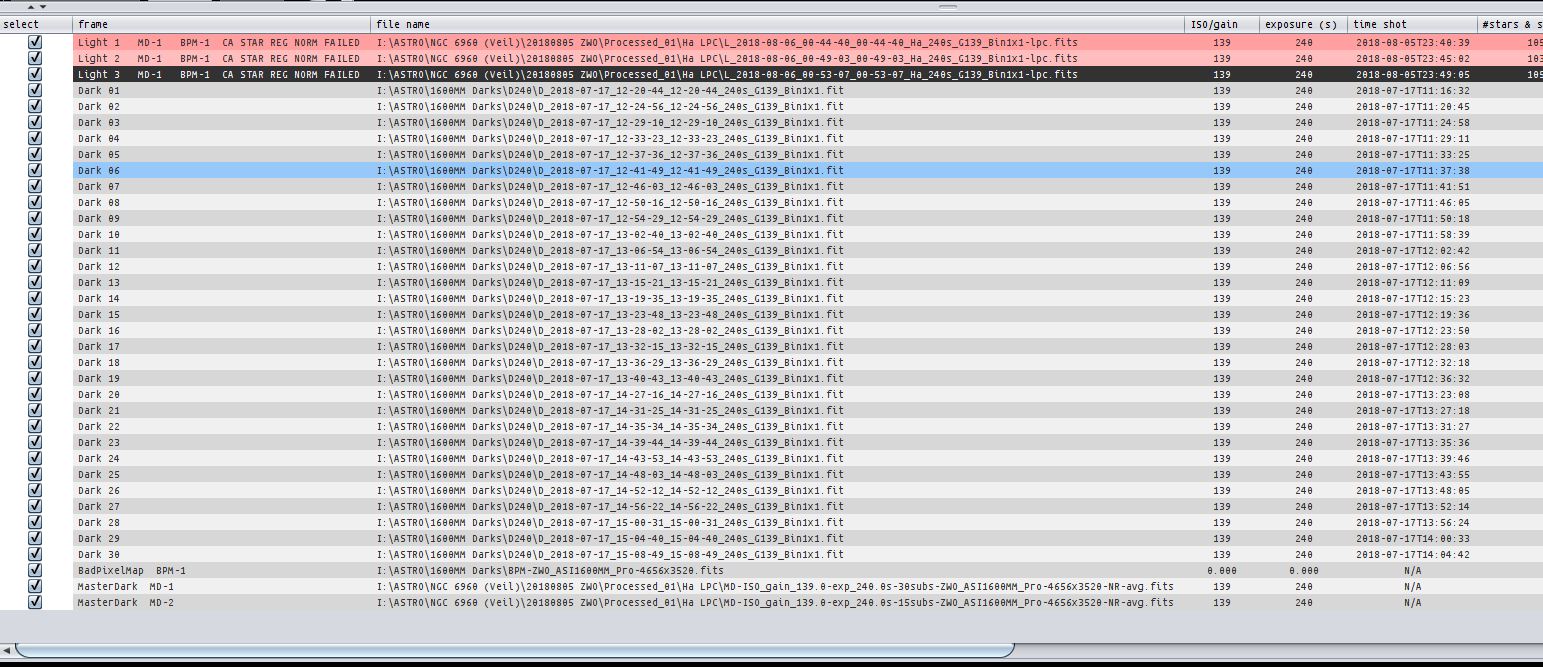
Further to my post above, I have spent some time attempting to find the cause of the normalisation failure. I tried some of my other Ha images but none of these had normalisation issues. I loaded the failing images into other channels (L and R) but the normalisation error still occurred. Clearly it is the data in these specific images that is causing the problem. There was increasing high cloud at the time I shot these, so I tried removing light pollution from each frame and re-processing. The normalisation routine still failed:
With nothing else to try, I deselected 20 of the 30 Dark frames (I always use as many darks as I can when processing) and tried again - this time there was no failure and I was able to complete the integration process with no errors:
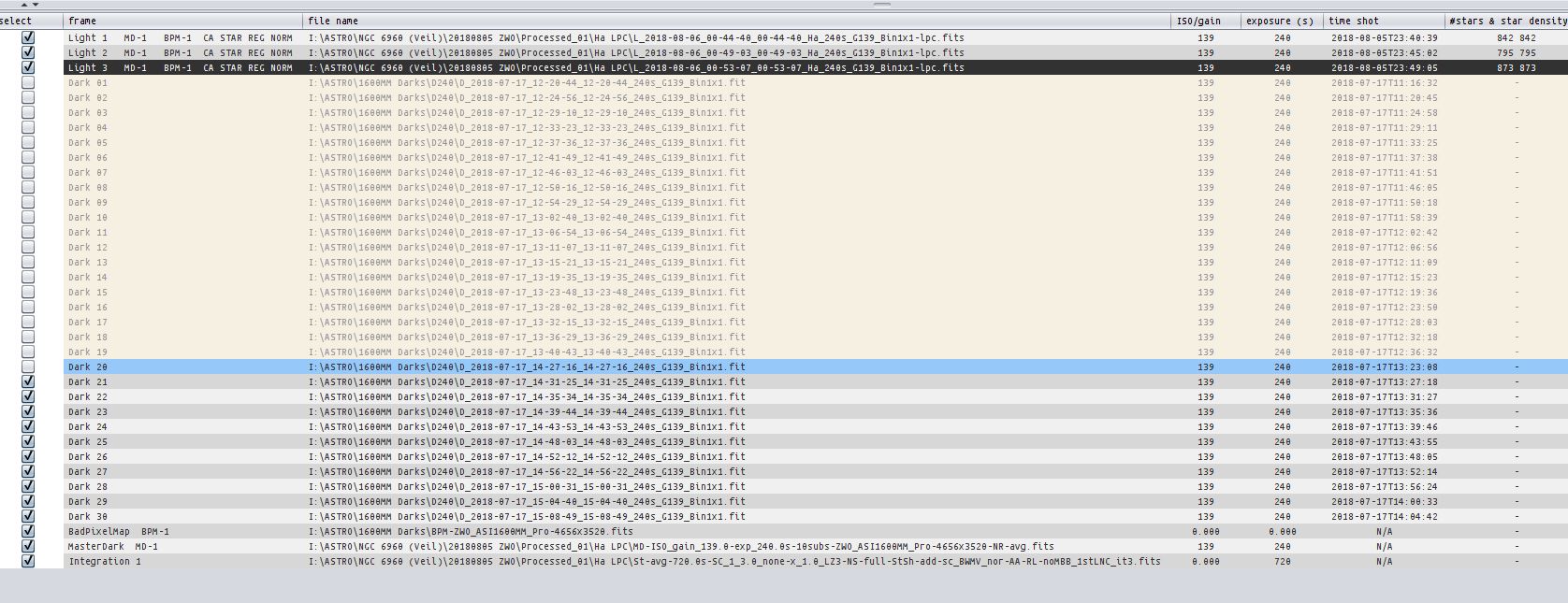
So, any ideas why having too many dark frames would cause Normalisation to fail? I have used these frames previously without issue, so the problem appears to be related to these three specific Ha images. The L, R, G, B data that I shot in the same session processes fine.
Weather permitting, in the coming nights I will try to capture some more narrowband Lights for testing
Cheers
Dave
Processing a new batch of L, R, G, B, Ha, Oiii data and the Normalisation Failure occurred again on the Ha subs. The same 240s Darks were allocated to the Ha and OIII subs and OIII Normailsed OK, so presumably there is nothing wrong with my Darks?
I would really appreciate some help with this please
Thanks
Dave
Hi Dave @jonesdee,
First of all, please accept my apologies for my late response.
I am not aware of any problem like you describe, probably I need to have a look at these frames and your master frames to know and solve what's happening here.
You can send the frames to me using wetransfer or dropbox : support@astropixelprocessor.com
And I will have a look as soon as I recieve them, I promise 😉
Please share the settings in calibration as well. Did you enable/disable the Adaptive Data Pedestal for instance ?
Kind regards,
Mabula
Hi Mabula - no problem as my work around of only using 10 darks for Ha works every time at the moment. I have sent some Ha subs plus MDFs for 10 and 30 subs (the latter causes the problem), also screen shots of my Cal settings to you by WeTransfer.
Please let me know if you need any more data - I should be able to reproduce the normalisation error and save the console output if that helps.
Regards
Dave
Hi Mabula - excellent now thanks! Last night I posted a bi-colour (Ha OIII) of the Veil in the Gallery which was processed with 1.063 without any hitches. With hindsight I should have uploaded it as a larger TIFF file, as the JPEG does not reveal the excellent detail that was revealed.
Regarding the Normalisation Failure, I should have checked the Adaptive Pedestal box when Calibrating - my fault for not recognising the benefit of this parameter 🙁
Best regards
Dave
Hi Mabula - excellent now thanks! Last night I posted a bi-colour (Ha OIII) of the Veil in the Gallery which was processed with 1.063 without any hitches. With hindsight I should have uploaded it as a larger TIFF file, as the JPEG does not reveal the excellent detail that was revealed.
Regarding the Normalisation Failure, I should have checked the Adaptive Pedestal box when Calibrating - my fault for not recognising the benefit of this parameter 🙁
Best regards
Dave
Excellent Dave 😉 @jonesdee , thanks for the confirmation.
Mabula
