

2026-10-09 APP 2.0.0-beta48 has been released !
This is mainly a bug fix release for the reported bugs in beta47. In addition it has a significant User Interface performance improvement noticable when you need to process 1000s of images in APP.
2026-10-03 APP 2.0.0-beta47 has been released !
This is a very big release... many code optimizations/rewrites, many parts of APP are much faster and more precise, especially star analysis and registration are much faster ! Big mosaics will go much faster 🙂
And we introduce a new preview filter, which includes the new Adaptive Deep Sky Stretch and a General Levels Stretch, this has been long over due. The old preview filter (the panel on the right side to stretch and preview your data) has not been updated for a couple of years and it is a critical part of any APP session.
Adaptive Deep Sky Stretch or ADSS is a much more intuitive stretch algorithm. It is also color preserving (which is a great new addition in itself ! ) which means that the highlights are no longer bleached, color is maintained from the linear data while stretching. You can simply stretch your data using the sky background level and signal width sliders which work much easier and more intuitive. You no longer need to fiddle with the old complicated sliders with zoom buttons. All the zoom buttons for the sliders are made redundant. And you can enter slider values in the slider value fields yourself. I will make a youtube video in the coming days to explain and fully introduce ADSS. Once the video is ready, it will be highlighted on the forum.
RGB Combine upgrade !. The RGB Combine Tool has been rewritten mostly. The tool is faster and easier to use and most importantly, the Luminance slider to inject a luminance channel or channels into the RGB composite is now working correctly. It no longer bleaches the RGB colors. Combined with the new ADSS preview, you will get much better and easier great composites with great color! I will also explain this in a new youtube video.
2.0.0-Beta19, checked with 2.0.0-Beta22 also, same issue
Workflow:
1. Stack all panels / filters individually
2. Load up all panels for each filter and perform mosaic
3. Once process has completed, enter the RGB Tool
4. Select Hubble Palette 1
5. Load up the individual filter mosaics and assign to correct channels
6. Click recalculate
Error thrown:

The Mosaic is 877mpx in size as it is 16 panels from the ASI6200MM Pro, so may be encountering some limit on RGB Tool here
Regards
Simon
I'll let Mabula know, we might need some data if this is not known already, thanks for the clear description!
@vincent-mod I think it is a limitation on the pixel size of the image that can be handled by the RGB tool, I tried using the "Cropped" versions of the mosaic panels, and as expected, the exception number changed from -1663639684 to -1836477244

I have also tried redicing the files from 32Bit Fits to 16Bit Fits to check if it was a file size issue, and the same result with the cropped image, same number of -1836477244, so I definitely think it is something to do with the image dimensions
Current image size is 35314x23206
I have alto noticed that APP changes the FITS Header from "FILTER" to FILT-1 which causes the mosaic not to recognise the filter header during the adding of the channels, requires a manual assignment
Original Ha Frame:

Mosaic Ha Panel:

Full Mosaic:

Is there a reason for APP to change the Filter Tag in the FITS Header?
Taking the base image of 35314x23206 and applying a resample in Pixinsight, I get the following number for the error at the specific image sizes:
100% 35314x23206 (819,496,684 pixels) : Error -1836477244
95% 33538x22039 (739,143,982 pixels): Error -2077535350
94% 33194x21813 (724,060,722 pixels): Error -2122785130
93% 32854x21589 (709,285,00 pixels): Successful Re-calculate

Hope the above data helps
Hi Simon @stastro,
Thank you very much for sharing this issue. Indeed, it must be caused by reaching the image dimension limit in APP.
To be sure, can you upload the data so I can fully test and make sure this error is dealt with appropriately?
https://upload.astropixelprocessor.com/
username: uploadData
password: uploadTestData
Please make a folder with your name and issue like: stastro-RGBCOmbine-RGBLimit
and let me know once uploaded 😉
Thanks!
Mabula
Since it is image dimension related, I will scale them down to 8-Bit to make them smaller file size wise, otherwise it might take a while to upload
Data is uploaded
STAstro-RGBTool-RGBLimit
8Bit files, tested and same result, so it is definitely dimension limit being hit
Hi Simon @stastro,
I have fixed this issue in the 2.0.0-beta25 release with instructions to inform you how to create the composite within the image size limit of APP:

Thank you very much for reporting this 😉
Mabula
Hi Simon @stastro,
Please try 2.0.0-beta25 which has been released with the fix for this issue.
https://www.astropixelprocessor.com/downloads/
Mabula
@mabula-admin Yep that works
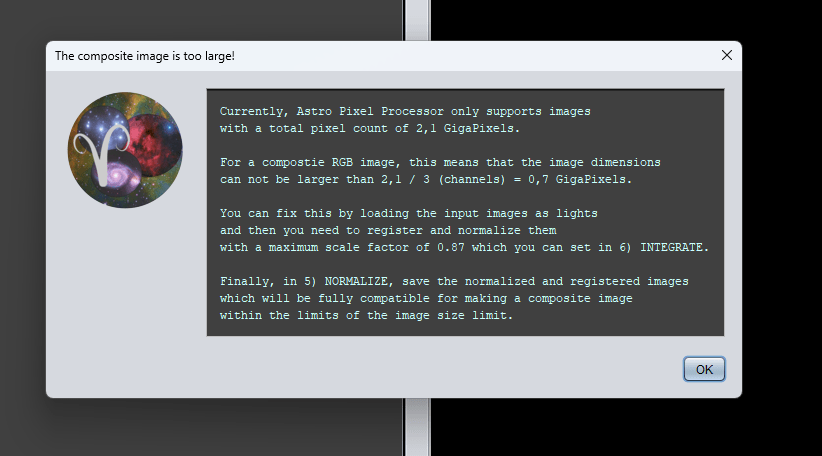
Will APP ever support larger than 2.1gpx in the RGB tool? What is the limitation?
Also did you see my note about FITS metadata changing "FILTER" to "FILT-1"

Wasn't sure if FILT-1 was a FITS Standard that other apps recognise, I know off the camera the variable is named "FILTER"
Hi Simon @stastro,
Great 😉 at least the error is now properly caught, and the warning shows you the scale factor needed to be able to complete the composite as large as possible within that image size limit.
The limit is a limit in our development platfrom, the size of an internal array can't be larger than 2^31 = 2.1G which is the main factor here.
I am sure that we can adjust this to offer a theoreritcal unlimited image size, but I need to develop/implement a modified version of the image instance that we currently use 🙂
As soon as 2.0 stable is released, this is probably our biggest next TODO on our list because of APP's mosaic capabilities and also because the sensors are getting bigger and bigger in pixel dimensions... Together with removing that image size limit. we will work an a more efficient preview filter and will also do big work on the mosaic registration algorithms. So that is what we have outlined going forward 😉
Yes, FILT-1 is an APP internal tag, it is not in the FITS standard, FILTER is the fits standard. But I had to introduce this since you can make intergrations combined of several filters. I have opened an issue to check what APP currently does with these tags and if FILTER should always be there alongside FILT-1. What would FILTER be if we indeed combined multiple filters for instance?
@mabula-admin I suppose you have to look at it from this aspect.
With OSC Cameras, users typically would never use the Filter Tag, because most do not use EFW's with an OSC, me on the other hand I used to use an OSC just to flip between the Dual Band Filter and the L-Pro filter, so I would have that in my filter tag.
Once an image is combined, the FILTER tag becomes irrelevant, because the image is now a colour image as opposed to a single filter, maybe if the image is combined in APP, it should be something like
Filter:
RGB
LRGB
SHO
HOO
HaRGB
Etc, depending on the colour palette used in the RGB tool
If I combine my filters in PixInsight, the resulting RGB image has nothing specified in the FILTER tag, it simply does not exist:

Hi Simon @stastro,
I have fixed everything for the 2.0.0-beta33 release,the FILTER tag, FRAMETYP tag and moving all distinct FITS tags from the reference or source FITS files to the output FITS images that APP produces across the whole application. So all relevant tags for plate-solving like RA and DEC coordinates will remain present now.
This is from the release notes:
- IMPROVED and FIXED, keep FITS HEADER TAGS from reference/source files including RA, DEC, FOCALLEN, XPIXSZ, YPIXSZ, DATE-OBS etc...
As mentioned in several topics like this one https://www.astropixelprocessor.com/community/rfcs-request-for-changes/include-more-fits-header-information-in-the-integration/#post-31871 , whenever APP would make a new FITS file, old FITS tags from the reference or source file would be lost like the RA and DEC coordinates of the object in the image. This is now fixed for the entire application. Calibration masters will still have all the information from the capture software like gain and sensor offset if present, integration files will have all the distinct FITS tags from the reference frame which should make sure that all information is correct like the RA and DEC coordinates. And saving FITS files in all tools will keep the original FITS header tags that APP will not add itself. The FTIS header will have a note that indicates when the transferred tags start from the source/reference file: HDU1 - NOTE-XX = 'Distinct header tags from the original/reference frame follow below'
See the below screenshots for the FITS headers that APP will now produce keeping the distinct FITS tags from the reference or source FITS files. Also note the addition of FILTER tag and FRAMETYP tags as described in the release notes below:


I will try to release 2.0.0-beta33 in the coming days for sure 😊 !
Mabula
