
2026-10-09 APP 2.0.0-beta48 has been released !
This is mainly a bug fix release for the reported bugs in beta47. In addition it has a significant User Interface performance improvement noticable when you need to process 1000s of images in APP.
2026-10-03 APP 2.0.0-beta47 has been released !
This is a very big release... many code optimizations/rewrites, many parts of APP are much faster and more precise, especially star analysis and registration are much faster ! Big mosaics will go much faster 🙂
And we introduce a new preview filter, which includes the new Adaptive Deep Sky Stretch and a General Levels Stretch, this has been long over due. The old preview filter (the panel on the right side to stretch and preview your data) has not been updated for a couple of years and it is a critical part of any APP session.
Adaptive Deep Sky Stretch or ADSS is a much more intuitive stretch algorithm. It is also color preserving (which is a great new addition in itself ! ) which means that the highlights are no longer bleached, color is maintained from the linear data while stretching. You can simply stretch your data using the sky background level and signal width sliders which work much easier and more intuitive. You no longer need to fiddle with the old complicated sliders with zoom buttons. All the zoom buttons for the sliders are made redundant. And you can enter slider values in the slider value fields yourself. I will make a youtube video in the coming days to explain and fully introduce ADSS. Once the video is ready, it will be highlighted on the forum.
RGB Combine upgrade !. The RGB Combine Tool has been rewritten mostly. The tool is faster and easier to use and most importantly, the Luminance slider to inject a luminance channel or channels into the RGB composite is now working correctly. It no longer bleaches the RGB colors. Combined with the new ADSS preview, you will get much better and easier great composites with great color! I will also explain this in a new youtube video.
Hi,
I've just been processing my first image and I'm seeing an issue which I am not sure if it's issue with equipment or my lack of knowledge in using the software.
I've got just under an hour of exposure time on M31. I'm using T16 from iTelescope. I've used master dark, flat and bias frames provided by iTelescope for this telescope.
This is my LRGB channels combined in APP.

If you look closely you see colorful "pixels" all over the image.
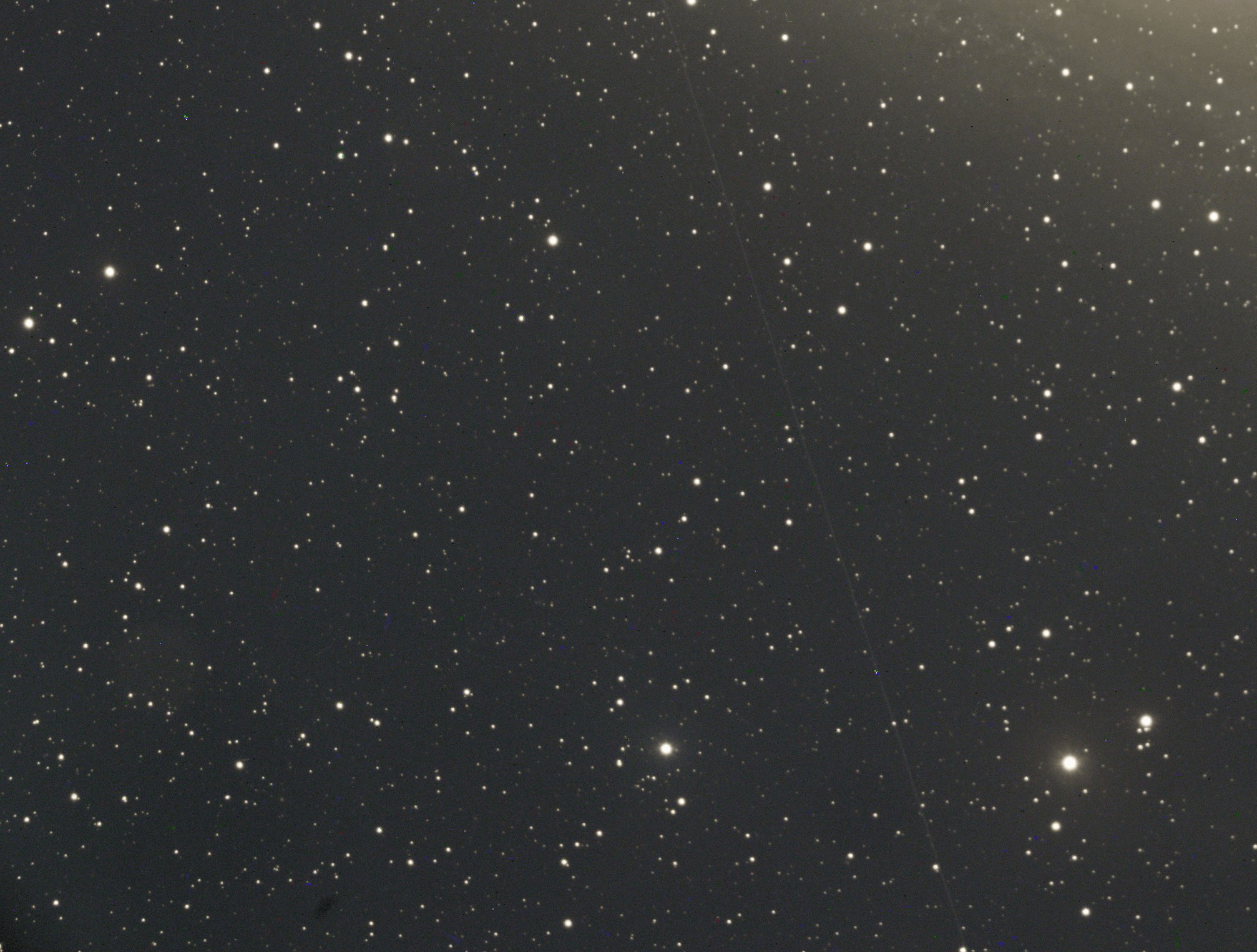
I am unsure if they are normal and to be expected or is there something I can do while stacking to avoid them?
I appreciate any ideas you guys might have about this.
Those look like hot pixels. I'm wondering if the calibration files they provided are good for this sensor. Where is T16 located?
Those look like hot pixels. I'm wondering if the calibration files they provided are good for this sensor. Where is T16 located?
T16 is in Nerpio - Spain
Ah ok, so that location I've had less luck with in the past. Depends on if they have new calibration data done recently, but back then they were not quite right. I also think the flats you have may not be great in eliminating the vignetting. I'd check the date of the calibration files and also contact iTelescope to check.
Ah ok, so that location I've had less luck with in the past. Depends on if they have new calibration data done recently, but back then they were not quite right. I also think the flats you have may not be great in eliminating the vignetting. I'd check the date of the calibration files and also contact iTelescope to check.
Ah thanks. I'll get in touch with them and see what they say. Can't remember exactly now but I think the date for the calibration files was August 2020 or something close to that.
Hi, everybody.
I have the same problem. Probably a little more widespread. I have tried with bias, without bias, with darkflats, without darkflats....
I've only managed to get them not to appear when I calibrate without darks. But then I have, obviously the effect of the amp-glow on the final image....

@anofeles As stated in an earlier comment in this thread, perhaps the darks used are not great. Did you take the darks with the same software as the lights? Did you take them recently? Is the exposure time of the darks the same as for the lights? Same temperature, gain/ISO and offset too?
Also, dithering while imaging greatly helps APP to identify the hot pixels. Are you applying dithering between the lights? If yes, how much in terms of pixels in the lights (so not in the guide cam)?
Hi, Wouter.
Yes, of course, I had made the darks with the same program (NINA), same gain, same temperature, same exposure....
Anyway I have redone another 100 and now I have had no problems.
Well, mysteries of technology.
Thanks for your help.
Pd. Y un placer poner cara a tu nombre tras ver tu nick de vez en cuando en el grupo de compra y venta de material astronómico.
Pd. Y un placer poner cara a tu nombre tras ver tu nick de vez en cuando en el grupo de compra y venta de material astronómico.
Encantado! Nos vemos en este grupo 🙂
