It did take a long time to have the work finished on this and it will have a major performance boost of 30-50% over 2.0.0-beta39 from calibration to integration. We extensively optimized many critical parts of APP. All has been tested to guarantee correct optimizations. Drizzle and image resampling is much faster for instance, those modules have been completely rewritten. Much less memory usage. LNC 2.0 will be released which works much better and faster than LNC in it's current state. And more, all will be added to the release notes in the coming weeks...
Update on the 2.0.0 release & the full manual
We are getting close to the 2.0.0 stable release and the full manual. The manual will soon become available on the website and also in PDF format. Both versions will be identical and once released, will start to follow the APP release cycle and thus will stay up-to-date to the latest APP version.
Once 2.0.0 is released, the price for APP will increase. Owner's license holders will not need to pay an upgrade fee to use 2.0.0, neither do Renter's license holders.
Can no longer analyze stars on my HA integrations for registering them.
Can no longer analyze stars on my HA integrations for registering them for combine RGB. Ver 1.069. Used to be able to adjust out of focus stars to fix this.
Just downloaded 1.070. Same thing. It can't register anymore. It works fine through an integration, but when trying to use the integrated HA image nothing I do can make it work.
Just tried to download 1.065 and can't find it. Please assist.
EDIT by Mabula
Beta versions with an upgrade and fix for the issue are here:
Had the same problem with 1.069, and i needed to lower Kappa to 0.03 above that no star were found , at least it stayed there and i was able to continue. my just be a big fix.
Had the same problem with 1.069, and i needed to lower Kappa to 0.03 above that no star were found , at least it stayed there and i was able to continue. my just be a big fix.
thanks, hope so. even in 1.068 I had to uncheck the minimum star box to get kappa to stay put, but it would stay put.
well that's good GW... after observing and imaging for over 45 years i think i finally found the program that will put all our final images to good use ( sharing with our friends) , instead of making them darker to hide the noise ... i teach Pixinsight and my student just got a taste of APP, but they are holding back because its not fully developed yet and many small things needs ironing out . The Post processing is quite difficult for a beginner even with me , i have no worries in Pix having been at it for almost 2 years. In this case i want to get a good grip on APP and stay with is as it sails the sea of Astro photographers and see it land on all shores across the world.
I like it and i'm sticking with it .... even if at first it's a bit difficult to get our heads around it. Mitch. Astrodude.
Found a copy of 1.062 on my hard drive. Installed it and did the RGB combine what's the hydrogen Alpha and oxygen three just fine registered analyze stars without a hitch
This post was modified 7 years ago by Greg Watkins
we need to be able to download older versions when these things happen. there should be a previous releases section but I can't find it just got lucky I had saved an old 1.0.62 download
Not sure if this is the best answer but a couple of times recently I too have encountered the message about reducing the kappa value when processing RGB stacks during Step 4 - Register, using both v1.069 and v 1.070
I overcame the problem by:
a) At step 3) Analyse Stars, substantially increasing the automatic minimum and maximum #stars target sliders - I think doing this causes APP to auto adjust the kappa value in order to try to achieve the target values.
b) At step 4) Register, changing the Pattern Recognition Descriptors selector to 'Triangles'
I also increased the Scale Stop value in my most recent case from 5 to 10 but not sure if this really had much influence of the result.
These value changes somewhat increased the processing times but overcome the kappa error message. I am currently of the opinion that the kappa value error message as it stands is a hangover from earlier releases of APP and needs to be revised to reflect the current processing model. I don't think there is a need to revert to an older version of APP in order to get Registar Stars to work.
These problems with star registration were things specifically addressed in the recent releases, so if that still proves to be a problem Mabula has to have a close look at it. (@mabula-admin) He's on a holiday at the moment, but will return in a week or so.
Indeed, the fix backfired. Had the same problem today so now I have two versions of after pixel processor on my computer. without both versions I was not able to process this image
Thanks! And another reason why I had to use two versions was because the master darkflats and mastet flats were created in 10.7 at 32-bit by default which I forgot to uncheck which I usually do and version 10.6 to does not support 32-bit Masters so it was an adventure
Thanks, it is HOO with Ha used as a luminance channel. I only have two filters and I use a color camera, the asi 1600mc. The telescope was a 72mm refractor.
I found a temporary fix. I unchecked both min and max on Star Analyze and it processed. I had over 400 frames at a minute each. It failed every time before but this time worked. I guess because it technically skipped Analyze even though it showed it running at one point(?)
I must say that I am a little disappointed that my issue on star registering for combining no longer working was never addressed. If it weren't for 1.062 I would still be dead in the water. This is my first gripe about anything APP. Man this site is slow.
My solution was to redownload 10.62 it works perfect. I have no idea why this has not been addressed he clamped it's more robust but it is a real bottleneck.
Can no longer analyze stars on my HA integrations for registering them for combine RGB. Ver 1.069. Used to be able to adjust out of focus stars to fix this.
Just downloaded 1.070. Same thing. It can't register anymore. It works fine through an integration, but when trying to use the integrated HA image nothing I do can make it work.
Just tried to download 1.065 and can't find it. Please assist.
First of all apologies for the late response to this issue.
In the past few weeks I have been addressing this issue with priority and I have now implemented a further upgrade of Star Analysis to make sure stars are detected no matter what size and how many. This is working on all problematic data that I have in my possession now from other users. Please feel free to send me any data that is giving you problems with APP 1.069 & 1.070. You can send it to support@astropixelprocessor.com using wetransfer.com or dropbox.
You can find the details here of the new star analysis module here:
IMPROVED/FIXED, star analysis & registration, several users have reported issues with both star analysis and registration on some particular datasets. The main cause were some parts in the star analysis code, like the variable kappa setting for detect above noise level. To further improve star analysis and registration and prevent the known issues, I have done a further rebuild of the star analysis module. I have tested this extensively on all problematic datasets and small and large mosaics to make sure that it is working more robustly now :
the kappa setting for detect above noise level has been made redundant. Internally the appropriate noise level is now found in 1 step (no iterations needed) to detect enough stars and it immediately finds a good estimate of the star FWHM values in the image, which further helps with direct and robust detection of stars in the images.
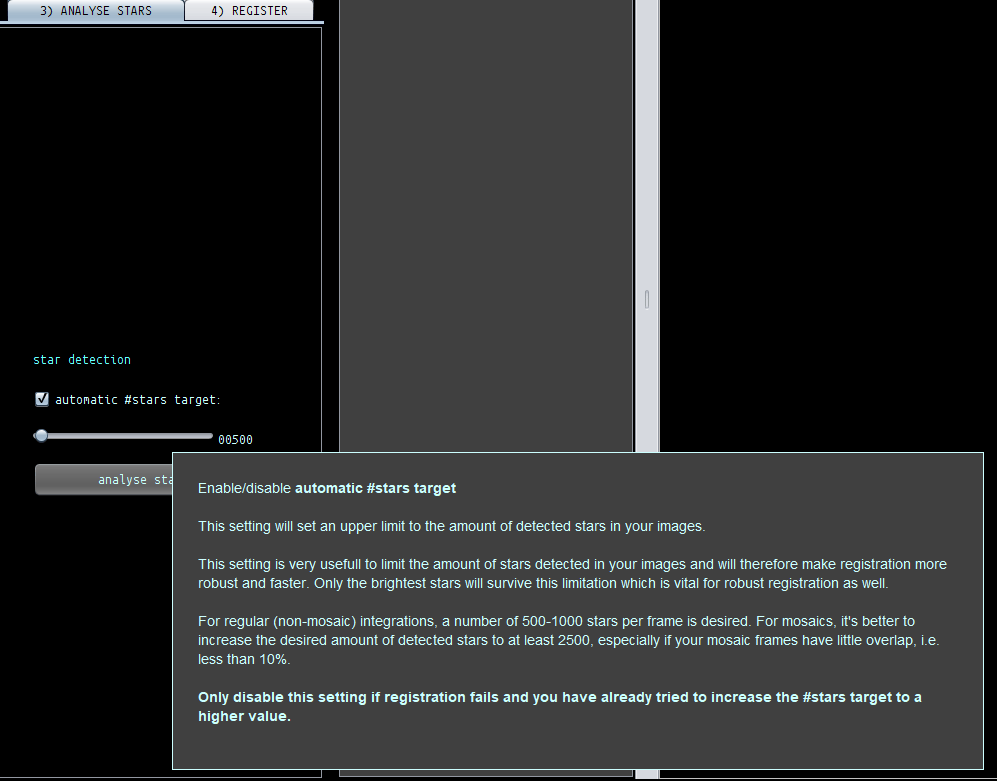
there is only 1 slider left, called the automatic #stars target.
The limitation on the amount of stars detected has a new algortihm, only the brightest stars survive in separate parts of the image. The old algortihm was scanning the immediate surrounding area of each star to detect if there was a brighter star nearby. This was rather slow and not robust it turned out.
if you turn off the automatic #stars target, all available stars will be detected and analysed. This is normally not very usefull, since star counts higher than 5000 usually will only slow things down, especiallly in registration.
If you want to test APP 1.071 already yourself, please let me know for which Operating System you need the installer and I will prepare a pre-release for you, so you can test if it works fine now.
I realise that there was a bug in the detect above noise kappa value, even when the automatic minimum/maximum sliders were disabled. The new star analysis will no longer have a sliding kappa slider, even more, it has been made redundant now.
Please let me know your concern/feedback on this and please share the problematic data. It will certainly help to further improve APP 😉
Kind regards,
Mabula
This post was modified 7 years ago 2 times by Mabula-Admin
Hi Mabula, everything appears to be working fine now with the star analyse feature using my ZWO294MC Pro on Windows 10 Pro x64. Thank you for the incredibly quick response. This was my first time using APP and the results I have achieved are fantastic, once again thank you!