I have had a very rough 2 months unfortunately health wise. I was struck 3x in a row with bacterial infections. The second infection occurred after a routine hospital checkup and I became very sick. I had to rest and take a lot of antibiotics. Once I was recovering and restarting work 1 month ago, I again became sick. The infection was not yet gone, so even more antibiotics and rest was needed. Needless to say, it took a lot of my energy and I needed a lot of rest.
Finally, the infection is really gone and my energy is coming back step-by-step now and I have started work again. I am terribly sorry to have kept you waiting for support. I will address all outstanding questions and e-mails step-by step and will be on the forum daily from today.
APP 2.0.0-beta47 will come soon as well, a lot of work was already completed before I became very ill, so the release is also nearly ready for you. Beta47 will be much faster actually. Many workflows will be more than 2x faster, mosaics can even be 10x faster than before because registration really received a major boost... all compared to beta46. Before I release it, I will make sure that everything is working properly and then I will release it.
I also notice that the package name is "astropixelprocessor" - ie all lower case instead of AstroPixelProcessor as in the package file name. This confused me when trying to uninstall and repeat the test!
The supported way to start up APP from the command line is not by simply executing from the /opt/AstroPixelProcessor folder, but rather
by opening a terminal and going to the right location and then launching the desktop file for the normal version
mabula@mabula-virtual-machine:~/Downloads$ cd /usr/share/applications/
mabula@mabula-virtual-machine:/usr/share/applications$ gtk-launch AstroPixelProcessor.desktop
or for the HiDPI version
mabula@mabula-virtual-machine:~/Downloads$ cd /usr/share/applications/
mabula@mabula-virtual-machine:/usr/share/applications$ gtk-launch AstroPixelProcessor-hidpi.desktop
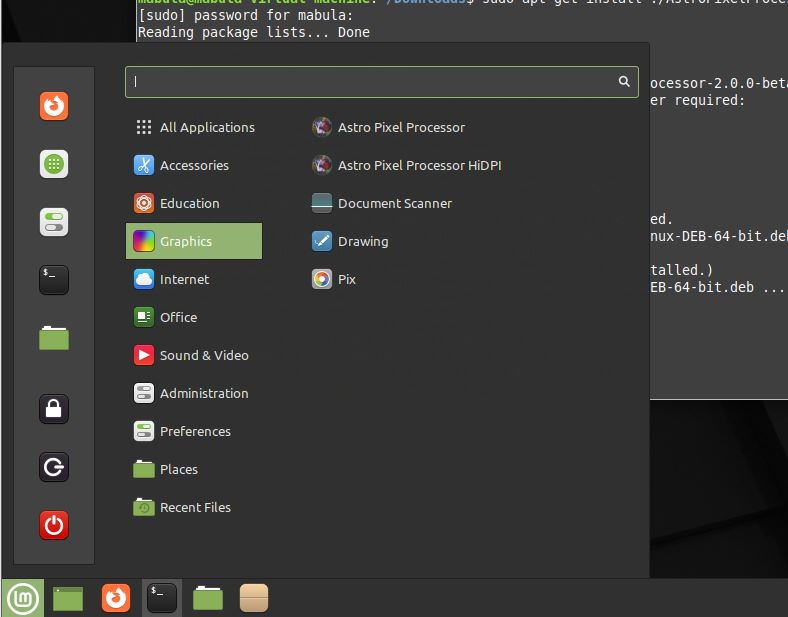
Or simply start the application from the desktop, isn't it somewhere in the Ubuntu menu like:
If this doesn't help to get APP started normally, then please try to collect an error log like:
For trouble shooting, you can also run APP from the terminal and have system out and error be recorded in a txt file which you can study after closing the application. First go to the folder with your application desktops and then execute the following:
mabula@mabula-virtual-machine:~/Downloads$ cd /usr/share/applications/
mabula@mabula-virtual-machine:/usr/share/applications$ gtk-launch AstroPixelProcessor.desktop 2>&1 | tee /home/mabula/log.txt
or for the HiDPI version
mabula@mabula-virtual-machine:~/Downloads$ cd /usr/share/applications/
mabula@mabula-virtual-machine:/usr/share/applications$ gtk-launch AstroPixelProcessor-hidpi.desktop 2>&1 | tee /home/mabula/log.txt
Make sure that you have the log file in a place where you can write with your user priviliges like in your home directory. (so replace Mabula with your username).
Check that log and please report it here 😉 thanks !
That XSetErrorHandler line on the command line can be ignored, that is a known issue but does not affect APP from working normally.
I suggest also to completely remove APP before reinstalling 2.0.0-beta38 just to be sure.
I have recreated the kubuntu VM from scratch and installed APP using sudo. I have run APP as suggested to capture the stdout and app logs and these are attached. Some more experimentation:
When first started, APP is showing high cpu usage - around 100%
If I click on the lights button then APP crashes - the logs go up to this point.
Restart APP - buttons are disabled.
Switch to the APP console and save the APP logs (attached)
Buttons are now enabled!
Click on lights - as before
The same occurs if I switch from opengl to cpu rendering
The stdout log shows these suspicious lines;
libEGL warning: DRI3: Screen seems not DRI3 capable libEGL warning: DRI3: Screen seems not DRI3 capable MESA: error: ZINK: failed to choose pdev libEGL warning: egl: failed to create dri2 screen
I have kubuntu 25.04 running in virtualbox so that I can test if APP works before switching from windows10 to kubuntu.
Sadly Linux mint shows exactly the same problems. My suspicion is that since there are graphics related messages in stdout and there is no java stack dump then the failure might be in the virtualbox graphics driver which is killing the jvm. I see from your screen dumps that it works on your mint installation. Is this a VM or a real machine?
This will definitely be a VM issue with Virtual Box. If I run Ubtuntu 24 in VMWare workstation, APP beta39 and older will start.
We still have the issue off the warning message:
Gdk-WARNING **: 22:01:01.835: XSetErrorHandler() called with a GDK error trap pushed. Don't do that.
And I have found a solution for that now. That warning message can make APP very instable on Linux distribution that use Wayland instead of X11. It will be fixed in 2.0.0-beta40.
Whoops, okay... well with the mac it will be way more stable for sure. Linux unfortunately is so fragmented with the technologies these days and there does not seem an universal driver to align things in the community for the best of all I feel.
I will of course do my best to keep APP running well on Linux. I am trying to sort all known issues on Linux at the moment for 2.0.0-beta40 and thus the upcoming 2.0 stable release.
Good news ! Thank you vey much for reporting the issues on Linux. I have worked last couple of weeks on testing, especially on the newer Linux distributions that use the XWayland server instead of the old X11 server. I think many issues were due to this.
The good news, the issues seems to be solved completely with APP 2.0.0-beta40, I will release it in the coming days.
APP was running with Graal JDK 24 as development platform. I have upgraded to Oracle JDK 25.0.2, the most recent JAVA and this is fixed many XWayland linux issues.
Another issue was caused by using JavaFX in our project. JavaFX was also cause for some Linux issues and also to lesser degree on Windows and macOS. Good news again, I was able to remove JavaFX completely from our project without sacrificing anything, instead things are much better. The File/Directory chooser behaves much better as a consequence for instance.
The error: Gdk-WARNING **: 22:01:01.835: XSetErrorHandler() called with a GDK error trap pushed. Don't do that has been fixed by above changes 🙂
And I have also fixed an OpenGL related warning on Linux, when you close the application you could see:
X11Util.Display: Shutdown (JVM shutdown: true, open (no close attempt): 1/1, reusable (open, marked uncloseable): 0, pending (open in creation order): 1) X11Util: Open X11 Display Connections: 1 X11Util: Open[0]: NamedX11Display[:0, 0x793508200440, refCount 1, unCloseable false]
This will no longer happen, cause has been removed.
I think that 2.0.0-beta40 will be much better for all Linux users, especially with newer Linux distributions 😉 in my testing all is fine and stable now. I tested mostly on Ubuntu 24 with XWayland.