

Mar 28 2026 APP 2.0.0-beta40 will be released in 7 days.
It did take a long time to have the work finished on this and it will have a major performance boost of 30-50% over 2.0.0-beta39 from calibration to integration. We extensively optimized many critical parts of APP. All has been tested to guarantee correct optimizations. Drizzle and image resampling is much faster for instance, those modules have been completely rewritten. Much less memory usage. LNC 2.0 will be released which works much better and faster than LNC in it's current state. And more, all will be added to the release notes in the coming weeks...
Update on the 2.0.0 release & the full manual
We are getting close to the 2.0.0 stable release and the full manual. The manual will soon become available on the website and also in PDF format. Both versions will be identical and once released, will start to follow the APP release cycle and thus will stay up-to-date to the latest APP version.
Once 2.0.0 is released, the price for APP will increase. Owner's license holders will not need to pay an upgrade fee to use 2.0.0, neither do Renter's license holders.
First mosaic in a while and its sort of not worked out well, top left corner has some issues so its bang head against the wall time. Other than that its stitched very well.
6 panels comprising 15 x 20 min subs with Astrodon 3nm Ha.

Beautiful 😉 @tonymacc
Great composition ! I think you refer to the dark patch top left? Can't you correct is properly with the Remove Light Pollution tool?
Mabula
Hi @ Mabula, cant sem to get rid of that corner, its like it has been clipped but it is not. In another program (cough) it is likely to be the dna linear fit is not good.
@Tonymacc, if you want me to have a look at the problem in detail, you will need to send me the mosaic panels I think as they were created in APP.
Did you create the individual mosaic panels first? Perhaps you can share those or at least the problematic one and it's neighbours?
Then I will be happy to have a look.
Mabula
@Tonymacc, if you want me to have a look at the problem in detail, you will need to send me the mosaic panels I think as they were created in APP.
Did you create the individual mosaic panels first? Perhaps you can share those or at least the problematic one and it's neighbours?
Then I will be happy to have a look.
Mabula
@Mabula, 6 stacks and a completed mosaic in the dropbox file.
Hi Tony @tonymacc,
I had a look at your mosiac data, first of all... very nice data 😉 !
I created the mosaic from the individual panels, that was no problem. I started with integration without MBB and LNC, just to see how much the panels actually overlap:
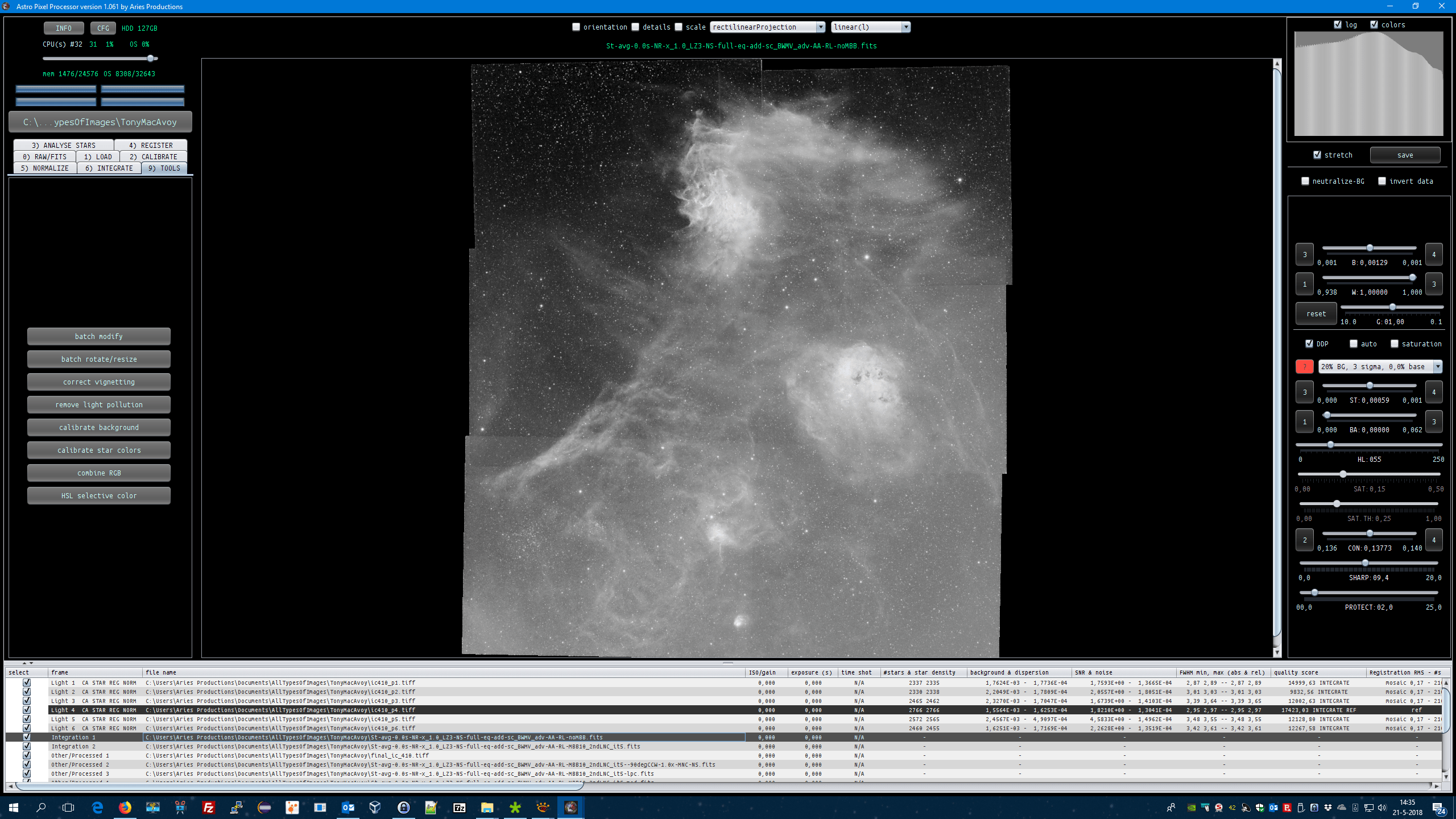
Then I integrated with MBB 10%, because the overlap is roughly 10%, and LNC 2nd degree 5 iterations:

So the panels blend into each other well now, we only need to correct the final gradients that are left with the Remove Light Pollution tool. I first rotated the mosaic 90 degrees Counter Clock Wise to match your orientation:
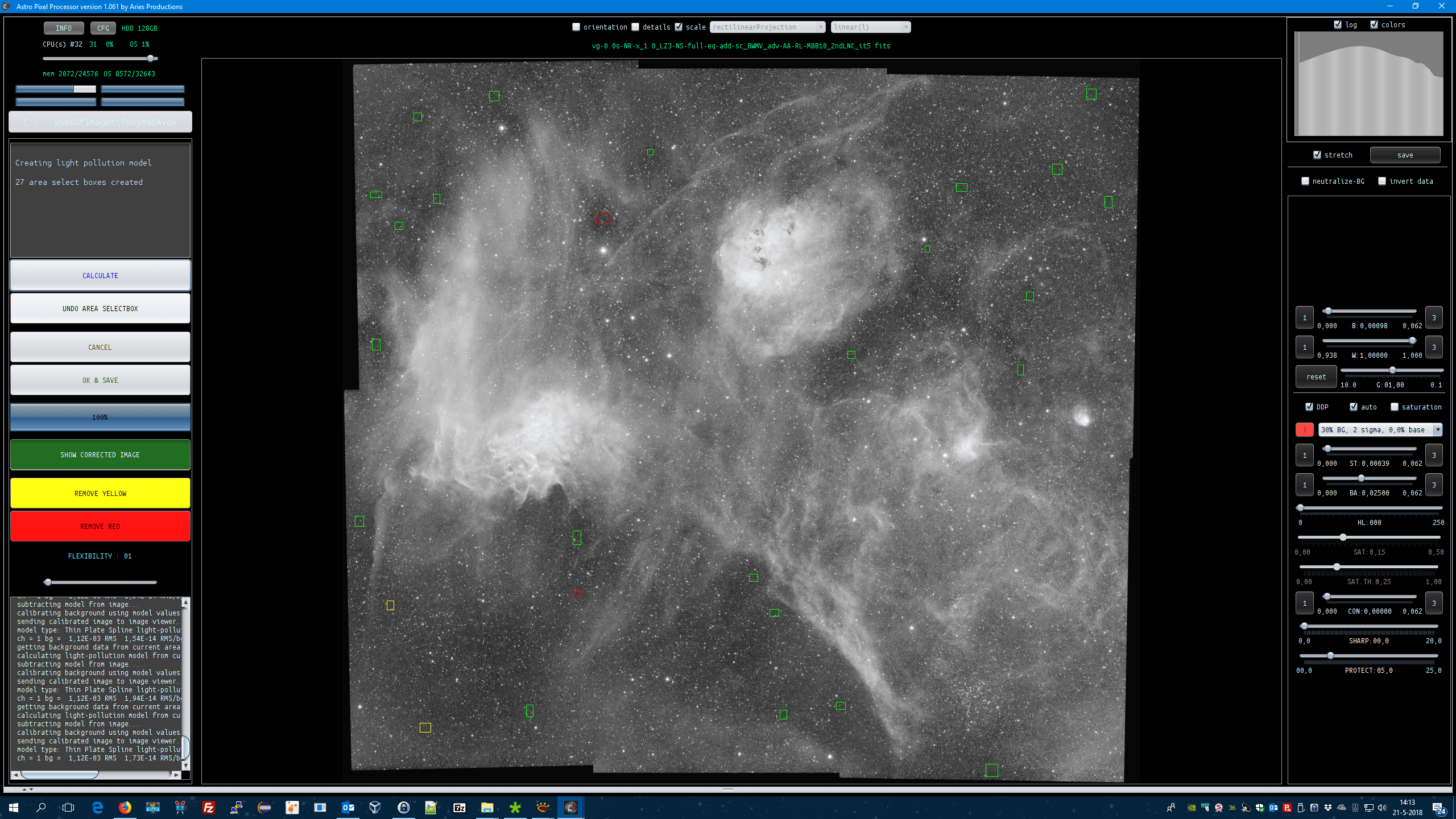
The top left corner is not messed up as far as I can see. The data isn't clipped on the black point.
The mosaic that I end up after tweaking the DDP settings in original size:


And downscaled with a factor of 0.35x:


This looks pretty good to me 😉
Could you indicate why you thought that the top left data had a problem? Perhaps this is due to only seeing a preview of the data with the preview filters, while the actual data is still linear? If the gradients aren't fixed and the data is stretched, parts of the image could look too dark.
Kind regards,
Mabula
Could you indicate why you thought that the top left data had a problem? Perhaps this is due to only seeing a preview of the data with the preview filters, while the actual data is still linear? If the gradients aren't fixed and the data is stretched, parts of the image could look too dark.
Kind regards,
Mabula
That could possibly be why, thankyou for having a look @Mabula, I can now go back and have another go, I have the o3 and s2 also now so I will attempt colour next. I really need to sit down and spend some more time with app, there is lots to learn.
Excellent Tony @tonymacc 😉
To create the multi-channel mosaic, check this video:
https://www.astropixelprocessor.com/how-to-create-a-multi-channel-mosaic-by-mabula/
Load the mosaic panels of all channels and register the multi-channel mosaic.
Looking forward to your results 😉
Mabula

Any idea what happened there @Mabula ? That was supposed to be a bi-colour. The mosaic merged perfectly and is registered, this was the result of the rgb combine tool, I assigned the ha to green and o3 to blue, the sliders were also not changing anything.
Dear Tony @tonymacc,
Think about it, if you only assing the 2 channels to G and B, then the Red channel in the composite is 0 everywhere. You will need to assing it to the red channel as well to be able to get a normal grey sky background.
So perhaps you should try this, start RGB combine tool and:
- assign Ha to green
- assign 03 to blue
just like you did, and then
3. mix the Ha data in the red channel as well, by applying Ha to red as well for 100%. That should give you an initial starting point with a grey sky background.
Let me know if this helps and clarifies the green/blue result that you showed.
Kind regards,
Mabula
Dear Tony @tonymacc,
Think about it, if you only assing the 2 channels to G and B, then the Red channel in the composite is 0 everywhere. You will need to assing it to the red channel as well to be able to get a normal grey sky background.
So perhaps you should try this, start RGB combine tool and:
- assign Ha to green
- assign 03 to blue
just like you did, and then
3. mix the Ha data in the red channel as well, by applying Ha to red as well for 100%. That should give you an initial starting point with a grey sky background.
Let me know if this helps and clarifies the green/blue result that you showed.
Kind regards,
Mabula
Hi @Mabula, ah yes, sorted now. This now creates another question, is there a way that we can see the colours change as you move the sliders? as opposed to clicking calculate and waiting, although the rgb combine tool is very new to me I have found it a bit frustrating to use as I need to click calculate each change and find myself back at the beginning again.
Dear Tony @tonymacc,
Think about it, if you only assing the 2 channels to G and B, then the Red channel in the composite is 0 everywhere. You will need to assing it to the red channel as well to be able to get a normal grey sky background.
So perhaps you should try this, start RGB combine tool and:
- assign Ha to green
- assign 03 to blue
just like you did, and then
3. mix the Ha data in the red channel as well, by applying Ha to red as well for 100%. That should give you an initial starting point with a grey sky background.
Let me know if this helps and clarifies the green/blue result that you showed.
Kind regards,
Mabula
Hi @Mabula, ah yes, sorted now. This now creates another question, is there a way that we can see the colours change as you move the sliders? as opposed to clicking calculate and waiting, although the rgb combine tool is very new to me I have found it a bit frustrating to use as I need to click calculate each change and find myself back at the beginning again.
@tonymacc, excellent.
Yes, in the future this will become possible. I am working on screen output using the graphics card for drawing and calculation and that should facilitate it 😉
APP 1.062 probably will have GPU drawing enabled as a first step. The next step will be to implement the calculations on the GPU as well.
Mabula
