This is mainly a bug fix release for the reported bugs in beta47. In addition it has a significant User Interface performance improvement noticable when you need to process 1000s of images in APP.
2026-10-03 APP 2.0.0-beta47 has been released !
This is a very big release... many code optimizations/rewrites, many parts of APP are much faster and more precise, especially star analysis and registration are much faster ! Big mosaics will go much faster 🙂
And we introduce a new preview filter, which includes the new Adaptive Deep Sky Stretch and a General Levels Stretch, this has been long over due. The old preview filter (the panel on the right side to stretch and preview your data) has not been updated for a couple of years and it is a critical part of any APP session.
Adaptive Deep Sky Stretch or ADSS is a much more intuitive stretch algorithm. It is also color preserving (which is a great new addition in itself ! ) which means that the highlights are no longer bleached, color is maintained from the linear data while stretching. You can simply stretch your data using the sky background level and signal width sliders which work much easier and more intuitive. You no longer need to fiddle with the old complicated sliders with zoom buttons. All the zoom buttons for the sliders are made redundant. And you can enter slider values in the slider value fields yourself. I will make a youtube video in the coming days to explain and fully introduce ADSS. Once the video is ready, it will be highlighted on the forum.
RGB Combine upgrade !. The RGB Combine Tool has been rewritten mostly. The tool is faster and easier to use and most importantly, the Luminance slider to inject a luminance channel or channels into the RGB composite is now working correctly. It no longer bleaches the RGB colors. Combined with the new ADSS preview, you will get much better and easier great composites with great color! I will also explain this in a new youtube video.
I am doing a 5 session integration. I have double and triple checked but it keeps saying the flat and darkflats have either a different exposure or gain setting.
I have tried a few times and it keeps saying this. The exposure times are different between the sessions but every session has the same settings.
Does the exposure time/gain setting have to be the same for all 5 sessions?
All RGB. I just tried for a third time, I got the same warning, but it only popped up once and it created the correct number of master flats and master darks. So I'm not sure if it worked correctly this time or not.
using upload for both username and password (note that your APP credentials don't work) to a new directory called adstottyahoo-com_flat_problem and let me know when the upload is done? Then I will have a look and try to see what the issue may be.
FIXED, CONCURRENCY ISSUE IN CALIBRATION ENGINE, as mentioned in this topic https://www.astropixelprocessor.com/community/postid/21090/ the calibration engine was not behaving properly. It could not find masterdarkflats for flat calibration in this case allthough they were provided. It was a concurrency issue which will occur if more than 1 master is created in MasterBias, MasterDark, MasterDarkFlat, MasterFlat creation.
I am going to release this fix today and then you can check if the problem is gone 😉
@mabula-admin thank you for working on this. It has been very crazy at my house... Furnace issues, work issues, and I am leaving on a trip a day early due to weather. I will be back Wednesday and I will test it then. Sorry for the delay.
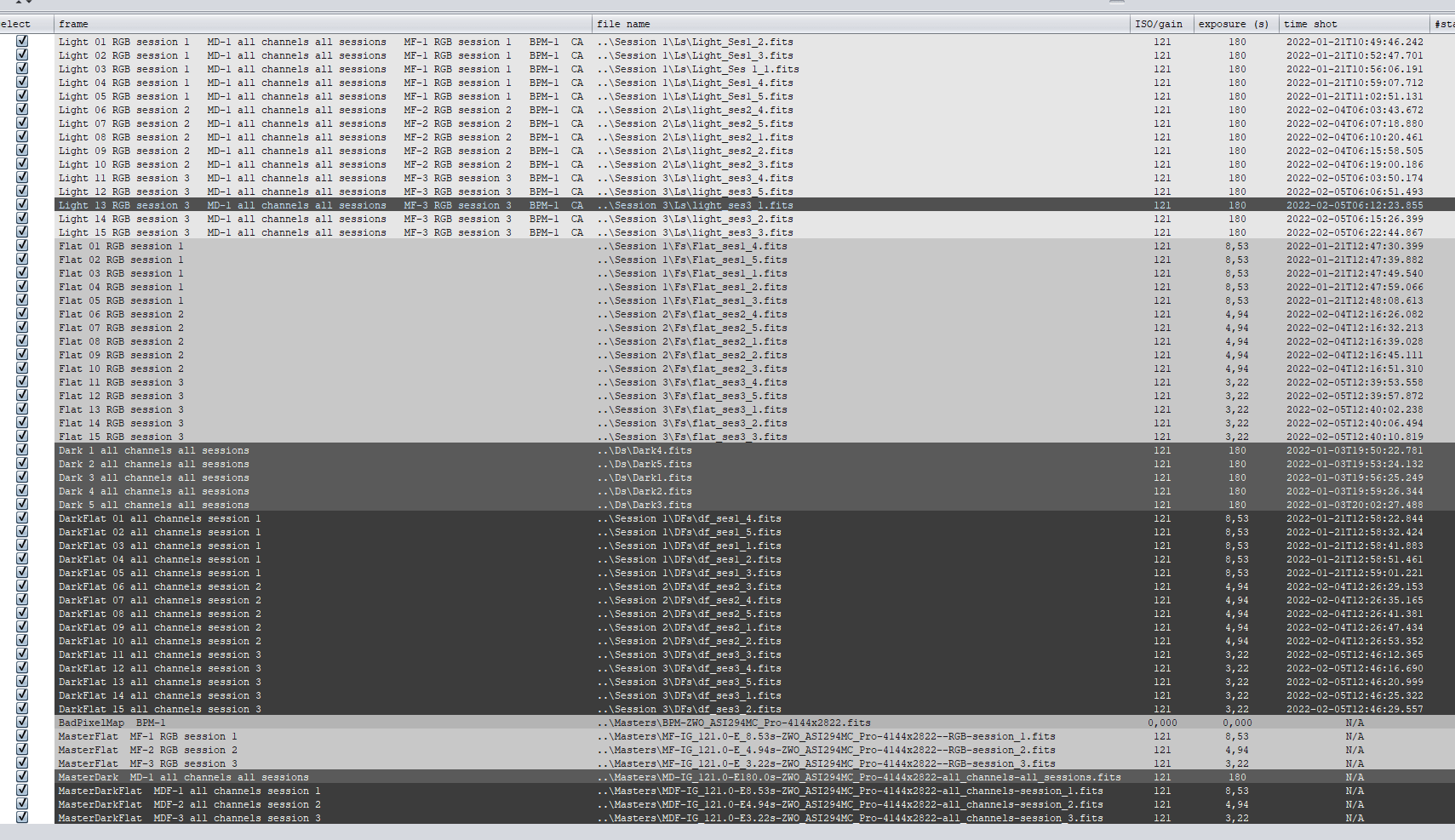
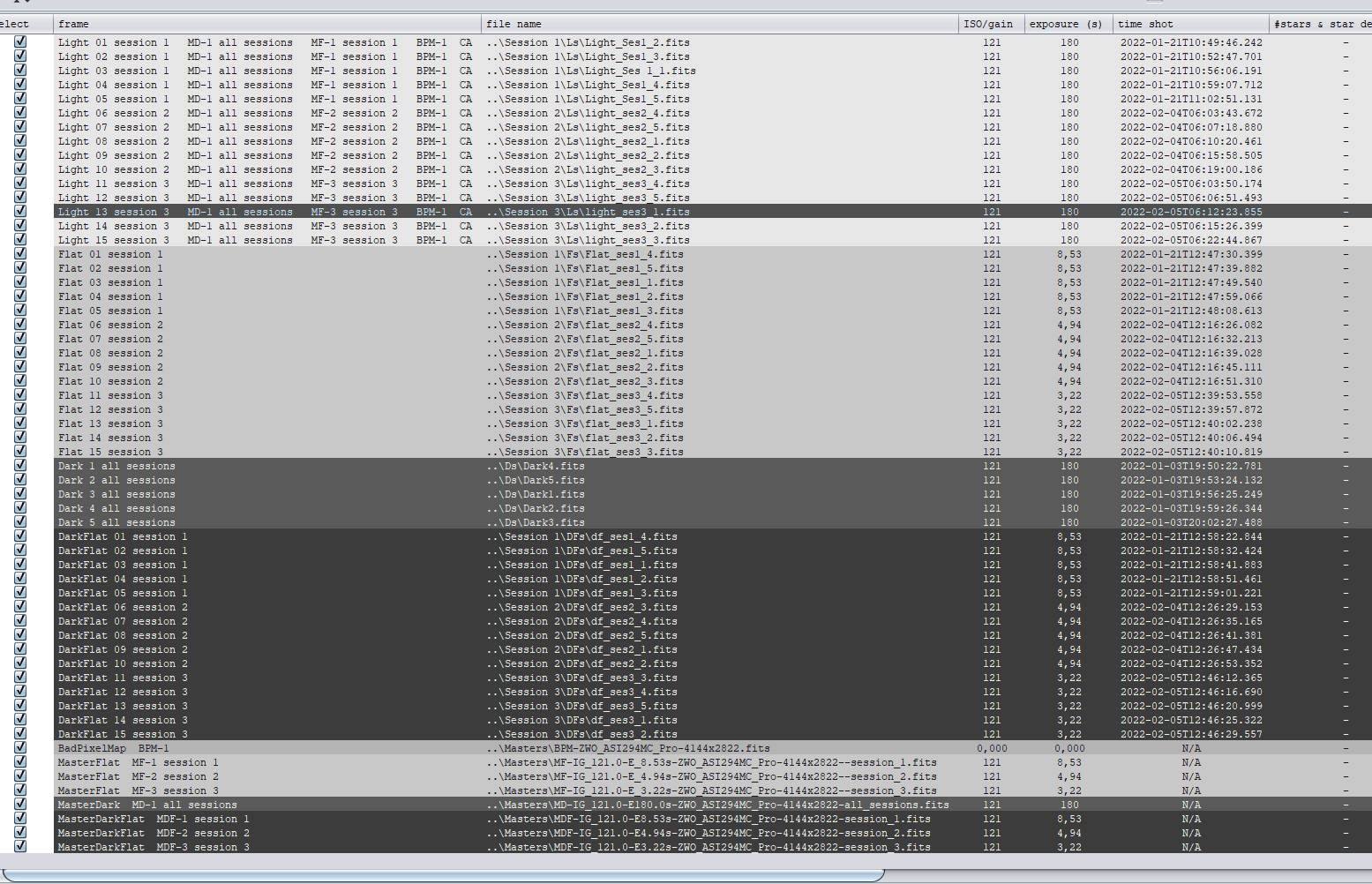
I do have the update installed. I was told the cause of the issue may be using one set of flats and darkflats for two different sessions, so I did combine the lights from the two sessions into one session and applied the flats and DF to that session. I have included a screen capture to show the ISO and Gain are the same for flats and dark flats. It's creating two separate DF masters and two Master Darks. Thanks for working on this.
I moved on to another project with M3 and APP is having the same behavior with this as well. I have double and triple checked, the ISO and exposure times are the same for every flat and the corresponding Darkflat.
I have more information. I would really like to figure out what is going on with this.
Some background info---When I use NINA and the flat wizard, the exposure time for the flats and darkflats are always the same for that particular session but the next night they will be different.
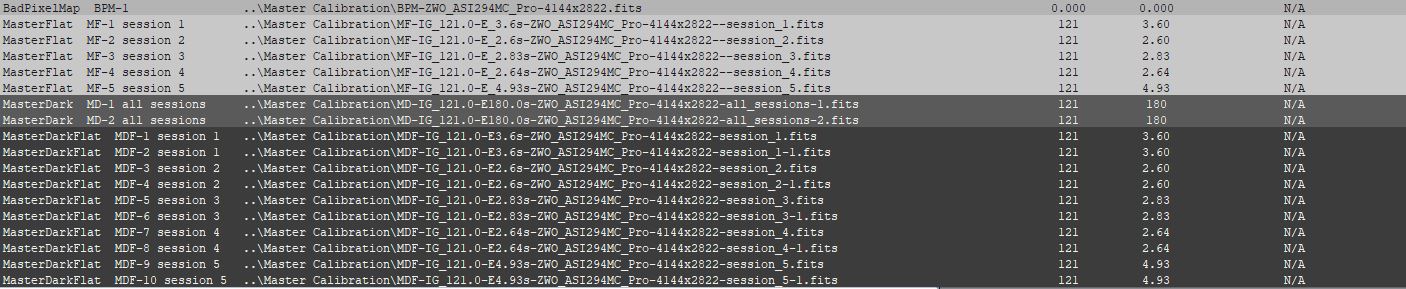
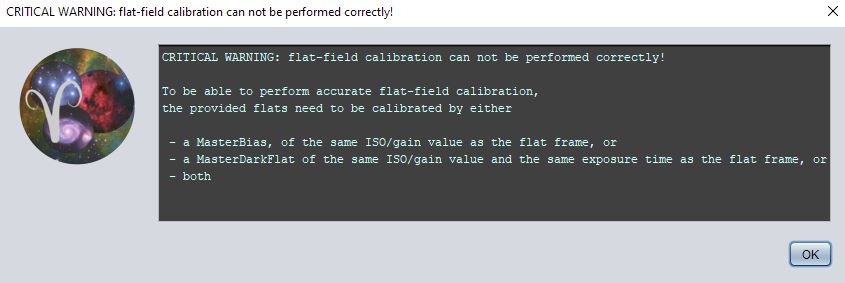
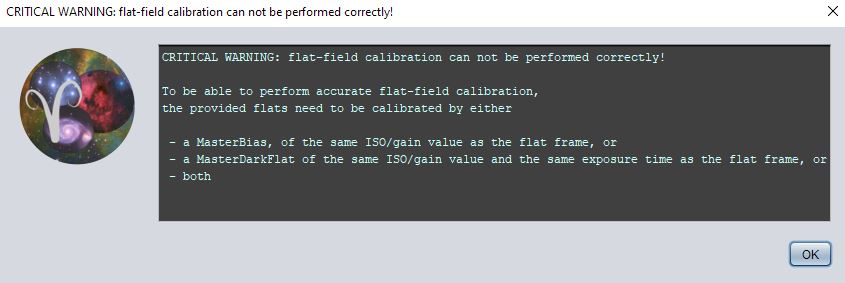
After running Step 2 "Calibration" and creating the master files, I received the warning below (warning comes at the 60% point)...I click okay and when step two was done I noticed the MasterDarkFlat files for the three sessions all had the same exposure time. This didn't make sense because the subframes for the three sessions of darkflats were different every night. The exposure time for the three masterDF happened to be the same as the first session's exposure time. I double and triple checked that the exposure times for the three sessions of DarkFlats matched the flats. I included screen shots to show this.
It has always been my understanding that I should be taking flats and darkflats every night of imaging. I've NOT been told that they have to be the exact exposure time from night to night...is this the problem?
I feel that you are complicating things when it is not needed. It is also a bit hard to understand what exactly you are doing with all those darkflats for flat calibration and darks as well.
This already looks weird to me: you have 2 masterdarks with exactly the same exposure time, loaded for all sessions but the file names indicate they are for different versions. Are these identical masterdarks or are they different in some aspect? Loading it like this in not logical, how do you know which masterdark will be used if you load them for all sessions with exactly the same exposure and gain settings?
Why are there 10 masterdarkflats where you seem to have 5 duplicates of others in terms of exposure time? What are you trying to do here? Same as with the masterdarks, how do you know which one will be used if you have duplicates in terms of gain and exposure loaded for the same session?
First of all, darkflats should not be that session dependent if you use a cooled camera like in your case, right? Darkflats have very short exposure times so they are almost the same as bias frames. There is very little dark current build up to create problems. So don't worry to much about creating new darkflats each time... when you create new flats. I don't. I would shoot flats for different filters with different exposure times and simply use 1 batch of darkflats with 1 exposure time to calibrate all flats. Should perfectly work and is much simpler than what you are doing here I think.
Please realise also that you can not assign the same frames on multiple sessions, I can only assume that that is were the problem lies in your workflow somehow.
If you can upload your dataset nicely arranged in folders per filter and session of how you are loading it, I will be happy to have a look to better understand what you are doing or trying to do, because at the moment, I am sure I can not follow it completely.
Use the upload instructions as show on the top left of our forum and let me know once uploaded 😉
Yes, it's a cooled camera. Initially the issue was applying flats for multiple sessions, I did stop doing that but I still received the warning. I have separate flats and dark flats for every session.
sorry, I posted the wrong screen capture. I realized I had accidentally loaded my Dark subframes as master darks. I ran it again and I had the same issue.
I'll take a look at the instructions and make sure I'm doing it right but basically all I do is load the lights, flats, and dark flats as a session then rinse and repeat for all subsequent sessions.
The files are uploaded to Stott_Andrew_Calibration. There are three folders for each session. The flats and dark flats in each folder were ONLY applied to that particular session, I do not use flats or darkflats for multiple sessions. I use OSC camera so no filters were used.
My workflow is to upload the lights, flats, and df to their own individual session, just as the folders are labeled. In the past I have used a MasterBPM and a MasterDark; however, with the issues I have been having I have been uploading the individual subframes for the darks and then having it create a new BPM every time. This has not made a difference.
I pretty much leave everything at default settings for APP with the exception of creating 32 Bit Masters, which I do have selected. I also will generally run the light leveling function (don't remember the name of it) because I always have multiple nights of images.
I've only been using this software for about a month. When I first started using it, I do not recall getting this error and I have not changed how I upload subframes. The only thing I have changed is I went from a Canon 600D to the 294MC pro which also changed the file type from .cr2 to .fits.
I do appreciate you working on this. It is difficult for me to explain the issues I'm having without it sounding like I'm an idiot (It also doesn't help when I post the wrong screenshots). What makes sense in my mind does not always come across so clearly to someone else.
I just tested your data with 1.083.2 and all is working as expected over here. The flats are calibrated with their respective masterdarkflat and i do not get the warning that you get. Did you try in 1.083.2 or 1.083.3 (windows) ? If you did, then I can only assume that your doing something odd when you load in all data ? I just load in all darks, flats, dark flats and lights and assing the channel and session. The darks are loaded simply for all channels and sessions.
@adstottyahoo-com , I also tried a second time without the multi-channel option, again works perfectly as expected in the 1.083.2 and 1.083.3 releases:
That is so odd. I double checked; I am on 1.083.3.
I don't know what I could be doing wrong when I upload the files. I will try to process just the files I sent you instead of the entirety of all three sessions. Maybe I have a bad file that is causing an issue.
Can you think of any setting or the way I am uploading that would cause this???
Thanks again for checking this for me, I do appreciate it.
I ran the entire data set again. This time I got the same warning below; however, the calibration frames turned out okay. The exposure times were all okay. I'm okay with the warning as long as it is creating appropriate calibration frames.
That is so odd. I double checked; I am on 1.083.3.
I don't know what I could be doing wrong when I upload the files. I will try to process just the files I sent you instead of the entirety of all three sessions. Maybe I have a bad file that is causing an issue.
Can you think of any setting or the way I am uploading that would cause this???
Thanks again for checking this for me, I do appreciate it.
@adstottyahoo-com , so how many frames are you processing, is it much more than the dataset than you uploaded ?
I have no clue at the moment, I simply load all frames assign them and no problems occur. Maybe that with a much larger amount of frames, the behaviour is different which would still indicate a concurrency (multi-threading) issue in the calibration engine.
Could you upload the entire dataset so I can test better?
I ran the entire data set again. This time I got the same warning below; however, the calibration frames turned out okay. The exposure times were all okay. I'm okay with the warning as long as it is creating appropriate calibration frames.
@adstottyahoo-com well, that is not okay to be honest. The warning should not appear if all is loaded okay and APP performs as expected... The warning is indicating that it can not find a masterdarkflat for certain flats to calibrate. So if that warning appears 1 or more of your masterflats will not be correct.
Thanks for the information. I just ran the small data set that I sent to you and it processed fine, which tells me there is something wrong with some of my data. I typically take 50 flats and 50 df for every session.
Let me do some testing on my end before I waste any more of your time, also the amount of data I would have to upload would be significant. If I can figure out which files are causing the issue then I will get back with you and see if you can help out.
So I did some testing for a few hours last night. I started with the data I sent you then I added 5 calibration frames for each season then I ran the calibration. I deleted the masters that were created after calibration then I added 5 more frames and ran calibration...I did this until I was able to add all 300 calibration frames. It went fine. I have no idea what I did different. Then I completely closed out APP just to make sure it wasn't a fluke and I started a brand new session; I was able to make it through the entire process and create a stacked image.
I'm not sure why it's working now, but it seems to be okay. Thanks.